Of course! This is a fantastic topic that sits at the intersection of operating systems, networking, and programming. Let's break down how to work with Java Sockets on a Linux system, from the fundamental concepts to practical code examples and advanced considerations.

The Big Picture: Sockets in the Linux Kernel
Before we dive into Java, it's crucial to understand what's happening under the hood in Linux.
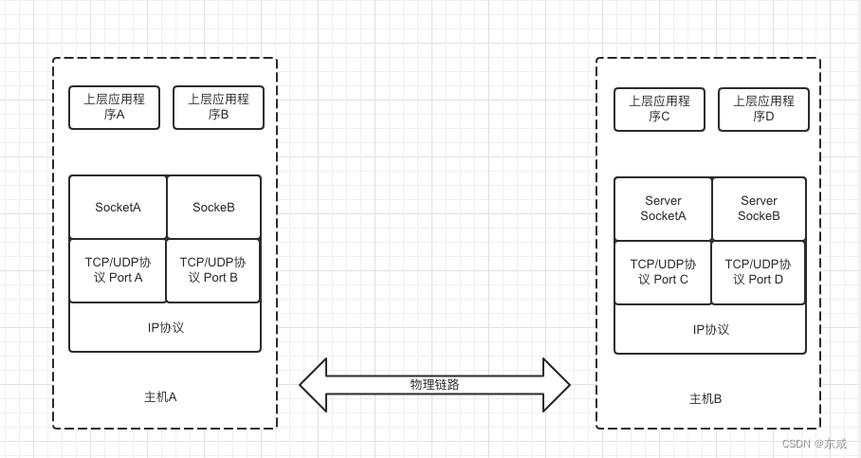
- A Socket is an Endpoint: Think of a socket as a phone jack. It's a point of communication where an application can send or receive data. For two applications to talk, they each need a socket.
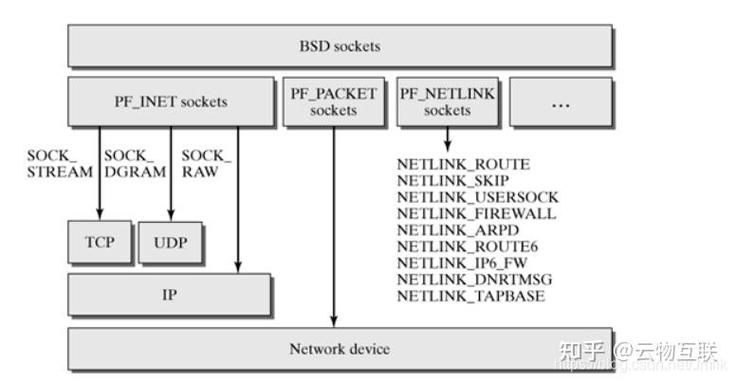
- The Kernel is the Phone Company: The Linux kernel's networking stack manages all the sockets. It's responsible for:
- Creating a socket (the
socket()system call). - Binding a socket to a specific IP address and port (the
bind()system call). - Listening for incoming connections (the
listen()system call). - Accepting a connection (the
accept()system call). - Reading/Writing data to/from the network (the
read()/write()system calls, or more advanced ones likesend()/recv()).
- Creating a socket (the
- Java is a User-Space Application: When you use Java's
ServerSocketorSocketclasses, you are making high-level API calls. Under the hood, the Java Virtual Machine (JVM) translates these calls into the native Linux system calls listed above.
Java Socket Programming: The Core Classes
Java provides a simple, object-oriented API for socket programming. The two main models are:
- Blocking I/O (BIO): The traditional and simplest model. The thread making a network call (like
accept()orread()) will block (pause) until the operation completes. This is easy to understand but can be inefficient for high-concurrency applications. - Non-Blocking I/O (NIO - New I/O): A more advanced model that allows a single thread to manage multiple connections efficiently by using a "Selector" to monitor channels for events (like "new connection ready" or "data ready to read"). This is the standard for building scalable, high-performance servers.
Let's start with the simpler, more common Blocking I/O model.
Key Classes for Blocking I/O:
java.net.ServerSocket: Used on the server side to listen for incoming client connections.java.net.Socket: Used on both the client and server side to represent an active connection.java.net.InetAddress: Represents an IP address.java.io.InputStream/java.io.OutputStream: Used to send and receive raw bytes over the socket.java.io.BufferedReader/java.io.PrintWriter: Wraps the streams to make it easier to send and receive text (strings).
Practical Example: A Simple Echo Server (Blocking I/O)
This is the "Hello, World" of socket programming. The server will listen for a client, the client will send a message, and the server will "echo" it back.
Step 1: The Server (EchoServer.java)
This server will listen on port 6789 on all available network interfaces (0.0.0).
// EchoServer.java
import java.io.BufferedReader;
import java.io.IOException;
import java.io.InputStreamReader;
import java.io.PrintWriter;
import java.net.InetAddress;
import java.net.ServerSocket;
import java.net.Socket;
public class EchoServer {
    public static void main(String[] args) {
        int port = 6789;
        // Using try-with-resources to automatically close the ServerSocket
        try (ServerSocket serverSocket = new ServerSocket(port, 50, InetAddress.getByName("0.0.0.0"))) {
            System.out.println("Server is listening on port " + port);
            // The accept() method blocks until a client connects
            Socket clientSocket = serverSocket.accept();
            System.out.println("Client connected: " + clientSocket.getInetAddress().getHostAddress());
            // Setup streams for communication
            PrintWriter out = new PrintWriter(clientSocket.getOutputStream(), true);
            BufferedReader in = new BufferedReader(new InputStreamReader(clientSocket.getInputStream()));
            String inputLine;
            // Read from the client until "bye" is sent
            while ((inputLine = in.readLine()) != null) {
                System.out.println("Received from client: " + inputLine);
                if ("bye".equalsIgnoreCase(inputLine)) {
                    out.println("Goodbye!");
                    break;
                }
                out.println("Echo: " + inputLine);
            }
            System.out.println("Client disconnected.");
        } catch (IOException e) {
            System.out.println("Server exception: " + e.getMessage());
            e.printStackTrace();
        }
    }
}
Step 2: The Client (EchoClient.java)
This client will connect to the server (on the same machine for now, using localhost).
// EchoClient.java
import java.io.BufferedReader;
import java.io.IOException;
import java.io.InputStreamReader;
import java.io.PrintWriter;
import java.net.Socket;
import java.net.UnknownHostException;
public class EchoClient {
    public static void main(String[] args) {
        String hostname = "localhost"; // or "127.0.0.1"
        int port = 6789;
        try (
            Socket socket = new Socket(hostname, port);
            PrintWriter out = new PrintWriter(socket.getOutputStream(), true);
            BufferedReader in = new BufferedReader(new InputStreamReader(socket.getInputStream()));
            BufferedReader stdIn = new BufferedReader(new InputStreamReader(System.in))
        ) {
            System.out.println("Connected to the echo server.");
            System.out.println("Type a message and press Enter. Type 'bye' to exit.");
            String userInput;
            // Read from the console and send to the server
            while ((userInput = stdIn.readLine()) != null) {
                out.println(userInput);
                System.out.println("Server response: " + in.readLine());
                if ("bye".equalsIgnoreCase(userInput)) {
                    break;
                }
            }
        } catch (UnknownHostException e) {
            System.err.println("Don't know about host " + hostname);
            System.exit(1);
        } catch (IOException e) {
            System.err.println("Couldn't get I/O for the connection to " +
                hostname);
            System.exit(1);
        }
    }
}
Step 3: How to Run and Test on Linux
-
Save the Files: Save the two code blocks above as
EchoServer.javaandEchoClient.java. -
Compile the Code: Open a terminal and use the Java compiler.
 (图片来源网络,侵删)
javac EchoServer.java EchoClient.java
-
Run the Server: In one terminal, start the server. It will wait for a connection.
java EchoServer
# Output:
# Server is listening on port 6789
-
Run the Client: In a second terminal, start the client. You can now type messages.
java EchoClient
# Output:
# Connected to the echo server.
# Type a message and press Enter. Type 'bye' to exit.
-
Interact:
- In the client terminal, type
Hello from clientand press Enter. - The server terminal will show:
Received from client: Hello from client - The client terminal will show:
Server response: Echo: Hello from client - Type
byein the client to close the connection.
- In the client terminal, type
Advanced Topics & Linux-Specific Considerations
For any real-world application, you need to think beyond the simple example.
A. High Concurrency with Threads
The simple server above can only handle one client at a time. If another client connects while the first is being served, the second will have to wait. To fix this, the server should spawn a new thread for each client connection.
Modified Server (Multi-threaded):
// ThreadedEchoServer.java
// ... (imports same as before)
public class ThreadedEchoServer {
    public static void main(String[] args) {
        int port = 6789;
        try (ServerSocket serverSocket = new ServerSocket(port, 50, InetAddress.getByName("0.0.0.0"))) {
            System.out.println("Server is listening on port " + port);
            while (true) {
                Socket clientSocket = serverSocket.accept();
                System.out.println("New client connected: " + clientSocket.getInetAddress().getHostAddress());
                // Create a new thread for each client
                ClientHandler clientHandler = new ClientHandler(clientSocket);
                new Thread(clientHandler).start();
            }
        } catch (IOException e) {
            System.out.println("Server exception: " + e.getMessage());
        }
    }
}
// A class to handle the client in a separate thread
class ClientHandler implements Runnable {
    private final Socket clientSocket;
    public ClientHandler(Socket socket) {
        this.clientSocket = socket;
    }
    @Override
    public void run() {
        try (
            PrintWriter out = new PrintWriter(clientSocket.getOutputStream(), true);
            BufferedReader in = new BufferedReader(new InputStreamReader(clientSocket.getInputStream()));
        ) {
            String inputLine;
            while ((inputLine = in.readLine()) != null) {
                System.out.println("Received from " + clientSocket.getInetAddress() + ": " + inputLine);
                out.println("Echo: " + inputLine);
            }
        } catch (IOException e) {
            System.out.println("Error handling client: " + e.getMessage());
        } finally {
            try {
                clientSocket.close();
            } catch (IOException e) {
                e.printStackTrace();
            }
            System.out.println("Client disconnected.");
        }
    }
}
B. Port Binding and Permissions
-
Port Numbers (Privileges):
- Ports 1-1023 are "well-known ports" and require root privileges to bind to.
- Ports 1024-49151 are "user ports" and can be used by any regular user.
- If you try to run your server on port 80 (HTTP) as a regular user, you'll get a
java.net.BindException: Permission denied.
-
Address in Use (
BindException):-
If your server crashes or is killed without properly closing the
ServerSocket, the port might remain in aTIME_WAITstate for a few minutes. If you try to restart the server immediately, you'll get aBindException: Address already in use. -
Linux Fix: You can use the
netstatorsscommand to find and kill the process using the port.# Find the process using port 6789 sudo ss -tulpn | grep :6789 # Or with netstat sudo netstat -tulpn | grep :6789 # Kill the process (replace PID with the actual Process ID) sudo kill -9 <PID>
-
C. Using NIO for Scalability
For thousands of concurrent connections, creating a thread for each one is inefficient. Java's NIO package (java.nio) solves this with a Selector.
- Selector: A single thread can monitor multiple
SocketChannels (NIO's version of a socket). - Channel: A bi-directional (read/write) connection, similar to a stream but more flexible.
- Buffer: Data is read from a channel into a buffer and written from a buffer to a channel.
This model is much more complex but is the foundation of high-performance Java servers like Netty and Apache Mina. You would typically use a framework built on NIO rather than implementing it from scratch.
Essential Linux Commands for Debugging
When your Java socket application isn't working, these commands are your best friends.
| Command | Purpose | Example |
|---|---|---|
ss or netstat |
View network connections, listening ports, and process IDs. | sudo ss -tulpn (Shows all TCP/UDP listening ports with PIDs) |
lsof |
List Open Files. In Linux, everything is a file, including sockets. | lsof -i :6789 (Shows which process is using port 6789) |
nc (netcat) |
The "Swiss Army knife" of networking. A great tool for testing servers. | nc localhost 6789 (Connects to your server like a client) |
telnet |
An older but still useful tool for testing text-based protocols. | telnet localhost 6789 (Connects to your server) |
iptables |
The Linux firewall. If your connection is being refused, it might be blocked. | sudo iptables -L -n (Lists firewall rules) |
Summary
| Concept | Description |
|---|---|
| Linux Kernel | Provides the low-level socket API (socket, bind, listen, etc.). |
| Java Sockets | A high-level, object-oriented wrapper around the OS's socket API. |
ServerSocket |
Server-side, used to listen for and accept connections. |
Socket |
Client-side (or server-side after accept()), represents an active connection. |
| Blocking I/O | Simple, but each connection needs its own thread. Good for simple applications. |
| NIO | Advanced, scalable, event-driven. A single thread can handle many connections. |
| Permissions | Regular users cannot bind to ports below 1024. |
| Debugging | Use ss, netstat, lsof, and nc to diagnose connection issues. |