Of course! This is an excellent question that touches on a fundamental concept of the web: the difference between a client and a server.

Let's break it down. The terms "requests" and "CGI" refer to two different sides of a web interaction.
requests(Python Library): This is a client-side library. It's used to send HTTP requests to a server and receive responses. Think of it as a web browser that you can control with Python code.- CGI (Common Gateway Interface): This is a server-side technology. It's a specification that allows a web server to execute external programs (like Python scripts) to generate dynamic web content. Think of it as the "backstage" area of a web server where scripts can run.
You don't use requests within a CGI script. Instead, you use a Python script as a CGI script, and you would use requests in a completely separate, client-side Python script to talk to that CGI script.
Part 1: The Client-Side (requests Library)
This is the most common use case for the requests library. You use it to interact with web services, APIs, or any server that can handle HTTP requests.
What is requests?
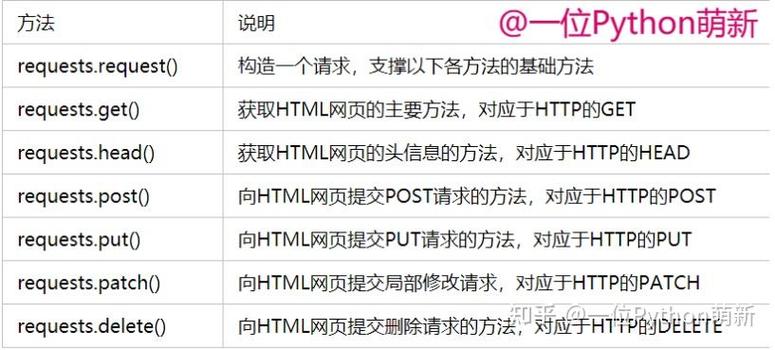
requests is a popular third-party Python library for making HTTP requests. It's much simpler and more user-friendly than Python's built-in urllib library.
First, you need to install it:
pip install requests
Basic Example: Making a GET Request
This script acts like a browser, visiting http://httpbin.org/get and printing the response.
# client_script.py
import requests
import json
# The URL of the server/endpoint we want to talk to
url = 'https://httpbin.org/get'
# You can send data as query parameters
params = {
    'name': 'Alice',
    'message': 'Hello from the requests library!'
}
try:
    # Send a GET request with the parameters
    response = requests.get(url, params=params)
    # Raise an exception if the request was unsuccessful (e.g., 404, 500)
    response.raise_for_status()
    # The response content is in text format by default
    print("Status Code:", response.status_code)
    print("Headers:", response.headers)
    print("\n--- Response Text (JSON) ---")
    print(response.text)
    # You can easily parse the JSON response into a Python dictionary
    data = response.json()
    print("\n--- Parsed JSON Data ---")
    print(f"URL requested: {data['url']}")
    print(f"Args received by server: {data['args']}")
except requests.exceptions.RequestException as e:
    print(f"An error occurred: {e}")
Basic Example: Making a POST Request
This script sends data to a server, just like a form submission would.
# client_post_script.py
import requests
import json
url = 'https://httpbin.org/post'
# The data you want to send in the request body
payload_data = {
    'username': 'bob',
    'password': 'secret123'
}
try:
    # Send a POST request with the JSON data
    response = requests.post(url, json=payload_data)
    # Raise an exception for bad status codes
    response.raise_for_status()
    # The server at httpbin.org will echo back the data it received
    print("Status Code:", response.status_code)
    print("\n--- JSON Data Sent ---")
    print(json.dumps(payload_data, indent=2))
    print("\n--- Data Received by Server (from response.json()) ---")
    received_data = response.json()
    print(f"Data received by server: {received_data['json']}")
except requests.exceptions.RequestException as e:
    print(f"An error occurred: {e}")
Part 2: The Server-Side (CGI Script)
CGI is an older but still valid way to make a web server run Python scripts. It's less common today (replaced by frameworks like Flask, Django, FastAPI) but is great for understanding the basics.
What is CGI?
When a server receives a request for a CGI script (e.g., http://example.com/cgi-bin/myscript.py), it doesn't just send the file's content. Instead, it:
- Executes the script using the Python interpreter.
- Captures the script's standard output (
stdout). - Sends that output back to the client's browser as the HTTP response.
The script communicates with the server using environment variables and standard input.
A Simple CGI Script Example
This script will be placed on a web server configured to run CGI.
# hello_cgi.py
#!/usr/bin/env python3
import cgi
import html
import os
# 1. Print the necessary HTTP header
# This tells the browser what kind of content to expect.
# Two newlines are required to separate the header from the body.
print("Content-Type: text/html\n")
# 2. Generate the HTML content
html_content = """
<!DOCTYPE html>
<html>
<head>Python CGI Script</title>
</head>
<body>
    <h1>Hello from a Python CGI Script!</h1>
    <p>This page was generated dynamically by a Python script running on the server.</p>
"""
# 3. Access information from the request
# Environment variables set by the web server
script_name = os.environ.get('SCRIPT_NAME', 'N/A')
request_method = os.environ.get('REQUEST_METHOD', 'GET')
html_content += f"<p><b>Script Name:</b> {html.escape(script_name)}</p>"
html_content += f"<p><b>Request Method:</b> {html.escape(request_method)}</p>"
# If the method is POST, read data from standard input
if request_method == 'POST':
    # Use the cgi module to parse form data
    form = cgi.FieldStorage()
    if 'user_input' in form:
        user_input = form['user_input'].value
        html_content += f"<p><b>You submitted:</b> {html.escape(user_input)}</p>"
html_content += """
</body>
</html>
"""
# 4. Print the HTML content to standard output
print(html_content)
How to run this CGI script:
- You need a web server with CGI enabled, like Apache or the built-in server in Python (though the latter is tricky for CGI).
- Save the script above as
hello_cgi.py. - Place it in your server's
cgi-bindirectory (e.g.,/var/www/cgi-bin/). - Make the script executable:
chmod +x /var/www/cgi-bin/hello_cgi.py. - Access it in your browser at
http://your_server.com/cgi-bin/hello_cgi.py.
Part 3: Putting It All Together: Client talks to CGI Script
Now, let's connect the two. We'll write a Python script that uses requests to send data to our hello_cgi.py script (which we assume is running on a local server at http://localhost:8000/cgi-bin/hello_cgi.py).
Note: Running a full CGI server setup is complex. For this example, let's assume you have a simple server running that can execute our hello_cgi.py script at the specified URL.
Client Script to POST to CGI
# client_to_cgi.py
import requests
# The URL of our CGI script on the server
# IMPORTANT: Replace with the actual URL of your CGI script.
# Using httpbin.org/post for a self-contained, working example.
# To test with a real CGI script, you'd use something like:
# cgi_url = 'http://localhost:8000/cgi-bin/hello_cgi.py'
cgi_url = 'https://httpbin.org/post' # This just echoes data back
# The data we want to send to the CGI script
# The key 'user_input' must match what the CGI script expects to find.
form_data = {
    'user_input': 'Hello CGI, this is the requests client!'
}
print(f"Sending POST request to: {cgi_url}")
print(f"With data: {form_data}\n")
try:
    # Send a POST request with form data
    # The `data` argument sends data as application/x-www-form-urlencoded
    response = requests.post(cgi_url, data=form_data)
    # Check if the request was successful
    response.raise_for_status()
    # Print the response received from the CGI script
    print("--- Response from Server (CGI Script Output) ---")
    print(response.text)
except requests.exceptions.RequestException as e:
    print(f"An error occurred while communicating with the server: {e}")
When you run client_to_cgi.py, it will send a POST request. The server will execute hello_cgi.py, which will read the user_input from the request, include it in the HTML it generates, and send that HTML back as the response. The client_to_cgi.py script will then print that HTML.
Summary Table
| Feature | requests Library |
CGI (Common Gateway Interface) |
|---|---|---|
| Role | Client-Side | Server-Side |
| Purpose | To send HTTP requests and receive responses. | To execute server-side scripts to generate content. |
| Analogy | A web browser that you control with code. | The "engine room" of a website that runs scripts. |
| How it Works | Makes network calls to a URL. | Server executes a script and sends its stdout back. |
| Communication | Sends and receives HTTP messages. | Reads environment variables and stdin; writes to stdout. |
| Modern Use | Extremely common. Used for APIs, web scraping, etc. | Rare. Largely replaced by modern web frameworks (Flask, Django). |