Of course! Building a proxy pool in Python is a common task for web scraping, data mining, and automating tasks where you need to avoid IP rate limits or blocks.
Here’s a comprehensive guide covering:
- What is a Proxy Pool? (The "Why")
- Core Components of a Proxy Pool (The "What")
- A Simple Proxy Pool Implementation (The "How" - Code)
- A More Advanced, Production-Ready Proxy Pool (Features like validation, rotation, persistence)
- Popular Libraries (To make your life easier)
What is a Proxy Pool and Why Do You Need It?
A proxy pool is a list of working proxy servers (IP addresses and ports) that your application can use to route its internet traffic. Instead of using a single IP address for all your requests, you cycle through different proxies from the pool.
Why is this important?
- Avoid Rate Limiting: Many websites will block you if you make too many requests from the same IP in a short period. Using a proxy pool spreads these requests across many different IPs.
- Bypass IP Bans: If a website blocks your IP, you can simply switch to a new one from your pool.
- Scrape Public Data: Essential for large-scale web scraping projects.
- Anonymity: Hide your real IP address from the target server.
Core Components of a Proxy Pool
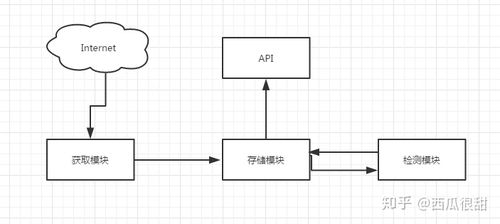
A robust proxy pool system typically has three main parts:
-
Proxy Sources: Where do you get your proxies from?
- Free Proxy Lists: Websites like
spys.one,free-proxy-list.net, etc. These are unreliable but easy to get. - Paid Proxy Providers: Services like Luminati, Smartproxy, Oxylabs. These offer high-quality, reliable proxies but cost money.
- Self-hosted Proxies: Your own servers. The most reliable but requires infrastructure management.
- Free Proxy Lists: Websites like
-
Proxy Manager: The "brain" of the pool. It handles:
- Fetching: Retrieving proxies from the sources.
- Validation: Checking if a proxy is working (i.e., can it successfully connect to a test website like
httpbin.org/ip?). - Storage: Keeping track of all proxies, their status (working, dead, last used), and other metadata.
- Rotation: Providing a proxy to your application, usually in a round-robin or random fashion.
-
Proxy User: Your application (e.g., a web scraper) that requests a proxy from the manager and uses it for its HTTP requests (using libraries like
requestsoraiohttp).
A Simple Proxy Pool Implementation
This is a basic, in-memory proxy pool. It's a great starting point to understand the core logic.
Structure:
proxy_pool.py: The main class for managing proxies.main.py: An example of how to use the pool.
proxy_pool.py
import random
import requests
class SimpleProxyPool:
    def __init__(self, proxy_list):
        """
        Initializes the pool with a list of proxy strings.
        Format: "ip:port" or "username:password@ip:port" for auth proxies.
        """
        self.proxies = [self._format_proxy(p) for p in proxy_list]
        self.failed_proxies = set()
    def _format_proxy(self, proxy_str):
        """Formats a proxy string into a dict for the requests library."""
        # Example: "123.123.123.123:8080" -> {"http": "http://123.123.123.123:8080", ...}
        return {
            "http": f"http://{proxy_str}",
            "https": f"http://{proxy_str}",
        }
    def get_proxy(self):
        """Returns a random, non-failed proxy."""
        available_proxies = [p for p in self.proxies if p not in self.failed_proxies]
        if not available_proxies:
            print("Warning: All proxies have failed. Resetting failed list.")
            self.failed_proxies = set()
            available_proxies = self.proxies
        return random.choice(available_proxies)
    def mark_failed(self, proxy):
        """Marks a proxy as failed so it's not used again."""
        self.failed_proxies.add(proxy)
        print(f"Marked proxy as failed: {proxy['http']}")
    def validate_proxy(self, proxy, test_url="http://httpbin.org/ip"):
        """
        Checks if a proxy is working by making a test request.
        Returns True if successful, False otherwise.
        """
        try:
            print(f"Validating proxy: {proxy['http']}")
            response = requests.get(test_url, proxies=proxy, timeout=5, verify=False)
            response.raise_for_status()  # Raise an exception for bad status codes (4xx or 5xx)
            print(f"Proxy is working: {proxy['http']}")
            return True
        except requests.exceptions.RequestException as e:
            print(f"Proxy validation failed for {proxy['http']}: {e}")
            return False
    def get_working_proxy(self):
        """Gets a proxy, validates it, and returns it if it works."""
        # In a real scenario, you'd want to re-validate failed proxies periodically.
        # For simplicity, we'll just get one and validate it on the fly.
        proxy = self.get_proxy()
        if self.validate_proxy(proxy):
            return proxy
        else:
            self.mark_failed(proxy)
            # If the first one fails, try another one
            return self.get_working_proxy()
main.py
import time
from proxy_pool import SimpleProxyPool
# A list of free proxies (you'll need to find a fresh list)
# These are examples and will likely be dead by the time you read this.
# You can get lists from sites like free-proxy-list.net
PROXY_LIST = [
    "103.21.244.2:80",
    "103.22.200.30:80",
    "104.236.54.196:8080",
    "192.41.41.216:3128",
]
def main():
    # 1. Initialize the pool
    pool = SimpleProxyPool(PROXY_LIST)
    # 2. Make 5 requests, each using a proxy from the pool
    for i in range(5):
        print(f"\n--- Request #{i+1} ---")
        proxy = pool.get_working_proxy()
        try:
            # Use the proxy with the requests library
            response = requests.get(
                "http://httpbin.org/ip",
                proxies=proxy,
                timeout=10
            )
            print(f"Success! Your public IP via proxy is: {response.json()['origin']}")
            time.sleep(2) # Be polite to the servers
        except requests.exceptions.RequestException as e:
            print(f"Request failed: {e}")
            pool.mark_failed(proxy)
if __name__ == "__main__":
    main()
How to Run:
- Save the two files in the same directory.
- Install
requests:pip install requests - Run
main.py:python main.py
Limitations of this Simple Version:
- In-Memory: The list of proxies is lost when the script stops.
- No Re-validation: Once a proxy is marked as "failed," it's never tried again.
- No Automatic Fetching: You have to manually provide the proxy list.
- No Persistence: It doesn't save the state of working proxies.
A More Advanced, Production-Ready Proxy Pool
To build a more robust system, you'd add features like a database, asynchronous validation, and a background worker.
Key Features:
- Database: Use
RedisorSQLiteto store proxies persistently. - Asynchronous Validation: Use
aiohttpandasyncioto validate hundreds of proxies simultaneously, which is much faster. - Background Worker: A separate process/thread that continuously runs in the background to fetch new proxies and validate existing ones.
- Scoring System: Assign a "score" to each proxy (e.g., based on speed, success rate). Proxies with a low score are removed.
Here’s a conceptual overview using asyncio and aiohttp. A full implementation would require more code for the database and background worker.
import asyncio
import aiohttp
from dataclasses import dataclass
# A simple dataclass to hold proxy info
@dataclass
class Proxy:
    ip: str
    port: int
    score: int = 100  # Higher is better
    is_alive: bool = True
class AdvancedProxyPool:
    def __init__(self):
        # In a real app, this would be a Redis set or a SQLite table
        self.proxies = set()
        self.session = None
    async def __aenter__(self):
        self.session = aiohttp.ClientSession()
        return self
    async def __aexit__(self, exc_type, exc, tb):
        await self.session.close()
    async def add_proxy(self, ip: str, port: int):
        proxy = Proxy(ip=ip, port=port)
        self.proxies.add(proxy)
        print(f"Added proxy: {ip}:{port}")
    async def validate_single_proxy(self, proxy: Proxy):
        """Asynchronously validates one proxy."""
        proxy_url = f"http://{proxy.ip}:{proxy.port}"
        try:
            async with self.session.get(
                "http://httpbin.org/ip",
                proxy=proxy_url,
                timeout=aiohttp.ClientTimeout(total=5)
            ) as response:
                if response.status == 200:
                    print(f"Proxy {proxy.ip}:{proxy.port} is alive.")
                    proxy.score += 1 # Reward working proxies
                    return True
        except (aiohttp.ClientError, asyncio.TimeoutError):
            pass
        print(f"Proxy {proxy.ip}:{proxy.port} is dead.")
        proxy.score -= 10 # Penalize dead proxies
        if proxy.score <= 0:
            self.proxies.remove(proxy) # Remove bad proxies
        return False
    async def validate_all_proxies(self):
        """Validates all proxies in the pool concurrently."""
        if not self.proxies:
            print("No proxies to validate.")
            return
        print(f"Validating {len(self.proxies)} proxies...")
        tasks = [self.validate_single_proxy(p) for p in self.proxies]
        results = await asyncio.gather(*tasks, return_exceptions=True)
        alive_count = sum(1 for r in results if r is True)
        print(f"Validation complete. {alive_count}/{len(self.proxies)} proxies are alive.")
async def main_advanced():
    pool = AdvancedProxyPool()
    async with pool:
        # Add some proxies to the pool
        await pool.add_proxy("103.21.244.2", 80)
        await pool.add_proxy("103.22.200.30", 80)
        await pool.add_proxy("192.41.41.216", 3128)
        # Validate them all at once
        await pool.validate_all_proxies()
if __name__ == "__main__":
    asyncio.run(main_advanced())
Popular Libraries for Proxy Pools
Instead of building from scratch, you can use well-maintained libraries that handle most of the complexity for you.
| Library | Key Features | Best For |
|---|---|---|
requests |
The standard library for HTTP requests. Has built-in proxy support. | Simple scripts where you already have a small list of proxies. |
aiohttp |
The asyncio equivalent of requests. Essential for high-performance async applications. |
Asynchronous web scrapers and applications that need to validate many proxies quickly. |
proxybroker |
A powerful, command-line tool and Python library. It can discover, validate, and manage proxies. | Discovery and validation of free proxies. It acts as a service you can query. |
proxypool |
A lightweight library specifically designed for managing a rotating pool of proxies. | Simple, in-memory proxy rotation needs. Very easy to integrate. |
scrapy-rotating-proxies |
A middleware for the Scrapy framework. It automatically handles proxy rotation and failure detection. | Scrapy projects. It's the de-facto standard for adding proxies to a Scrapy spider. |
Example using scrapy-rotating-proxies:
-
Installation:
pip install scrapy-rotating-proxies
-
Settings (
settings.py):# Add the middleware DOWNLOADER_MIDDLEWARES = { # Keep the default scrapy downloader middleware 'scrapy.downloadermiddlewares.httpproxy.HttpProxyMiddleware': 110, # Add the rotating proxies middleware 'rotating_proxies.middlewares.RotatingProxyMiddleware': 610, 'rotating_proxies.middlewares.BanDetectionMiddleware': 620, } # List of proxies to use ROTATING_PROXY_LIST = [ 'http://user:pass@ip1:port1', 'http://ip2:port2', # ... ] -
Usage: You don't need to do anything else in your spider code. The middleware automatically injects a working proxy for every request.