Linux Python 教程:从入门到实践
Linux 和 Python 是一对天作之合,Linux 提供了稳定、强大的命令行环境,而 Python 则以其简洁的语法和强大的库支持,成为自动化、系统管理和数据科学的理想选择,本教程将引导你掌握这一强大组合。

第一部分:准备工作 - 你的 Linux Python 环境
在开始写代码之前,我们需要确保你的系统已经准备好迎接 Python。
检查是否已安装 Python
大多数现代 Linux 发行版(如 Ubuntu, Debian, Fedora)默认都安装了 Python,你可以通过终端检查其版本。
打开你的终端(通常快捷键是 Ctrl + Alt + T),输入以下命令:
python3 --version
或者
python --version
- 如果看到版本号(
Python 3.10.6),恭喜你,可以直接进入下一部分。 - 如果提示
command not found,说明你需要安装 Python。
安装 Python 3
以 Ubuntu/Debian 为例,使用 apt 包管理器:
# 更新软件包列表
sudo apt update
# 安装 Python 3 和 pip (Python 的包管理器)
sudo apt install python3 python3-pip
以 Fedora/CentOS/RHEL 为例,使用 dnf 或 yum 包管理器:
# 对于 Fedora/CentOS/RHEL 8+
sudo dnf install python3 python3-pip
# 对于旧版 CentOS/RHEL
# sudo yum install python3 python3-pip
选择代码编辑器
一个优秀的代码编辑器能极大提升你的效率,对于 Python 开发,强烈推荐以下两个:
- Visual Studio Code (VS Code): 免费、开源、功能极其强大,通过安装 Python 扩展,可以获得代码高亮、智能提示、调试等一站式体验。
- 安装:你可以从官网下载,或者在 Linux 终端中通过
sudo snap install --classic code安装。
- 安装:你可以从官网下载,或者在 Linux 终端中通过
- Geany: 轻量级、快速、简单,非常适合初学者,不需要复杂的配置。
- 安装:
sudo apt install geany
- 安装:
Hello, World!
让我们写第一个程序,打开你选择的编辑器,输入:

print("Hello, Linux World!")
将文件保存为 hello.py,在终端中运行它:
# 使用 python3 命令来运行
python3 hello.py
你应该会在终端看到输出:
Hello, Linux World!
重要提示:在 Linux 系统中,强烈建议使用 python3 命令来显式调用 Python 3 解释器,因为系统中可能同时存在 Python 2,而它们的语法有不兼容之处。
第二部分:Python 基础语法
现在我们来学习 Python 的核心语法。
变量和数据类型
Python 是动态类型语言,你不需要声明变量类型。
# 字符串
name = "Alice"
message = 'Hello, ' + name
print(message)
# 整数
age = 30
print(f"{name} is {age} years old.") # f-string 是现代 Python 推荐的格式化方式
# 浮点数
height = 1.68
print(f"Her height is {height} meters.")
# 布尔值
is_student = True
print(f"Is she a student? {is_student}")
数据结构
Python 内置了非常方便的数据结构。
-
列表: 有序、可变。
fruits = ["apple", "banana", "cherry"] print(fruits[0]) # 输出: apple fruits.append("orange") # 添加元素 print(fruits) # 输出: ['apple', 'banana', 'cherry', 'orange'] -
元组: 有序、不可变。
coordinates = (10.0, 20.0)
# coordinates[0] = 5.0 # 这行会报错,因为元组不可变
-
字典: 键值对集合,无序(Python 3.7+ 后有序)。
person = { "name": "Bob", "age": 25, "city": "New York" } print(person["name"]) # 输出: Bob person["age"] = 26 # 修改值 -
集合: 无序、不重复元素集合。
unique_numbers = {1, 2, 2, 3, 4, 4, 4}
print(unique_numbers) # 输出: {1, 2, 3, 4}
控制流
-
if-elif-else语句:score = 85 if score >= 90: grade = 'A' elif score >= 80: grade = 'B' else: grade = 'C' print(f"Your grade is {grade}.") -
for循环:# 遍历列表 for fruit in fruits: print(f"I like {fruit}s.") # 使用 range() 函数 for i in range(5): # 输出 0, 1, 2, 3, 4 print(i) -
while循环:count = 0 while count < 5: print(f"Count is {count}") count += 1
函数
使用 def 关键字定义函数。
def greet(name, greeting="Hello"): # greeting 是默认参数
    """这是一个简单的问候函数"""
    return f"{greeting}, {name}!"
print(greet("Charlie"))
print(greet("David", "Good morning"))
文件操作
Python 让文件读写变得非常简单。
# 写入文件
with open("my_file.txt", "w") as f: # "w" 表示写入模式,会覆盖文件
    f.write("This is the first line.\n")
    f.write("This is the second line.\n")
# 读取文件
with open("my_file.txt", "r") as f: # "r" 表示读取模式
    content = f.read()
    print("--- Reading all at once ---")
    print(content)
    print("\n--- Reading line by line ---")
    f.seek(0) # 将指针移回文件开头
    for line in f:
        print(line.strip()) # strip() 用于移除行尾的换行符
第三部分:Linux 环境下的 Python 实践
这才是 Linux Python 的精髓所在——与系统交互。
使用 os 和 sys 模块
os 模块提供了与操作系统交互的功能。
import os
# 获取当前工作目录
current_dir = os.getcwd()
print(f"Current working directory: {current_dir}")
# 列出目录内容
files = os.listdir(".")
print(f"Files in current directory: {files}")
# 创建一个新目录
new_dir = "test_dir"
if not os.path.exists(new_dir):
    os.makedirs(new_dir)
    print(f"Directory '{new_dir}' created.")
# 执行系统命令
# os.system("ls -l") # 不推荐,有安全风险
使用 subprocess 模块(更安全、更强大)
subprocess 是执行外部命令的现代、安全的方式。
import subprocess
# 执行一个命令并获取其输出
result = subprocess.run(["ls", "-l"], capture_output=True, text=True)
# 检查命令是否成功执行
if result.returncode == 0:
    print("Command executed successfully.")
    print("Output:")
    print(result.stdout)
else:
    print("Error executing command.")
    print("Error:")
    print(result.stderr)
使用 argparse 模块创建命令行工具
让你的 Python 脚本可以接受命令行参数,非常实用。
创建一个名为 file_counter.py 的文件:
import argparse
import os
def count_files(directory):
    """统计指定目录下的文件数量"""
    try:
        files = os.listdir(directory)
        file_count = len([f for f in files if os.path.isfile(os.path.join(directory, f))])
        return file_count
    except FileNotFoundError:
        return -1 # 表示目录不存在
if __name__ == "__main__":
    # 创建解析器
    parser = argparse.ArgumentParser(description="Count files in a directory.")
    # 添加一个位置参数
    parser.add_argument("path", help="The directory path to scan.")
    # 解析参数
    args = parser.parse_args()
    # 调用函数并打印结果
    count = count_files(args.path)
    if count >= 0:
        print(f"The directory '{args.path}' contains {count} files.")
    else:
        print(f"Error: Directory '{args.path}' not found.")
你可以在终端中这样使用它:
# 统计当前目录的文件数
python3 file_counter.py .
# 统计 /etc 目录的文件数
python3 file_counter.py /etc
# 查看帮助
python3 file_counter.py -h
第四部分:虚拟环境与包管理
为了避免项目间的依赖冲突,强烈建议为每个项目创建一个独立的虚拟环境。
创建和使用虚拟环境
# 1. 创建一个项目目录
mkdir my_project
cd my_project
# 2. 创建一个名为 venv 的虚拟环境
python3 -m venv venv
# 3. 激活虚拟环境
source venv/bin/activate
# 激活后,你的终端提示符前会出现 (venv)
(venv) user@hostname:~/my_project$
# 4. 在虚拟环境中安装包
pip install requests
# 5. 退出虚拟环境
deactivate
使用 pip 管理第三方库
pip 是 Python 的包安装器。
# 安装库
pip install numpy pandas
# 升级库
pip install --upgrade requests
# 卸载库
pip uninstall numpy
# 查看已安装的包
pip list
# 将当前环境的包列表保存到文件
pip freeze > requirements.txt
# 根据文件安装所有依赖
pip install -r requirements.txt
第五部分:进阶主题与调试
使用 pdb 进行调试
Python 内置了一个简单的调试器 pdb。
在你的代码中想开始调试的地方插入:
import pdb; pdb.set_trace()
或者使用断点:
breakpoint()
然后运行你的脚本,它会在断点处暂停,进入交互式调试模式。
常用命令:
n(next): 执行到下一行。c(continue): 继续执行。l(list): 查看当前代码。p <variable>(print): 打印变量的值。q(quit): 退出调试器。
编写可执行的 Python 脚本
让你的脚本可以直接像 Linux 命令一样运行。
-
在
hello.py的第一行添加 Shebang:#!/usr/bin/env python3 print("Hello, Linux World!") -
给脚本添加可执行权限:
chmod +x hello.py
-
只要你的
python3解释器在/usr/bin/env能够找到的路径下,你就可以直接运行:./hello.py
第六部分:总结与下一步
恭喜!你已经完成了这份 Linux Python 教程,掌握了从环境搭建到系统交互的核心技能。
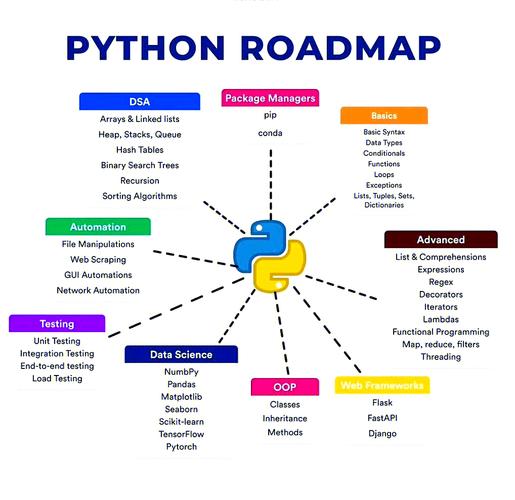
接下来的路怎么走?
- 深入学习标准库: Python 的标准库非常强大,可以探索
datetime(时间处理),json(JSON 数据处理),shutil(高级文件操作),logging(日志记录) 等。 - 选择一个方向深入:
- Web 开发: 学习 Flask 或 Django 框架。
- 数据科学: 学习
NumPy,Pandas,Matplotlib,Jupyter。 - 自动化运维: 学习
Ansible(它本身就是用 Python 写的),Fabric。 - 网络编程: 学习
socket库。
- 阅读优秀代码: 去 GitHub 上找一些你感兴趣的开源项目,阅读它们的源码,学习别人的编程风格和设计模式。
- 动手实践: 最好的学习方式就是实践,尝试写一些小工具来自动化你的日常工作,比如批量重命名文件、监控服务器磁盘空间、备份重要文件等。
Linux 和 Python 的世界广阔无垠,希望这份教程能成为你探索之旅的坚实起点,祝你编码愉快!