- 基于 WSDL 的调用(推荐):这是最常见、最规范的方式,你拥有 WebService 的 WSDL (Web Services Description Language) 文件,CXF 可以根据这个文件自动生成调用所需的 Java 代码(客户端存根)。
- 手动创建客户端:在没有 WSDL 文件,或者 WSDL 文件不正确的情况下,你可以手动创建客户端对象,直接指定服务的地址和接口。
我们将重点讲解第一种方式,因为它更实用、更健壮。

准备工作:环境搭建
- JDK: 确保 JDK 1.8 或更高版本已安装并配置好环境变量。
- IDE: 推荐使用 IntelliJ IDEA 或 Eclipse。
- Maven: 用于管理项目依赖。
- CXF: 我们将通过 Maven 引入 CXF 的核心依赖。
基于 WSDL 文件调用(推荐)
这种方式的核心思想是 “契约优先” (Contract-First),我们根据 WSDL 这个“契约”来生成客户端代码,然后调用生成的代码。
步骤 1:创建 Maven Java 项目
在你的 IDE 中创建一个普通的 Maven Java 项目。
步骤 2:添加 CXF 依赖
在 pom.xml 文件中添加 CXF 的核心依赖,CXF 会自动下载其依赖的 Spring 等库。
<dependencies>
    <!-- CXF 核心依赖 -->
    <dependency>
        <groupId>org.apache.cxf</groupId>
        <artifactId>cxf-core</artifactId>
        <version>3.4.5</version> <!-- 建议使用较新版本 -->
    </dependency>
    <dependency>
        <groupId>org.apache.cxf</groupId>
        <artifactId>cxf-rt-frontend-jaxws</artifactId>
        <version>3.4.5</version>
    </dependency>
    <dependency>
        <groupId>org.apache.cxf</groupId>
        <artifactId>cxf-rt-transports-http</artifactId>
        <version>3.4.5</version>
    </dependency>
    <!-- JAX-WS API (CXF 没有自动引入,可以加上) -->
    <dependency>
        <groupId>jakarta.jws</groupId>
        <artifactId>jakarta.jws-api</artifactId>
        <version>2.1.1</version>
        <scope>provided</scope>
    </dependency>
</dependencies>
步骤 3:获取 WSDL 文件
你需要调用目标 WebService 的 WSDL 地址,我们使用一个公共的测试 WebService:http://ws.webxml.com.cn/WebServices/MobileCodeWS.asmx?wsdl
将这个 WSDL 文件内容保存到你的本地,或者直接使用网络地址。
步骤 4:使用 CXF 工具生成客户端代码
CXF 提供了一个命令行工具 wsdl2java,可以根据 WSDL 文件生成 Java 客户端代码。
方法 A:通过命令行执行
-
找到你 Maven 项目中
cxf-core-xxx.jar的位置,通常在你的本地 Maven 仓库中,路径类似:~/.m2/repository/org/apache/cxf/cxf-core/3.4.5/cxf-core-3.4.5.jar。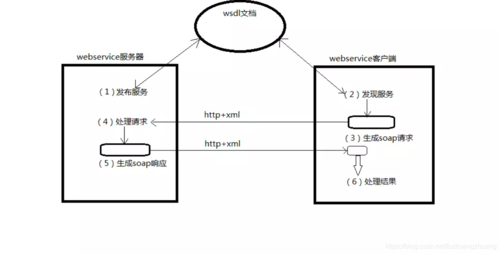 (图片来源网络,侵删)
 -
打开命令行/终端,进入你的 Maven 项目的根目录(即
pom.xml所在的目录)。 -
执行以下命令:
java -cp "C:\path\to\your\repository\org\apache\cxf\cxf-core\3.4.5\cxf-core-3.4.5.jar;C:\path\to\your\repository\org\apache\cxf\cxf-rt-frontend-jaxws\3.4.5\cxf-rt-frontend-jaxws-3.4.5.jar" org.apache.cxf.tools.wsdlto.WSDLToJava -client -p com.example.client http://ws.webxml.com.cn/WebServices/MobileCodeWS.asmx?wsdl
-cp: 指定cxf-core和cxf-rt-frontend-jaxws的 jar 包路径。注意:Windows 使用 分隔路径,Linux/macOS 使用 。org.apache.cxf.tools.wsdlto.WSDLToJava: 这是主类。-client: 生成一个可以独立运行的客户端示例类。-p com.example.client: 指定生成的 Java 包名,避免使用默认的、很长的包名。- WSDL 的 URL 或本地文件路径。
方法 B:通过 Maven 插件(更推荐)
在 pom.xml 中添加 cxf-codegen-plugin,这样每次编译时自动生成代码。
<build>
    <plugins>
        <plugin>
            <groupId>org.apache.cxf</groupId>
            <artifactId>cxf-codegen-plugin</artifactId>
            <version>3.4.5</version>
            <executions>
                <execution>
                    <id>generate-sources</id>
                    <phase>generate-sources</phase>
                    <goals>
                        <goal>wsdl2java</goal>
                    </goals>
                    <configuration>
                        <sourceRoot>${project.build.directory}/generated-sources/cxf</sourceRoot>
                        <wsdlOptions>
                            <wsdlOption>
                                <wsdl>http://ws.webxml.com.cn/WebServices/MobileCodeWS.asmx?wsdl</wsdl>
                                <extraargs>
                                    <extraarg>-p</extraarg>
                                    <extraarg>com.example.client</extraarg>
                                </extraargs>
                            </wsdlOption>
                        </wsdlOptions>
                    </configuration>
                </execution>
            </executions>
        </plugin>
    </plugins>
</build>
在 Maven 项目根目录执行 mvn clean compile 或在 IDE 中刷新/编译项目,代码就会自动生成在 target/generated-sources/cxf 目录下,你需要将这个目录标记为 "Sources Root"。
步骤 5:查看并理解生成的代码
生成后,你会看到类似下面的结构:
com.example.client
└── webxml
    └── com
        └── webxml
            └── www
                └── MobileCodeWS
                    ├── MobileCodeWS.java          // 服务接口
                    ├── MobileCodeWSImplService.java // 服务工厂类
                    ├── MobileCodeWSSoap.java        // SOAP 协议接口
                    └── GetMobileCodeInfoResponse.java // 返回值对象
关键文件:
MobileCodeWS.java: 这是我们要调用的主服务接口。MobileCodeWSImplService.java: 这是一个工厂类,用于获取MobileCodeWS的实例。
步骤 6:编写 Java 代码调用 WebService
你可以像调用普通 Java 接口一样调用 WebService 了。
package com.example.client;
import com.example.client.webxml.com.webxml.www.MobileCodeWS;
import com.example.client.webxml.com.webxml.www.MobileCodeWSImplService;
import com.example.client.webxml.com.webxml.www.GetMobileCodeInfoResponse;
public class WebServiceClient {
    public static void main(String[] args) {
        // 1. 创建服务工厂
        MobileCodeWSImplService service = new MobileCodeWSImplService();
        // 2. 从工厂获取服务接口的实例
        //    getMobileCodeWS() 是根据 WSDL 中的 service name 生成的
        MobileCodeWS port = service.getMobileCodeWS();
        // 3. 调用接口中的方法
        //    getMobileCodeInfo 是 WSDL 中定义的 operation
        //    参数是手机号码
        GetMobileCodeInfoResponse response = port.getMobileCodeInfo("13800138000");
        // 4. 处理返回结果
        //    返回值是一个对象,通过 getGetMobileCodeInfoResult() 方法获取具体的字符串
        String result = response.getGetMobileCodeInfoResult();
        System.out.println("查询结果:");
        System.out.println(result);
    }
}
运行这个 main 方法,如果一切顺利,你就能在控制台看到手机号码归属地的查询结果。
手动创建客户端(不推荐,但作为了解)
当你无法使用 WSDL 时,可以使用这种方式,你需要知道服务端的接口类和地址。
步骤 1:创建服务接口
你需要一个与服务器端完全相同的 Java 接口,上面有 @WebService 注解。
import jakarta.jws.WebMethod;
import jakarta.jws.WebParam;
import jakarta.jws.WebService;
@WebService
public interface MobileCodeWS {
    @WebMethod
    String getMobileCodeInfo(@WebParam(name = "mobileCode") String mobileCode);
}