Of course! Let's break down try, catch, and throw in Java, which are the fundamental components of exception handling.

What is an Exception?
An exception is an event that disrupts the normal flow of a program's execution. It's an error that occurs at runtime (like trying to divide by zero or accessing an array element that doesn't exist).
Without exception handling, your program would crash abruptly. With it, you can gracefully handle these errors and provide meaningful feedback or recovery actions.
try, catch, and finally Blocks
This is the most common way to handle exceptions that are thrown by Java itself (or by other code you call). The idea is to "try" a block of code that might throw an exception and "catch" it if it does.
The try Block
You place code that might throw an exception inside a try block.

try {
    // Code that might cause an exception
    int[] numbers = {1, 2, 3};
    System.out.println(numbers[5]); // This line will throw an ArrayIndexOutOfBoundsException
} catch (ArrayIndexOutOfBoundsException e) {
    // Code to run if the exception occurs
    System.out.println("Oops! You tried to access an invalid index.");
}
The catch Block
A catch block "catches" a specific type of exception. It's designed to handle that particular error.
- You can have multiple
catchblocks for a singletryblock to handle different types of exceptions. - The parameter in the
catchblock (e.g.,ArrayIndexOutOfBoundsException e) is an exception object. This object contains information about the error, such as the message and the stack trace.
try {
    String text = "hello";
    int number = Integer.parseInt(text); // This will throw a NumberFormatException
} catch (NumberFormatException e) {
    // This block will execute
    System.out.println("Could not convert string to integer.");
    // You can also print the detailed error message:
    System.out.println("Error details: " + e.getMessage());
}
The finally Block
The finally block is optional. It contains code that will always be executed, whether an exception occurred or not. It's typically used for cleanup tasks like closing files or database connections.
try {
    // Some code that might fail
    System.out.println("Inside try block.");
} catch (Exception e) {
    // Handle the exception
    System.out.println("Exception caught!");
} finally {
    // This code will run no matter what
    System.out.println("This is the finally block. Cleaning up...");
}
Complete Example:
public class TryCatchExample {
    public static void main(String[] args) {
        System.out.println("Starting the program...");
        try {
            // This code is "risky"
            int a = 10;
            int b = 0;
            int result = a / b; // This will throw an ArithmeticException
            System.out.println("Result: " + result); // This line will never be reached
        } catch (ArithmeticException e) {
            // This block catches the specific exception
            System.out.println("Error: Cannot divide by zero!");
            System.out.println("Exception details: " + e);
        } catch (Exception e) {
            // A general catch-all for any other exception (good practice to have this last)
            System.out.println("An unexpected error occurred.");
        } finally {
            // This block always executes
            System.out.println("Program finished execution.");
        }
        System.out.println("Program continues normally after the try-catch block.");
    }
}
Output:

Starting the program...
Error: Cannot divide by zero!
Exception details: java.lang.ArithmeticException: / by zero
Program finished execution.
Program continues normally after the try-catch block.
The throw Keyword
While try-catch handles exceptions that are thrown by the system, the throw keyword allows you to manually create and throw an exception in your code. This is useful when a method encounters an error condition that it cannot handle itself.
How to use throw:
- Create an exception object:
new ExceptionType("Error message"); - Use the
throwkeyword:throw new ExceptionType("Error message");
The method that throws an exception must declare this in its signature using the throws keyword (more on that below).
Example:
Let's create a method that checks a person's age. You can't be a negative age.
public class ThrowExample {
    // A method to validate age
    public static void validateAge(int age) {
        if (age < 0) {
            // Manually create and throw an exception
            throw new IllegalArgumentException("Age cannot be negative: " + age);
        }
        System.out.println("Age is valid: " + age);
    }
    public static void main(String[] args) {
        try {
            validateAge(25); // This will work fine
            validateAge(-5); // This will throw the exception
        } catch (IllegalArgumentException e) {
            // The caller (main method) catches the exception
            System.out.println("Caught an exception: " + e.getMessage());
        }
    }
}
Output:
Age is valid: 25
Caught an exception: Age cannot be negative: -5
throws Keyword
The throws keyword is used in a method's signature to declare that the method might throw one or more specific types of checked exceptions. It's a way of saying, "I'm not going to handle this exception here; the responsibility is passed to the method that calls me."
Key Points:
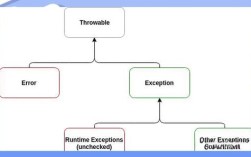
- It's used for checked exceptions (exceptions that are checked at compile-time, like
IOException,SQLException). You must either handle them with atry-catchor declare them withthrows. - It is not used for unchecked exceptions (like
RuntimeException,NullPointerException). These are usually programming errors and don't need to be declared.
Example:
Imagine a method that reads a file. The FileReader constructor can throw a FileNotFoundException, which is a checked exception.
import java.io.FileReader;
import java.io.IOException;
public class ThrowsExample {
    // This method declares that it might throw an IOException
    public void readFile(String fileName) throws IOException {
        // This line can throw a FileNotFoundException (a subtype of IOException)
        FileReader reader = new FileReader(fileName);
        System.out.println("File opened successfully.");
        // In a real program, you would close the reader here in a finally block
        reader.close();
    }
    public static void main(String[] args) {
        ThrowsExample example = new ThrowsExample();
        try {
            // The main method must either handle or declare the IOException
            example.readFile("non_existent_file.txt");
        } catch (IOException e) {
            System.out.println("Could not read the file. Error: " + e.getMessage());
        }
    }
}
Output:
Could not read the file. Error: non_existent_file.txt (No such file or directory)Summary Table
| Keyword | Purpose | When to Use |
|---|---|---|
try |
To define a block of code that might throw an exception. | When you execute code that could potentially fail (e.g., file I/O, network calls, division). |
catch |
To handle a specific type of exception if one occurs in the associated try block. |
Immediately after a try block to gracefully recover from an error. |
finally |
To define a block of code that always runs, regardless of whether an exception occurred. | For cleanup tasks like closing resources (files, database connections). |
throw |
To manually create and throw an exception object from your code. | When a method encounters an error condition it cannot handle (e.g., invalid input). |
throws |
To declare that a method might throw a checked exception. | In a method signature to pass the responsibility of handling an exception to the caller. |