Java int数组转byte数组
在Java中将int数组转换为byte数组有几种方法,具体取决于你的需求(如是否考虑字节序、是否需要处理多字节int值等),以下是几种常见的实现方式:
(图片来源网络,侵删)
方法1:直接转换(每个int转为4个byte)
public static byte[] intArrayToByteArray(int[] intArray) {
    byte[] byteArray = new byte[intArray.length * 4];
    for (int i = 0; i < intArray.length; i++) {
        int value = intArray[i];
        byteArray[i * 4] = (byte) (value >>> 24);
        byteArray[i * 4 + 1] = (byte) (value >>> 16);
        byteArray[i * 4 + 2] = (byte) (value >>> 8);
        byteArray[i * 4 + 3] = (byte) value;
    }
    return byteArray;
}
方法2:使用ByteBuffer(推荐)
import java.nio.ByteBuffer;
import java.nio.ByteOrder;
public static byte[] intArrayToByteArray(int[] intArray) {
    ByteBuffer buffer = ByteBuffer.allocate(intArray.length * 4);
    buffer.order(ByteOrder.BIG_ENDIAN); // 或 ByteOrder.LITTLE_ENDIAN 根据需求
    for (int i : intArray) {
        buffer.putInt(i);
    }
    return buffer.array();
}
方法3:处理单个int为byte数组
如果你需要将每个int转换为byte数组(可能因为int值在byte范围内):
public static byte[] intToByteArray(int value) {
    return new byte[] {
        (byte) (value >>> 24),
        (byte) (value >>> 16),
        (byte) (value >>> 8),
        (byte) value
    };
}
public static byte[] intArrayToByteArray(int[] intArray) {
    byte[] byteArray = new byte[intArray.length];
    for (int i = 0; i < intArray.length; i++) {
        byteArray[i] = (byte) intArray[i]; // 只保留最低8位
    }
    return byteArray;
}
注意事项
-
字节序:在网络传输或文件存储中,需要注意字节序(大端序或小端序),ByteBuffer方法可以方便地指定字节序。
-
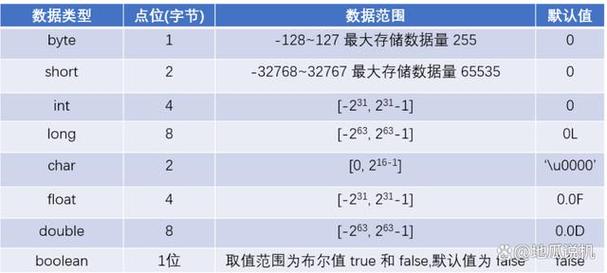
数据丢失:如果int值超出byte范围(-128到127),直接转换会导致数据丢失。
-
性能:对于大量数据,ByteBuffer方法通常比手动循环更高效。
 (图片来源网络,侵删)
 -
替代方案:如果你需要将int数组转换为字节数组以便序列化,可以考虑使用ObjectOutputStream或其他序列化机制。
选择哪种方法取决于你的具体需求和应用场景。
(图片来源网络,侵删)