Of course! The switch statement is a powerful control flow tool in Java for selecting one of many code blocks to execute. Here’s a comprehensive guide on how to use it with strings, including its history, syntax, best practices, and alternatives.
The Modern Way (Java 7 and Later)
Since Java 7, you can use a switch statement directly with String objects. This is the most common and readable approach for string-based logic.
How It Works
The switch statement uses the String's hashCode() method internally to determine which case to execute. For efficiency, it first compares the hash codes and then, to avoid hash collisions, performs an equals() comparison on the matching hash code cases.
Syntax:
String day = "MONDAY";
switch (day) {
    case "MONDAY":
        System.out.println("The work week begins.");
        break; // Don't forget the break!
    case "FRIDAY":
        System.out.println("TGIF! Almost the weekend.");
        break;
    case "SATURDAY":
    case "SUNDAY": // You can group cases with the same logic
        System.out.println("It's the weekend!");
        break;
    default: // Optional, but good practice
        System.out.println("Mid-week day.");
        break;
}
Key Rules & Best Practices
-
The
breakStatement is Crucial: If you omit thebreak;statement, execution will "fall through" to the nextcase. This is a common source of bugs.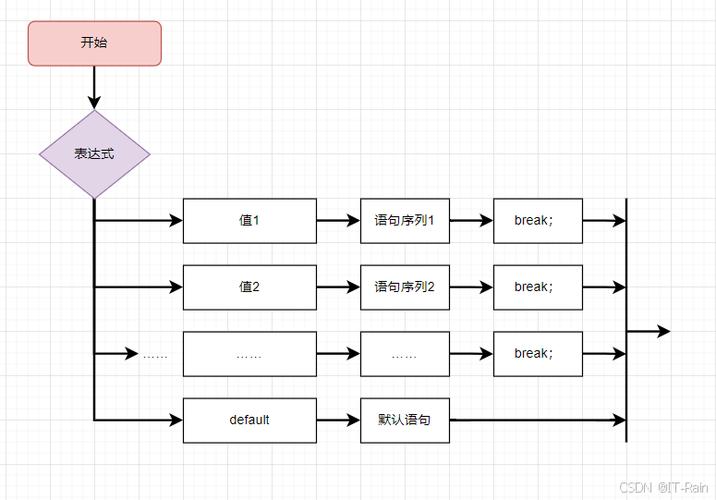 (图片来源网络,侵删)
// Example of FALL-THROUGH (usually a bug) switch (day) { case "MONDAY": System.out.println("Start of the week."); // Missing break! case "TUESDAY": System.out.println("Second day of the week."); // This will also print for MONDAY break; } -
nullCheck: Aswitchon anullstring will throw aNullPointerException. Always ensure your string variable is not null before switching, or handle it within thedefaultcase.String day = null; switch (day) { // Throws NullPointerException! // ... } -
caseLabels Must be String Literals: You cannot use variables or expressions in acaselabel. They must be compile-time constant strings.String myDay = "MONDAY"; // This will NOT compile switch (day) { case myDay: // Error: constant expression required // ... } -
Case Sensitivity: String comparisons in a
switchare case-sensitive."Monday"and"monday"would be treated as different strings.
The Pre-Java 7 Way (Using if-else if)
Before Java 7, you had to use a series of if-else if statements to achieve the same logic. This works on all versions of Java.

Example:
String day = "friday"; // Note the lowercase 'f'
if ("MONDAY".equals(day)) {
    System.out.println("The work week begins.");
} else if ("FRIDAY".equals(day)) {
    System.out.println("TGIF! Almost the weekend.");
} else if ("SATURDAY".equals(day) || "SUNDAY".equals(day)) {
    System.out.println("It's the weekend!");
} else {
    System.out.println("Mid-week day.");
}
Why string.equals(variable) and not variable.equals(string)?
A common best practice is to write "MONDAY".equals(day) instead of day.equals("MONDAY"). The reason is to prevent a NullPointerException if day is null.
"MONDAY".equals(day)will returnfalsesafely ifdayisnull.day.equals("MONDAY")will throw aNullPointerExceptionifdayisnull.
Advanced Alternatives (The "Modern Java" Way)
While switch is great, modern Java offers more expressive and powerful alternatives that can be more readable and maintainable, especially for complex logic.
A. Using if-else if with equalsIgnoreCase()
If you need case-insensitive comparisons, the if-else approach is very clear.
String day = "friday";
if ("MONDAY".equalsIgnoreCase(day)) {
    System.out.println("The work week begins.");
} else if ("FRIDAY".equalsIgnoreCase(day)) {
    System.out.println("TGIF! Almost the weekend.");
} else if ("SATURDAY".equalsIgnoreCase(day) || "SUNDAY".equalsIgnoreCase(day)) {
    System.out.println("It's the weekend!");
} else {
    System.out.println("Mid-week day.");
}
B. Using a Map (Excellent for Mappings)
If you are mapping strings to specific values or actions, a Map is often the cleanest and most efficient solution. This is great for things like command handlers or status codes.
import java.util.HashMap;
import java.util.Map;
import java.util.function.Consumer;
public class StringSwitchExample {
    public static void main(String[] args) {
        String day = "MONDAY";
        // Create a map of actions
        Map<String, Consumer<String>> dayActions = new HashMap<>();
        dayActions.put("MONDAY", d -> System.out.println("The work week begins for " + d));
        dayActions.put("FRIDAY", d -> System.out.println("TGIF! It's almost the weekend for " + d));
        dayActions.put("SATURDAY", d -> System.out.println("Time to relax! It's the weekend for " + d));
        dayActions.put("SUNDAY", d -> System.out.println("Rest up! It's the weekend for " + d));
        // Use getOrDefault to handle the default case
        dayActions.getOrDefault(day, d -> System.out.println("Mid-week day for " + d)).accept(day);
    }
}
- Pros: Very clean, decouples the logic from the switch statement, easy to extend (just add to the map).
- Cons: Can be overkill for a simple one-off check.
Summary: Which One Should You Use?
| Method | When to Use | Pros | Cons |
|---|---|---|---|
switch (Java 7+) |
The default choice. When you have a clear, finite set of string values to check against and the actions are simple. | - Very readable and concise. - Standard control flow structure. |
- Case-sensitive. - Requires null check.- break statements are mandatory and can be forgotten. |
if-else if |
When you need case-insensitive comparisons or are working on a Java version older than 7. | - Works everywhere. - Easy to add complex conditions (e.g., day.startsWith("M")).- Flexible. |
- Can become verbose with many conditions. |
Map |
When you are mapping strings to specific values, objects, or actions. | - Extremely clean and maintainable. - Decouples logic from the "switch" statement. - Very efficient lookups. |
- Can be overkill for simple checks. - Slightly more setup code. |
For most new projects using Java 7 or later, the switch statement is the perfect tool for the job when dealing with string-based conditional logic. Choose the alternative that best fits the specific needs of your code.