
Of course! The Nginx Python module is a powerful way to integrate Python applications directly into the Nginx web server. This allows Nginx to handle Python processing in-process, which can offer significant performance benefits by avoiding the overhead of creating new processes for each request.
The most popular and well-maintained module for this is nginx-module-python by Apsara (Alibaba Cloud).
Here's a comprehensive guide covering everything you need to know.
What is the Nginx Python Module?
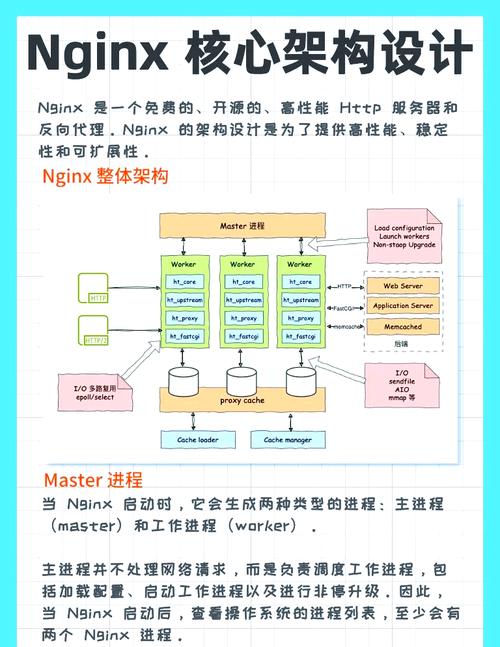
The nginx-module-python is a third-party Nginx module that embeds a Python interpreter directly into the Nginx worker processes. When a request arrives that needs to be handled by Python, the Nginx worker process passes the request to the embedded Python interpreter, which executes your Python code and returns the response directly back to the worker process.
Key Concept: It's not a reverse proxy like proxy_pass. The Python code runs inside the Nginx process, acting as a "handler" for specific locations.
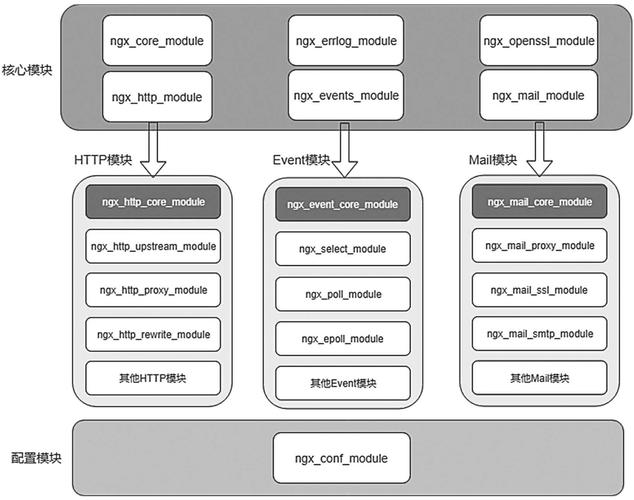
How it works (simplified):
- A client request hits Nginx.
- Nginx matches the request URI against its configured
locationblocks. - If a location is configured with the
pythonhandler, Nginx passes the request object (headers, body, etc.) to the embedded Python interpreter. - Your Python code executes.
- Your Python code generates an HTTP response (status, headers, body).
- The Python interpreter passes the response back to the Nginx worker process.
- Nginx sends the final response to the client.
How to Install Nginx with the Python Module
You cannot simply add this module to an existing Nginx installation. You must recompile Nginx from source, including the Python module as a dependency.
Prerequisites
build-essential(or your system's equivalent C/C++ compiler toolchain)pcrelibrary (for regular expressions)zliblibrary (for gzip compression)libpython3-dev(the Python development headers and libraries for your desired Python version, e.g.,python3.10-dev)
Step-by-Step Installation (for Ubuntu/Debian)
Let's assume you want to build Nginx with the latest mainline version and Python 3.10.
Step 1: Install Dependencies
sudo apt update
sudo apt install -y build-essential libpcre3-dev zlib1g-dev libpython3.10-dev
Step 2: Download Nginx Source Code and the Python Module
# Create a directory for our build
mkdir ~/nginx-python-build
cd ~/nginx-python-build
# Download Nginx source
wget http://nginx.org/download/nginx-1.25.3.tar.gz
tar -xvzf nginx-1.25.3.tar.gz
cd nginx-1.25.3
# Download the Python module
# It's good practice to clone it into a sibling directory
cd ..
git clone https://github.com/yaoweibin/ngx_http_python_module.git
Step 3: Configure and Compile Nginx
Now, run the configure script, telling it where to find the Python module and which options to enable. The --add-dynamic-module flag is crucial as it builds the Python module as a shared object (.so file), which is more flexible.
cd nginx-1.25.3
# Run the configure script
./configure \
    --prefix=/etc/nginx \
    --sbin-path=/usr/sbin/nginx \
    --modules-path=/usr/lib/nginx/modules \
    --conf-path=/etc/nginx/nginx.conf \
    --error-log-path=/var/log/nginx/error.log \
    --http-log-path=/var/log/nginx/access.log \
    --pid-path=/var/run/nginx.pid \
    --lock-path=/var/run/nginx.lock \
    --http-client-body-temp-path=/var/cache/nginx/client_temp \
    --http-proxy-temp-path=/var/cache/nginx/proxy_temp \
    --http-fastcgi-temp-path=/var/cache/nginx/fastcgi_temp \
    --http-uwsgi-temp-path=/var/cache/nginx/uwsgi_temp \
    --http-scgi-temp-path=/var/cache/nginx/scgi_temp \
    --with-http_ssl_module \
    --with-http_realip_module \
    --with-http_addition_module \
    --with-http_sub_module \
    --with-http_dav_module \
    --with-http_flv_module \
    --with-http_mp4_module \
    --with-http_gunzip_module \
    --with-http_gzip_static_module \
    --with-http_random_index_module \
    --with-http_secure_link_module \
    --with-http_stub_status_module \
    --with-http_auth_request_module \
    --with-http_slice_module \
    --with-threads \
    --with-http_v2_module \
    --with-http_v3_module \
    --with-stream \
    --with-stream_realip_module \
    --with-stream_ssl_module \
    --with-stream_ssl_preread_module \
    --with-compat \
    --with-file-aio \
    --with-http_v2_hpack_enc \
    --add-dynamic-module=../ngx_http_python_module
Step 4: Compile and Install
# Compile the code (this will take a few minutes)
make -j$(nproc)
sudo make install
Step 5: Verify the Installation
Check if the Python module was successfully built and installed.
# The module should be in the modules directory
ls -l /usr/lib/nginx/modules/ | grep python
# You should see something like: ngx_http_python_module.so
# You can also check Nginx's version with modules
nginx -V 2>&1 | grep python
# You should see: --add-dynamic-module=../ngx_http_python_module
Basic Configuration Example
Now that Nginx is built with the module, you need to load it in your nginx.conf.
Step 1: Load the Module
In your main /etc/nginx/nginx.conf, add the load_module directive at the top. This must be at the very top of the file, outside any http block.
# /etc/nginx/nginx.conf
load_module /usr/lib/nginx/modules/ngx_http_python_module.so;
user www-data;
worker_processes auto;
pid /run/nginx.pid;
...
Step 2: Configure a Python Location
Let's create a simple Python script that returns "Hello from Python!".
Python Script (/var/www/hello.py):
def application(env, start_response):
    status = '200 OK'
    headers = [('Content-type', 'text/plain')]
    start_response(status, headers)
    return [b"Hello from Python!"]
Nginx Server Block (/etc/nginx/sites-available/default):
server {
    listen 80;
    server_name localhost;
    location /python/ {
        # The python directive tells Nginx to use the Python handler
        python /var/www/hello.py;
        # Optional: Set the working directory for the Python script
        # python_path /var/www;
    }
    # A regular static file location for comparison
    location / {
        root /var/www/html;
        index index.html;
    }
}
Step 3: Test and Reload Nginx
- Create the
hello.pyscript and make it executable.sudo mkdir -p /var/www sudo nano /var/www/hello.py # Paste the Python code from above into the file sudo chmod +x /var/www/hello.py
- Test your Nginx configuration for syntax errors.
sudo nginx -t
# Expected output: syntax is ok, test is successful
- If the test passes, reload Nginx.
sudo systemctl reload nginx
- Visit
http://localhost/python/in your browser. You should see "Hello from Python!".
Python Handler API
The Python module exposes a simple API for your scripts. The function you define in your .py file is the entry point.
def application(env, start_response):
    # --- 'env' dictionary ---
    # Contains the WSGI environment variables.
    # Key examples:
    # env['REQUEST_METHOD']  -> 'GET', 'POST', etc.
    # env['REQUEST_URI']     -> The full path, e.g., '/python/hello'
    # env['QUERY_STRING']    -> The query string, e.g., 'name=foo'
    # env['SERVER_PROTOCOL'] -> 'HTTP/1.1'
    # env['HTTP_HOST']       -> 'localhost'
    # env['CONTENT_LENGTH']  -> Length of the request body
    # env['CONTENT_TYPE']    -> 'application/json'
    # env['wsgi.input']      -> A file-like object for the request body
    # --- 'start_response' callable ---
    # This function is used to begin the HTTP response.
    # It takes two arguments:
    # 1. The HTTP status code (e.g., '200 OK', '404 Not Found')
    # 2. A list of (header_name, header_value) tuples
    start_response('200 OK', [
        ('Content-Type', 'text/plain'),
        ('X-Custom-Header', 'MyValue')
    ])
    # --- Return value ---
    # Must be an iterable of byte strings (e.g., a list of bytes, or a generator).
    # For a simple response, just return a list containing the body.
    return [b"This is the response body."]
Pros and Cons
Pros ✅
- Performance: Very low overhead since there's no process forking. The Python code runs in the same process as Nginx, making it extremely fast for simple tasks.
- Simplicity: Easy to configure for straightforward, request-response tasks.
- Resource Efficiency: Low memory footprint compared to running a full Python WSGI server (like Gunicorn) behind Nginx.
Cons ❌
- Not for Full Web Apps: This is not a replacement for a full web framework like Django or Flask. It's designed for small, stateless tasks. You lose the rich ecosystem of web frameworks, ORM, template engines, etc.
- Limited Python Environment: You're working with a very basic, WSGI-like environment. You can't use many standard libraries that require a full server environment.
- Stability: A bug or infinite loop in your Python code will crash the entire Nginx worker process, taking down part of your server. A traditional WSGI server would isolate the application.
- Scalability: Python's Global Interpreter Lock (GIL) means that only one thread can execute Python bytecode at a time within a single process. While Nginx's worker processes are separate, the Python code within one worker won't be truly multi-threaded for CPU-bound tasks.
Alternatives
For almost all Python web applications, the standard and recommended architecture is:
Nginx (Reverse Proxy) -> WSGI Server (Gunicorn, uWSGI) -> Python App (Django, Flask)
- Nginx: Serves static files efficiently, handles SSL termination, and acts as a reverse proxy, load-balancing requests to the WSGI server.
- WSGI Server (e.g., Gunicorn): Manages a pool of Python worker processes. It's built for running full Python web applications and handles process management and concurrency.
- Python App: Your actual Django, Flask, FastAPI, etc., application.
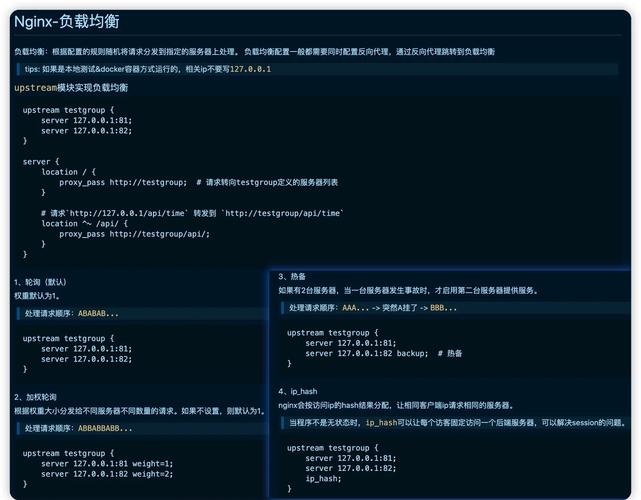
This architecture is more robust, scalable, and gives you access to the entire Python ecosystem. Only use the nginx-module-python if you have a very specific, high-performance need for a simple, in-process task that doesn't require a full framework. Examples include:
- A simple health check endpoint.
- A dynamic configuration page that reads from a local file.
- A lightweight API that just returns data from a simple calculation.











