Of course! Let's dive deep into BlockingQueue in Java. It's a fundamental and incredibly useful interface in the java.util.concurrent package.
What is a BlockingQueue?
A BlockingQueue is a thread-safe queue that additionally supports operations that wait for the queue to become non-empty when retrieving an element, and wait for space to become available when storing an element.
Think of it as a bridge between producer and consumer threads. Producers add elements to the queue, and consumers take them off. The "blocking" part is what makes it so powerful for concurrent programming: if a consumer tries to take an element from an empty queue, it will block (wait) until a producer adds one. Similarly, if a producer tries to add an element to a full queue, it will block until a consumer makes space.
Key Interfaces and Hierarchy
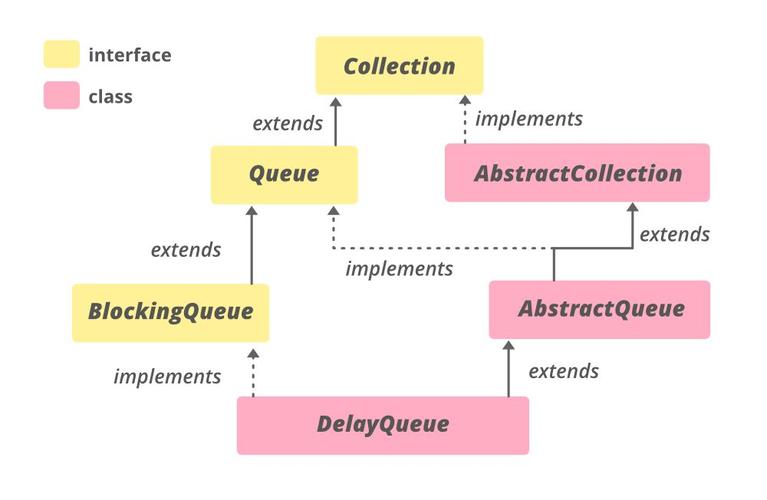
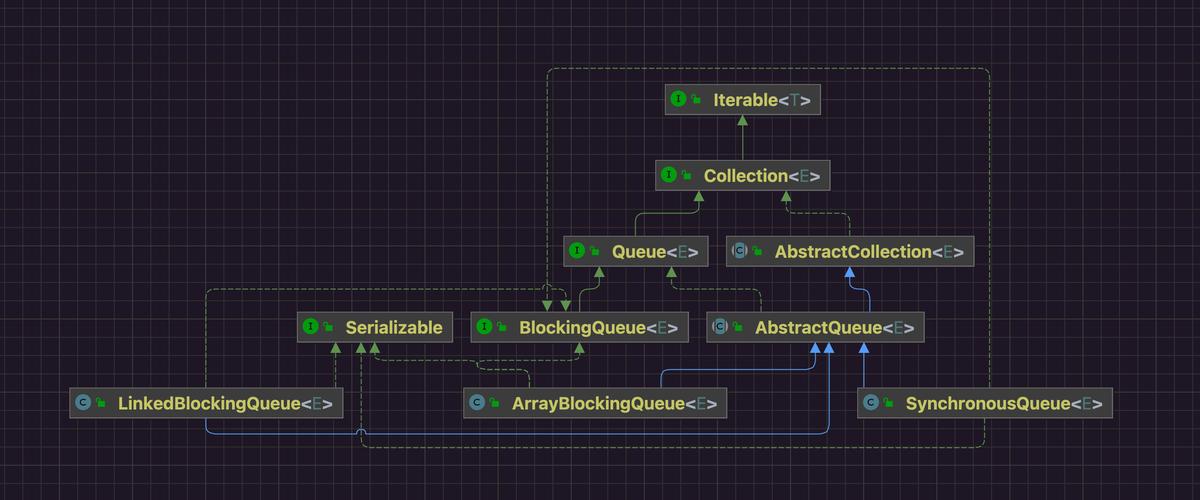
BlockingQueue is an interface. You'll typically use one of its concrete implementations.
java.util.concurrent.BlockingQueue (Interface)
       ^
       |
+------------------+------------------+------------------+
|                  |                  |                  |
ArrayBlockingQueue  LinkedBlockingQueue  PriorityBlockingQueue  DelayQueue
(Sized, FIFO)      (Sized, FIFO)      (Priority-based)     (Delayed elements)
       |                  |
       +------------------+
              |
       SynchronousQueue
       (Rendezvous point, no capacity)
Core Methods
The methods in BlockingQueue are designed for different blocking and non-blocking scenarios.
| Method Type | Throws Exception | Special Value | Blocks | Description |
|---|---|---|---|---|
| Insert | add(e) |
offer(e) |
put(e) |
Adds an element to the tail of the queue. add() throws IllegalStateException if full. offer() returns false if full. put() blocks until space is available. |
offer(e, time, unit) |
Attempts to add an element, blocking for up to the specified time before giving up. Returns true on success, false on timeout. |
|||
| Remove | remove() |
poll() |
take() |
Retrieves and removes an element from the head. remove() throws NoSuchElementException if empty. poll() returns null if empty. take() blocks until an element is available. |
poll(time, unit) |
Attempts to retrieve an element, blocking for up to the specified time. Returns the element or null on timeout. |
|||
| Examine | element() |
peek() |
Retrieves, but does not remove, the head element. element() throws NoSuchElementException if empty. peek() returns null if empty. Neither blocks. |
Most Common Methods:
put(e): The go-to for producers. It will block until the queue has capacity.take(): The go-to for consumers. It will block until the queue has an element.offer(e): Useful for producers that don't want to block and can handle a "full" state gracefully.poll(): Useful for consumers that don't want to block and can handle an "empty" state gracefully.
Common Implementations
ArrayBlockingQueue
- Backed by an array.
- Has a fixed capacity specified during creation.
- Uses a single lock for both producers and consumers (can lead to contention).
- Use Case: When you know the maximum size of your queue and want to prevent it from growing uncontrollably.
// A queue that can hold a maximum of 10 items
BlockingQueue<String> queue = new ArrayBlockingQueue<>(10);
LinkedBlockingQueue
- Backed by a linked nodes.
- Has an optional capacity. If no capacity is specified, it can grow to
Integer.MAX_VALUE. - Uses separate locks for producers and consumers (higher throughput than
ArrayBlockingQueue). - Use Case: The most common choice. Use it when you need a flexible-sized queue or expect high throughput.
// A queue with no theoretical maximum size (practically very large)
BlockingQueue<String> queue = new LinkedBlockingQueue<>();
// A queue with a maximum of 100 items
BlockingQueue<String> queue = new LinkedBlockingQueue<>(100);
PriorityBlockingQueue
- Backed by a priority heap.
- Elements are not retrieved in FIFO order, but in priority order (defined by
Comparableor aComparator). - Has no fixed capacity and will grow as needed.
- Use Case: When you need to process elements based on their priority (e.g., processing high-priority tasks first).
// A queue of tasks, where tasks with higher priority are processed first
BlockingQueue<Runnable> queue = new PriorityBlockingQueue<>();
SynchronousQueue
- A special case with no capacity.
- It's a rendezvous point. A
putto the queue will block until another thread does atake, and vice-versa. It's not really a queue at all, but a hand-off mechanism. - Use Case: Directly handing off items from a producer to a consumer without intermediate storage. Used internally by
Executors.newCachedThreadPool().
// A queue where each put must be matched by a take before another put can proceed
BlockingQueue<Integer> queue = new SynchronousQueue<>();
Classic Producer-Consumer Example
This is the canonical use case for BlockingQueue. We'll create a shared queue and two separate threads: a Producer and a Consumer.
import java.util.concurrent.BlockingQueue;
import java.util.concurrent.LinkedBlockingQueue;
import java.util.concurrent.TimeUnit;
public class ProducerConsumerExample {
    // Shared bounded queue
    private static final BlockingQueue<String> queue = new LinkedBlockingQueue<>(5);
    public static void main(String[] args) {
        // Create and start the producer and consumer threads
        Thread producerThread = new Thread(new Producer());
        Thread consumerThread = new Thread(new Consumer());
        producerThread.start();
        consumerThread.start();
        // Let them run for a bit
        try {
            TimeUnit.SECONDS.sleep(10);
        } catch (InterruptedException e) {
            Thread.currentThread().interrupt();
        }
        // Stop the threads (in a real app, you'd use a more robust shutdown mechanism)
        producerThread.interrupt();
        consumerThread.interrupt();
    }
    static class Producer implements Runnable {
        @Override
        public void run() {
            int i = 0;
            try {
                while (!Thread.currentThread().isInterrupted()) {
                    String item = "Item-" + i++;
                    System.out.println("Producing: " + item);
                    // put() will block if the queue is full
                    queue.put(item);
                    // Simulate production time
                    Thread.sleep(500);
                }
            } catch (InterruptedException e) {
                System.out.println("Producer interrupted.");
                Thread.currentThread().interrupt(); // Restore the interrupt status
            }
            System.out.println("Producer finished.");
        }
    }
    static class Consumer implements Runnable {
        @Override
        public void run() {
            try {
                while (!Thread.currentThread().isInterrupted()) {
                    // take() will block if the queue is empty
                    String item = queue.take();
                    System.out.println("Consuming: " + item);
                    // Simulate consumption time
                    Thread.sleep(1000);
                }
            } catch (InterruptedException e) {
                System.out.println("Consumer interrupted.");
                Thread.currentThread().interrupt(); // Restore the interrupt status
            }
            System.out.println("Consumer finished.");
        }
    }
}
How it works:
- The
Producercreates items and usesqueue.put(item). If the queue is full,put()pauses the producer thread until theConsumermakes space. - The
Consumerusesqueue.take()to get items. If the queue is empty,take()pauses the consumer thread until theProduceradds an item. - This elegant synchronization is handled entirely by the
BlockingQueue, eliminating the need for manualwait()andnotify()calls, complexsynchronizedblocks, and messy state variables.
When to Use BlockingQueue
- Producer-Consumer Patterns: The primary use case. Any time you have one or more threads producing work and one or more threads consuming it.
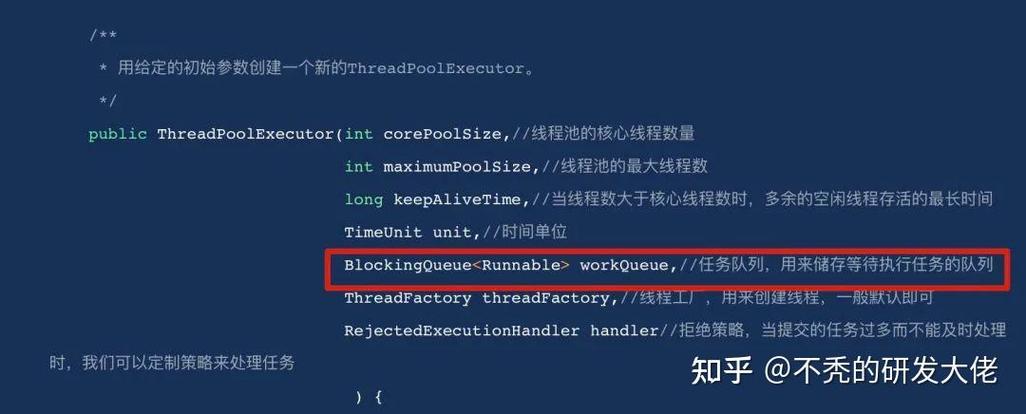
- Task Execution: Thread pools (like
ExecutorService) often useBlockingQueueto hold tasks waiting to be executed by worker threads. - Event-Driven Architectures: For queuing events from multiple sources to be processed by a single handler.
- Data Pipelines: To buffer data between different stages of a multi-stage processing pipeline.
Advantages
- Simplicity: Dramatically simplifies concurrent code.
- Thread-Safety: It's inherently thread-safe, so you don't have to worry about race conditions.
- Efficiency: The implementations are highly optimized for concurrent access.
- Robustness: Prevents common errors like losing notifications or having to write complex, error-prone synchronization logic.