Of course! Sorting based on ASCII values in Python is straightforward because the default behavior of Python's sort() and sorted() functions is to sort strings lexicographically, which is based on the numerical order of their characters' ASCII (or more accurately, Unicode) values.
Here’s a complete guide, from the basics to more advanced use cases.
The Basics: Default String Sorting
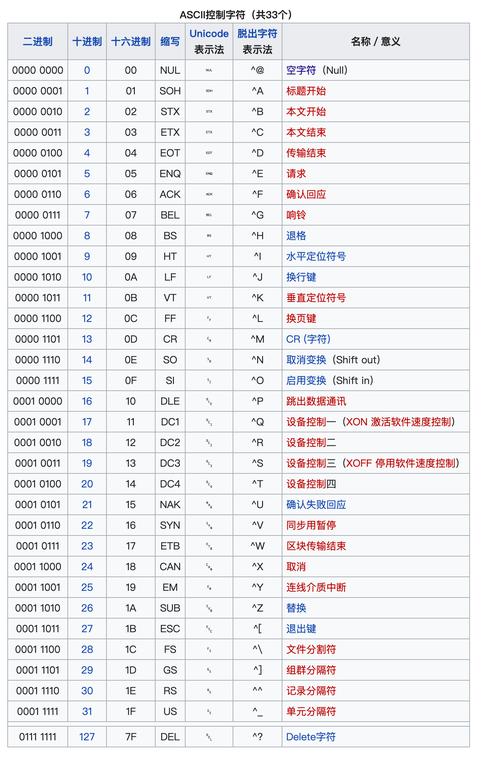
When you sort a list of strings, Python compares them character by character based on their underlying ASCII/Unicode code points.
How it works:
- It compares the first character of each string.
- If they are different, the string with the character that has the lower ASCII value comes first.
- If the first characters are the same, it moves to the second character, and so on.
- If one string is a prefix of another (e.g., "cat" and "caterpillar"), the shorter string comes first.
Example:
words = ["banana", "Apple", "cat", "Dog", "Zebra", "apple"]
# Sort the list in-place
words.sort()
print(words)
Output:
['Apple', 'Dog', 'Zebra', 'apple', 'banana', 'cat']Why this order? Let's look at the ASCII values of the first letters:
'A'-> 65'D'-> 68'Z'-> 90'a'-> 97'b'-> 98'c'-> 99
Notice that all uppercase letters (A-Z) have lower ASCII values (65-90) than all lowercase letters (a-z, 97-122). This is why "Apple" comes before "apple".
Case-Insensitive Sorting (Most Common Need)
Often, you don't want "Apple" to come before "apple". You want them treated as the same for sorting purposes. The best way to do this is by using the key argument.
The key argument specifies a function to be called on each element prior to making comparisons. We can use the str.lower method to convert every string to lowercase for the comparison.
Example:
words = ["banana", "Apple", "cat", "Dog", "Zebra", "apple"]
# Use sorted() to get a new sorted list
# The key=str.lower tells sort to compare based on the lowercase version of each string
sorted_words = sorted(words, key=str.lower)
print(sorted_words)
Output:
['Apple', 'apple', 'banana', 'cat', 'Dog', 'Zebra']Explanation:
Python now effectively compares 'apple' vs 'apple' vs 'banana', etc., so the words are sorted alphabetically regardless of their original case.
Reversing the Sort
To sort in descending (reverse) order, you can use the reverse=True argument. This can be combined with a key.
Example (Descending ASCII order):
words = ["banana", "Apple", "cat", "Dog"]
sorted_desc = sorted(words, reverse=True)
print(sorted_desc)
Output:
['cat', 'banana', 'Dog', 'Apple']Example (Case-Insensitive, Descending order):
words = ["banana", "Apple", "cat", "Dog"]
sorted_desc_case_insensitive = sorted(words, key=str.lower, reverse=True)
print(sorted_desc_case_insensitive)
Output:
['Zebra', 'cat', 'banana', 'apple', 'Dog', 'Apple'](Assuming 'Zebra' was in the original list for a better example)
Sorting a List of Characters by ASCII Value
If you have a single string and want to sort its characters based on their ASCII values, the process is identical.
Example:
my_string = "Python"
# Convert the string to a list of characters, then sort that list
sorted_chars = sorted(my_string)
print(sorted_chars)
Output:
['P', 'h', 'n', 'o', 't', 'y']Explanation:
The ASCII values are: P(80), y(121), t(116), h(104), o(111), n(110). Sorted numerically, this gives the order above.
Advanced: Custom Sorting Logic with lambda
What if your sorting rule is more complex? For example, sorting a list of words first by length and then alphabetically for words of the same length.
You can provide a lambda function to the key argument. This function can return a tuple, and Python will sort by the first element of the tuple, then the second, and so on.
Example (Sort by length, then alphabetically):
words = ["cat", "banana", "a", "dog", "apple", "hi"]
# The key is a tuple: (len(word), word.lower())
# Python will first sort by the length (the first item in the tuple)
# If lengths are equal, it will sort by the lowercase word (the second item)
sorted_custom = sorted(words, key=lambda word: (len(word), word.lower()))
print(sorted_custom)
Output:
['a', 'hi', 'cat', 'dog', 'apple', 'banana']Explanation:
'a'(len 1) comes first.'hi'(len 2) comes next.'cat'and'dog'both have length 3. They are then sorted alphabetically:'cat'comes before'dog'.'apple'and'banana'both have length 6. They are sorted alphabetically:'apple'comes before'banana'.
Summary Table
| Goal | Method | Example |
|---|---|---|
| Default Sort (ASCII) | my_list.sort() or sorted(my_list) |
sorted(["Dog", "cat"]) -> ['Dog', 'cat'] |
| Case-Insensitive Sort | sorted(my_list, key=str.lower) |
sorted(["Dog", "cat"], key=str.lower) -> ['Dog', 'cat'] |
| Reverse Sort | sorted(my_list, reverse=True) |
sorted(["Dog", "cat"], reverse=True) -> ['cat', 'Dog'] |
| Sort Characters in a String | sorted(my_string) |
sorted("hello") -> ['e', 'h', 'l', 'l', 'o'] |
| Custom Sort (e.g., by length) | sorted(my_list, key=lambda item: (len(item), item)) |
sorted(["a", "hi", "cat"], key=lambda s: len(s)) -> ['a', 'hi', 'cat'] |