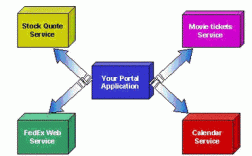
- 传统方法 (基于 SOAP):使用 JAX-WS (Java API for XML Web Services)。
- 现代方法 (基于 RESTful):使用 Spring 的
RestTemplate或 Java 11+ 内置的HttpClient。
下面我将详细介绍这两种主流方法,并提供完整的代码示例。

使用 JAX-WS 调用传统的 SOAP WebService
SOAP (Simple Object Access Protocol) 是一种基于 XML 的协议,通常用于企业级应用,Java 官方提供了 JAX-WS API 来简化 SOAP WebService 的开发和调用。
场景假设
我们要调用一个免费的公共天气查询 WebService,
- WSDL 地址:
http://www.webxml.com.cn/webservices/weatherwebservice?wsdl - 功能: 根据城市名查询天气。
- 可用方法:
getWeather,它接受一个城市名数组,返回一个包含详细天气信息的字符串数组。
步骤 1:生成客户端代码
WSDL (Web Services Description Language) 文件描述了 WebService 的所有信息,包括可用的方法、参数和返回值,我们需要根据 WSDL 文件生成 Java 客户端代码。
使用 JDK 自带的 wsimport 工具 (推荐)

打开你的命令行(CMD 或 PowerShell),执行以下命令:
# -keep: 生成源代码
# -d: 指定编译后的 .class 文件存放目录
# -p: 指定生成的包名
# wsdl_location: 指定 wsdl 文件的最终访问地址
wsimport -keep -d D:\temp -p com.example.weather.client http://www.webxml.com.cn/webservices/weatherwebservice?wsdl
执行成功后,你会在 D:\temp\com\example\weather\client 目录下看到一堆 .java 和 .class 文件,这些就是调用该 WebService 所需的客户端代码。
在 IDE (如 IntelliJ IDEA 或 Eclipse) 中生成
- 在项目中创建一个新的客户端。
- 选择 "Web Service Client"。
- 输入 WSDL 地址,IDE 会自动帮你完成代码生成工作。
步骤 2:编写 Java 代码调用服务
将生成的 .java 文件(主要是 WeatherWS 和 WeatherWS 相关的接口和实现类)复制到你的项目中,然后就可以调用了。

import com.example.weather.client.WeatherWS;
import com.example.weather.client.WeatherWSImplService;
import com.example.weather.client.WeatherWSSoap;
public class JaxwsWeatherClient {
    public static void main(String[] args) {
        // 1. 创建服务视图 (Service)
        // WeatherWSImplService 是 wsimport 生成的工厂类
        WeatherWSImplService service = new WeatherWSImplService();
        // 2. 获取服务端点接口 (Service Endpoint Interface, SEI)
        // WeatherWSSoap 是 wsimport 生成的接口,包含了所有可用的方法
        WeatherWSSoap port = service.getWeatherWSSoap();
        try {
            // 3. 调用方法并传递参数
            // getWeather 方法需要一个字符串数组作为城市名
            String[] weatherInfo = port.getWeather(new String[]{"北京"});
            // 4. 处理返回结果
            // 返回的结果是一个字符串数组,每个元素代表一行天气信息
            System.out.println("=== 北京天气信息 ===");
            if (weatherInfo != null) {
                for (String line : weatherInfo) {
                    System.out.println(line);
                }
            } else {
                System.out.println("获取天气信息失败。");
            }
        } catch (Exception e) {
            e.printStackTrace();
            System.err.println("调用 WebService 出错: " + e.getMessage());
        }
    }
}
代码解析:
WeatherWSImplService: 这是根据 WSDL 生成的工厂类,用于创建服务的实例。service.getWeatherWSSoap(): 获取一个代理对象,这个对象实现了WeatherWSSoap接口,通过这个代理对象,我们就可以像调用本地方法一样调用远程的 WebService 方法。port.getWeather(...): 调用具体的 WebService 方法。- 返回的结果是一个字符串数组,内容是格式化好的天气信息。
使用 Spring RestTemplate 调用 RESTful WebService
绝大多数新的 WebService 都是基于 RESTful 风格的,它使用 HTTP 协议,通常返回 JSON 或 XML 格式的数据,在 Spring 项目中,RestTemplate 是调用 RESTful API 的传统标准工具。
场景假设
我们要调用一个公共的 IP 地址查询 API,返回 JSON 格式的数据。
- API 地址:
http://ip-api.com/json/ - 功能: 查询指定 IP 地址的地理位置信息。
- 请求方式: GET
- 返回格式: JSON
步骤 1:添加 Spring Boot 依赖
确保你的 pom.xml 文件中包含了 spring-boot-starter-web,它已经包含了 RestTemplate。
<dependency>
    <groupId>org.springframework.boot</groupId>
    <artifactId>spring-boot-starter-web</artifactId>
</dependency>
步骤 2:配置 RestTemplate
在 Spring Boot 的主类或配置类中,将 RestTemplate 声明为一个 Bean。
import org.springframework.boot.SpringApplication;
import org.springframework.boot.autoconfigure.SpringBootApplication;
import org.springframework.context.annotation.Bean;
import org.springframework.web.client.RestTemplate;
@SpringBootApplication
public class RestTemplateApplication {
    public static void main(String[] args) {
        SpringApplication.run(RestTemplateApplication.class, args);
    }
    @Bean
    public RestTemplate restTemplate() {
        return new RestTemplate();
    }
}
步骤 3:创建一个实体类来映射返回的 JSON
为了方便处理返回的 JSON 数据,我们创建一个 Java 类(POJO)来与之对应。
// IpInfo.java
import com.fasterxml.jackson.annotation.JsonIgnoreProperties;
@JsonIgnoreProperties(ignoreUnknown = true) // 忽略 JSON 中存在但 Java 类中没有的属性
public class IpInfo {
    private String country;
    private String regionName;
    private String city;
    private String zip;
    private double lat;
    private double lon;
    // Getters and Setters (非常重要)
    public String getCountry() { return country; }
    public void setCountry(String country) { this.country = country; }
    public String getRegionName() { return regionName; }
    public void setRegionName(String regionName) { this.regionName = regionName; }
    public String getCity() { return city; }
    public void setCity(String city) { this.city = city; }
    public String getZip() { return zip; }
    public void setZip(String zip) { this.zip = zip; }
    public double getLat() { return lat; }
    public void setLat(double lat) { this.lat = lat; }
    public double getLon() { return lon; }
    public void setLon(double lon) { this.lon = lon; }
    @Override
    public String toString() {
        return "IpInfo{" +
                "country='" + country + '\'' +
                ", regionName='" + regionName + '\'' +
                ", city='" + city + '\'' +
                ", zip='" + zip + '\'' +
                ", lat=" + lat +
                ", lon=" + lon +
                '}';
    }
}
步骤 4:编写 Service 或 Controller 来调用 API
import org.springframework.beans.factory.annotation.Autowired;
import org.springframework.stereotype.Service;
import org.springframework.web.client.RestTemplate;
@Service
public class IpLocationService {
    @Autowired
    private RestTemplate restTemplate;
    // 可以指定一个 IP,或者不指定,默认查询当前客户端的 IP
    public IpInfo getLocationByIp(String ip) {
        String url = "http://ip-api.com/json/" + (ip != null ? ip : "");
        // 使用 getForObject 方法,它会自动发送 HTTP GET 请求,
        // 并将返回的 JSON 字符串自动映射到 IpInfo 对象中
        IpInfo ipInfo = restTemplate.getForObject(url, IpInfo.class);
        return ipInfo;
    }
}
步骤 5:创建一个 Controller 来测试
import org.springframework.beans.factory.annotation.Autowired;
import org.springframework.web.bind.annotation.GetMapping;
import org.springframework.web.bind.annotation.PathVariable;
import org.springframework.web.bind.annotation.RequestMapping;
import org.springframework.web.bind.annotation.RestController;
@RestController
@RequestMapping("/api")
public class IpController {
    @Autowired
    private IpLocationService ipLocationService;
    @GetMapping("/location")
    public String getLocation() {
        // 查询当前 IP 的信息
        IpInfo info = ipLocationService.getLocationByIp(null);
        return "你的位置信息: " + info.toString();
    }
    @GetMapping("/location/{ip}")
    public String getLocationByIp(@PathVariable String ip) {
        // 查询指定 IP 的信息
        IpInfo info = ipLocationService.getLocationByIp(ip);
        return "IP " + ip + " 的位置信息: " + info.toString();
    }
}
启动你的 Spring Boot 应用,然后访问 http://localhost:8080/api/location,你就能在浏览器中看到 JSON 数据被成功解析并以友好的格式返回了。
总结与对比
| 特性 | JAX-WS (SOAP) | Spring RestTemplate (REST) |
|---|---|---|
| 协议 | SOAP (基于 XML) | HTTP (通常基于 JSON/XML) |
| 数据格式 | 严格的 XML | 灵活的 JSON, XML, Text 等 |
| 标准 | WS-* (WS-Security, WS-Addressing 等) | RESTful 架构风格 (无统一标准) |
| 优点 | - 标准化程度高,安全性和事务支持强 - 自动化工具支持好 (wsimport) |
- 轻量、简单、易于理解 - 与 HTTP 协议无缝集成 - 性能通常更好 |
| 缺点 | - 协议复杂,数据包冗余 - 学习曲线较陡 |
- 缺乏统一标准,安全性需自行实现 - 通常无事务支持 |
| 适用场景 | 企业级应用、银行、金融等对安全性和事务性要求极高的领域。 | 大多数现代 Web 应用、移动端后端、微服务架构。 |
如何选择?
- 如果你要调用的服务是传统的、基于 SOAP 的,或者你的项目环境对安全性、事务性有硬性要求,那么使用 JAX-WS。
- 如果你要调用的服务是现代的、基于 RESTful 的,或者你正在开发一个新的 Spring Boot 应用,那么使用 Spring
RestTemplate(或者更新的WebClient) 是更简单、更高效的选择。