Of course! Working with MySQL data and converting it into Python dictionaries is a very common and essential task. The most popular library for this is mysql-connector-python.
Here’s a complete guide covering the best practices, from basic usage to advanced techniques.
The Short and Sweet Answer
The cursor object from mysql-connector-python has a convenient property called .dictionary that, when set to True, makes fetching results incredibly easy.
import mysql.connector
from mysql.connector import Error
try:
    # Establish the database connection
    connection = mysql.connector.connect(
        host='localhost',
        database='your_database',
        user='your_username',
        password='your_password'
    )
    if connection.is_connected():
        cursor = connection.cursor(dictionary=True) # <-- THE KEY IS HERE!
        # Execute a query
        cursor.execute("SELECT id, name, email FROM users WHERE is_active = 1")
        # Fetch all results - they are now a list of dictionaries!
        users = cursor.fetchall()
        # Print the results
        for user in users:
            print(user)
        # Example of accessing data like a dictionary
        if users:
            print("\nFirst user's name:", users[0]['name'])
except Error as e:
    print(f"Error while connecting to MySQL: {e}")
finally:
    # Closing the database connection
    if 'connection' in locals() and connection.is_connected():
        cursor.close()
        connection.close()
        print("\nMySQL connection is closed.")
Detailed Breakdown and Best Practices
Let's break down the process and explore different scenarios.
Installation
First, you need to install the library. It's recommended to use a virtual environment.
pip install mysql-connector-python
Connecting to the Database
You always start by creating a connection object. It's good practice to handle potential connection errors.
import mysql.connector
from mysql.connector import Error
def create_db_connection(host_name, user_name, user_password, db_name):
    connection = None
    try:
        connection = mysql.connector.connect(
            host=host_name,
            user=user_name,
            passwd=user_password,
            database=db_name
        )
        print("MySQL connection is successful")
    except Error as e:
        print(f"The error '{e}' occurred")
    return connection
# --- Usage ---
# connection = create_db_connection("localhost", "your_user", "your_pass", "your_db")
The Core: cursor(dictionary=True)
This is the most important part for getting dictionary output.
-
cursor = connection.cursor(): By default,fetchall()returns a list of tuples.# Example with default cursor (tuple) cursor.execute("SELECT id, name FROM users LIMIT 1") user_tuple = cursor.fetchone() print(user_tuple) # Output: (1, 'Alice') print(user_tuple[0]) # Access by index: 1 -
cursor = connection.cursor(dictionary=True): When you setdictionary=True, the cursor returns a list of dictionaries. Each dictionary represents a row, with column names as keys.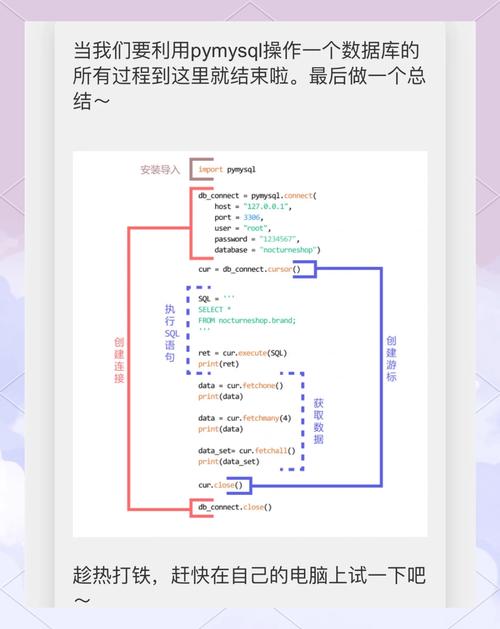 (图片来源网络,侵删)
# Example with dictionary cursor cursor = connection.cursor(dictionary=True) cursor.execute("SELECT id, name FROM users LIMIT 1") user_dict = cursor.fetchone() print(user_dict) # Output: {'id': 1, 'name': 'Alice'} print(user_dict['name']) # Access by key: 'Alice'
Fetching Data: fetchone(), fetchall(), fetchmany()
fetchall(): Fetches all remaining rows from the result set. Returns a list of dictionaries.fetchone(): Fetches the next single row. Returns a single dictionary.fetchmany(size=N): Fetches the nextNrows. Returns a list of dictionaries.
# Assuming connection and cursor are established
cursor.execute("SELECT * FROM products")
# Get all products
all_products = cursor.fetchall()
# print(all_products)
# Get the first product
first_product = cursor.fetchone()
# print(first_product)
# Get the next 5 products
next_five_products = cursor.fetchmany(5)
# print(next_five_products)
Executing Queries with Parameters (Preventing SQL Injection)
Never use Python string formatting (f-strings or ) to insert variables directly into a query. This is a massive security risk (SQL Injection). Always use parameterized queries.
The mysql-connector uses %s as a placeholder, regardless of the data type.
# BAD (Vulnerable to SQL Injection)
# query = f"SELECT * FROM users WHERE name = '{user_name}'"
# GOOD (Secure)
user_name_to_find = "Bob"
query = "SELECT * FROM users WHERE name = %s"
cursor.execute(query, (user_name_to_find,)) # Note the comma! It makes it a tuple.
found_user = cursor.fetchone()
print(found_user)
Complete Example with Error Handling and Context Managers
This is a robust, production-ready example.
import mysql.connector
from mysql.connector import Error
def get_users_by_status(connection, status):
    """
    Fetches users from the database with a given status and returns them as a list of dictionaries.
    """
    users = []
    try:
        # Use a dictionary cursor
        with connection.cursor(dictionary=True) as cursor:
            # Parameterized query to prevent SQL injection
            sql_query = "SELECT id, name, email, created_at FROM users WHERE status = %s"
            cursor.execute(sql_query, (status,))
            # Fetch all results
            users = cursor.fetchall()
    except Error as e:
        print(f"Error while fetching users: {e}")
    return users
# --- Main execution ---
if __name__ == "__main__":
    # --- Replace with your actual database details ---
    db_config = {
        'host': 'localhost',
        'user': 'root',
        'password': 'your_password',
        'database': 'company_db'
    }
    connection = None
    try:
        connection = mysql.connector.connect(**db_config)
        if connection.is_connected():
            print("Successfully connected to the database.")
            # Get active users
            active_users = get_users_by_status(connection, 'active')
            print("\n--- Active Users ---")
            for user in active_users:
                print(f"ID: {user['id']}, Name: {user['name']}, Email: {user['email']}")
            # Get inactive users
            inactive_users = get_users_by_status(connection, 'inactive')
            print("\n--- Inactive Users ---")
            for user in inactive_users:
                print(f"ID: {user['id']}, Name: {user['name']}")
    except Error as e:
        print(f"Failed to connect to MySQL or execute query: {e}")
    finally:
        if connection and connection.is_connected():
            connection.close()
            print("\nMySQL connection is closed.")
Alternative Libraries
While mysql-connector-python is excellent, other libraries are popular and handle the dictionary conversion for you automatically.
PyMySQL
PyMySQL is another pure Python MySQL client. It also supports a cursor class that returns dictionaries.
import pymysql
connection = pymysql.connect(
    host='localhost',
    user='your_user',
    password='your_password',
    database='your_db',
    cursorclass=pymysql.cursors.DictCursor  # <-- The key here
)
try:
    with connection.cursor() as cursor:
        cursor.execute("SELECT * FROM users LIMIT 2")
        results = cursor.fetchall()
        print(results)
finally:
    connection.close()
SQLAlchemy
SQLAlchemy is a powerful Object-Relational Mapper (ORM). It's more complex but provides a higher level of abstraction, making database interactions more "Pythonic".
from sqlalchemy import create_engine, text
# The connection string format is slightly different
engine = create_engine('mysql+pymysql://your_user:your_password@localhost/your_db')
# Using text() for raw SQL queries
with engine.connect() as connection:
    # SQLAlchemy automatically maps rows to dictionaries when using .mappings()
    result = connection.execute(text("SELECT id, name FROM users"))
    # .mappings() provides a view that can be easily converted to a list of dicts
    users = result.mappings().all()
    print(users)
    # Output: [{'id': 1, 'name': 'Alice'}, {'id': 2, 'name': 'Bob'}]
Summary: Which One to Choose?
| Library | Pros | Cons | Best For |
|---|---|---|---|
mysql-connector-python |
Official Oracle driver, feature-rich, good performance. | Can be slightly more verbose than others. | General purpose, applications where you want the official driver. |
PyMySQL |
Pure Python, easy to install, very similar to mysql-connector. |
Slightly less feature-rich than the official driver. | General purpose, great for most projects. |
SQLAlchemy |
High-level ORM, prevents SQL injection automatically, database agnostic. | Steeper learning curve, can be overkill for simple scripts. | Complex applications, large projects, or when you need to switch databases. |
For most use cases, mysql-connector-python with cursor(dictionary=True) is the perfect balance of simplicity, power, and readability.