Of course! java.math.BigDecimal is a crucial class in Java for financial and high-precision calculations. Here’s a comprehensive guide covering what it is, why it's needed, how to use it, and best practices.
The Problem with double and float
Before BigDecimal, you'd likely use double for non-integer numbers. However, double and float are binary floating-point types. They are designed for scientific calculations, not financial ones, which suffer from precision issues.
This is because not all decimal fractions (like 0.1) can be represented exactly in binary (base-2).
Example:
public class DoubleProblem {
    public static void main(String[] args) {
        double a = 0.1;
        double b = 0.2;
        System.out.println("a + b = " + (a + b)); // Expected: 0.3, Actual: 0.30000000000000004
        // This is even more dangerous for comparisons
        System.out.println("Is 0.1 + 0.2 equal to 0.3? " + (a + b == 0.3)); // false
    }
}
This imprecision makes double and float unsuitable for anything where exact decimal precision is required, like currency calculations.
What is BigDecimal?
BigDecimal is a Java class that represents an immutable, arbitrary-precision signed decimal number.
- Immutable: Any operation (like addition or multiplication) on a
BigDecimalobject returns a newBigDecimalobject; the original is not changed. - Arbitrary Precision: It can hold numbers with a very large number of decimal places, limited only by available memory.
- Decimal-Based: It represents numbers in base-10 (decimal), which aligns perfectly with how humans think about money and other decimal values.
A BigDecimal consists of two parts:
- An unscaled value (a
BigIntegerrepresenting the digits of the number). - A scale (an
intrepresenting the number of digits to the right of the decimal point).
For example, the number 456 has an unscaled value of 123456 and a scale of 3.
Creating BigDecimal Instances (The Right Way)
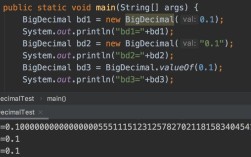
How you create a BigDecimal is critical. Never use the BigDecimal(double) constructor.
❌ Bad Practice (Precision Loss)
// DO NOT DO THIS!
double badDouble = 0.1;
BigDecimal badBigDecimal = new BigDecimal(badDouble); // Creates 0.1000000000000000055511151231257827021181583404541015625
System.out.println(badBigDecimal);
✅ Good Practice (Use String or int/long)
The recommended ways to create a BigDecimal are:
-
Using a
String: This is the most precise and recommended method.BigDecimal fromString = new BigDecimal("123.456"); // Perfectly precise -
Using
BigDecimal.valueOf(): This is the preferred method if you start from adoubleor a primitive type. It's more efficient than theStringconstructor and avoids the precision pitfalls of thedoubleconstructor.// The best way to convert a double to a BigDecimal BigDecimal fromDouble = BigDecimal.valueOf(0.1); // Creates 0.1 correctly System.out.println(fromDouble); // 0.1 // Also works for longs BigDecimal fromLong = BigDecimal.valueOf(12345L);
-
Using
intorlongconstructors:BigDecimal fromInt = new BigDecimal(123); // Creates 123.0
Core Operations and Methods
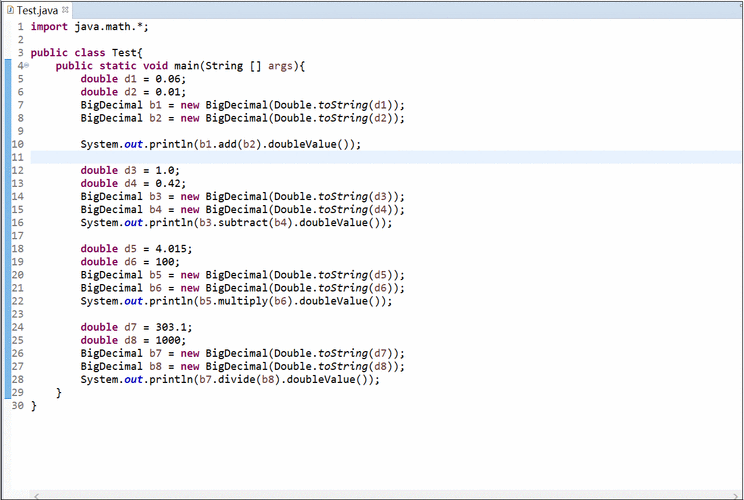
BigDecimal has its own set of methods for arithmetic, comparison, and scaling. Since it's immutable, methods like add() and multiply() return a new BigDecimal.
Arithmetic Operations
| Operation | Method | Example |
|---|---|---|
| Addition | add(BigDecimal augend) |
a.add(b) |
| Subtraction | subtract(BigDecimal subtrahend) |
a.subtract(b) |
| Multiplication | multiply(BigDecimal multiplicand) |
a.multiply(b) |
| Division | divide(BigDecimal divisor) |
a.divide(b) |
Division is special. You must specify a rounding mode and a scale (number of decimal places) to avoid an ArithmeticException (which occurs if the division results in a non-terminating decimal).
BigDecimal a = new BigDecimal("10.0");
BigDecimal b = new BigDecimal("3.0");
// Without rounding, this throws ArithmeticException
// BigDecimal result = a.divide(b);
// Correct way: specify scale and rounding mode
// RoundingMode.HALF_UP is standard for financial calculations (like rounding 0.5 up to 1)
BigDecimal result = a.divide(b, 4, RoundingMode.HALF_UP);
System.out.println(result); // 3.3333
Comparison
Use the compareTo() method, not equals().
a.compareTo(b)returns:-1ifa < b0ifa == b1ifa > b
Never use equals() for comparison! equals() also checks the scale, so new BigDecimal("1.00").equals(new BigDecimal("1")) returns false.
BigDecimal price1 = new BigDecimal("19.99");
BigDecimal price2 = new BigDecimal("20.00");
int comparison = price1.compareTo(price2);
if (comparison < 0) {
    System.out.println("Price 1 is cheaper.");
} else if (comparison > 0) {
    System.out.println("Price 2 is cheaper.");
} else {
    System.out.println("Prices are equal.");
}
Rounding and Scaling
setScale(int newScale, RoundingMode roundingMode): Returns a newBigDecimalwith the specified scale, using the given rounding mode.round(MathContext mc): Rounds according to aMathContext, which specifies a precision (total number of digits) and a rounding mode.
BigDecimal price = new BigDecimal("19.995");
// Round to 2 decimal places using HALF_UP (standard currency rounding)
BigDecimal roundedPrice = price.setScale(2, RoundingMode.HALF_UP);
System.out.println(roundedPrice); // 20.00
Practical Example: Shopping Cart Calculation
This example shows how to use BigDecimal to calculate a total price with tax, avoiding the pitfalls of double.
import java.math.BigDecimal;
import java.math.RoundingMode;
public class ShoppingCart {
    public static void main(String[] args) {
        // Prices as Strings to ensure precision
        BigDecimal item1Price = new BigDecimal("19.99");
        BigDecimal item2Price = new BigDecimal("25.50");
        BigDecimal item3Price = new BigDecimal("10.00");
        // Calculate subtotal
        BigDecimal subtotal = item1Price.add(item2Price).add(item3Price);
        System.out.println("Subtotal: $" + subtotal);
        // Tax rate (e.g., 8.25%)
        BigDecimal taxRate = new BigDecimal("0.0825");
        // Calculate tax
        // Use 4 decimal places for intermediate calculation to avoid rounding errors
        BigDecimal tax = subtotal.multiply(taxRate).setScale(4, RoundingMode.HALF_UP);
        System.out.println("Tax: $" + tax.setScale(2, RoundingMode.HALF_UP));
        // Calculate total
        BigDecimal total = subtotal.add(tax);
        System.out.println("Total: $" + total.setScale(2, RoundingMode.HALF_UP));
    }
}
Output:
Subtotal: $55.49
Tax: $4.5779
Total: $60.07
If you had used double, you might have gotten a result like 06999999999999 or 07000000000001.
Best Practices Summary
- Never use the
BigDecimal(double)constructor. Always useBigDecimal.valueOf()or theBigDecimal(String)constructor. - Perform calculations using
BigDecimalmethods (add,subtract, etc.) from the start. Don't convert back and forth todouble. - Always specify a
RoundingModefor division andsetScaleoperations.RoundingMode.HALF_UPis the most common for financial calculations. - Use
compareTo()for numerical comparisons. Avoidequals()unless you specifically need to check for both value and scale equality. - Be mindful of performance.
BigDecimalis significantly slower and uses more memory thandouble. Use it only when precision is paramount. For general-purpose non-financial math,doubleis perfectly fine.