Of course! Let's break down the relationship between Tomcat, Java, and Web applications. This is a fundamental concept in modern web development.
Here's a complete guide, starting from the basics and moving to how they all work together.
The Three Core Concepts
First, let's understand what each piece is individually.
Java
- What it is: A high-level, class-based, object-oriented programming language.
- Key Feature: It's platform-independent. This is achieved through the Java Virtual Machine (JVM). You write your code once, and the JVM on any operating system (Windows, Linux, macOS) can run it. This "write once, run anywhere" philosophy is Java's greatest strength.
- Relevance: It's the language you use to write the business logic, data processing, and core functionality of your web application.
Web
- What it is: A system that allows information to be shared and accessed over the internet using protocols like HTTP/HTTPS.
- How it works: A user (client) makes a request to a server (e.g., by typing a URL in a browser). The server processes the request and sends back a response, usually in the form of an HTML page, JSON data, or an image.
- Relevance: This is the environment where your Java application needs to live. It needs to listen for web requests, understand them, and send back appropriate responses.
Tomcat
- What it is: An open-source web server and servlet container developed by the Apache Software Foundation.
- Key Function: Tomcat's job is to bridge the gap between the Web and Java. It's a specialized server whose primary purpose is to run Java-based web applications.
- As a Web Server, it can serve static content (like HTML, CSS, images).
- As a Servlet Container, it provides the runtime environment for Java Servlets, JavaServer Pages (JSPs), and WebSocket applications. This is its most crucial role.
How They Work Together: The Big Picture
Think of it like a restaurant:
- The Customer's Browser: This is the customer. It makes a request ("I want the lunch special").
- The Waiter (Web Server/HTTP): The waiter takes the customer's order and brings it to the kitchen. In our case, this is the HTTP protocol. Tomcat acts as the waiter, receiving the request from the browser.
- The Kitchen (Tomcat + JVM): The kitchen is where the magic happens. Tomcat is the head chef who orchestrates everything. The JVM is the kitchen itself—the environment where all the cooking (code execution) can take place.
- The Recipe (Your Java Code): This is your web application. It's written in Java (the recipe) and contains the logic for what to do with each order (e.g., "check inventory," "prepare ingredients," "cook the meal").
- The Finished Meal (Response): The kitchen (Tomcat/JVM) executes the recipe (your Java code) and gives the finished meal (the response, e.g., a webpage with data) back to the waiter (Tomcat), who then serves it to the customer (the browser).
The Role of Java Web Technologies (Servlets & JSP)
Tomcat doesn't just run any Java file; it runs specific types of Java web components. The two most important are:
Servlets
- What they are: Java classes that handle web requests. A servlet's job is to receive a request from a browser, process it (e.g., query a database, perform calculations), and generate a response (usually HTML).
- How they work with Tomcat:
- You write a Java class that extends the
HttpServletclass. - You override methods like
doGet()ordoPost()to handle specific types of HTTP requests. - You "deploy" this servlet to Tomcat by configuring it in a special file called
web.xml(or using annotations in modern Java). - When a user requests a URL mapped to your servlet, Tomcat instantiates your class and calls the appropriate method (
doGet()ordoPost()).
- You write a Java class that extends the
Example Simple Servlet:
import java.io.*;
import javax.servlet.*;
import javax.servlet.http.*;
public class HelloServlet extends HttpServlet {
    // This method is called when a GET request is sent to the servlet's URL
    public void doGet(HttpServletRequest request, HttpServletResponse response)
            throws ServletException, IOException {
        // Set the content type of the response
        response.setContentType("text/html");
        // Get a writer to output the response
        PrintWriter out = response.getWriter();
        out.println("<html><body>");
        out.println("<h1>Hello, World from a Java Servlet!</h1>");
        out.println("</body></html>");
    }
}
JavaServer Pages (JSP)
- What they are: A technology that allows you to mix HTML with Java code. It's great for creating the "view" part of a web application (the user interface).
- How they work with Tomcat:
- You create a file with a
.jspextension (e.g.,index.jsp). - This file contains HTML, and special tags for Java code (e.g.,
<% ... %>for scriptlets, for Expression Language). - When Tomcat receives a request for a JSP, it first translates the JSP file into a Java servlet behind the scenes.
- It then compiles that servlet into Java bytecode.
- Finally, it executes the servlet to generate the HTML response that is sent back to the browser.
- You create a file with a
Example Simple JSP:
<%@ page contentType="text/html;charset=UTF-8" language="java" %>
<html>
<head>My First JSP</title>
</head>
<body>
    <h1>Hello, World from a JSP!</h1>
    <p>The current time is: <%= new java.util.Date() %></p>
</body>
</html>
(The <%= ... %> tag executes the Java expression inside it and prints the result to the HTML.)
Building and Running a Java Web App with Tomcat (The Workflow)
Here's the typical process for a developer:

-
Set up the Environment:
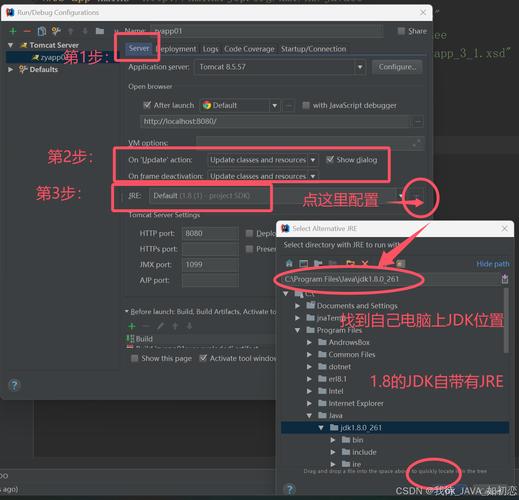
- Install the JDK (Java Development Kit): This provides the compiler (
javac) and tools to build your code. - Download and install Apache Tomcat: This is the server that will run your application.
- Install the JDK (Java Development Kit): This provides the compiler (
-
Develop the Application:
- Use an IDE like IntelliJ IDEA or Eclipse.
- Create a "Dynamic Web Project" or a "Maven/Gradle project" with a webapp archetype.
- Write your Java Servlets, JSPs, and any other Java classes (for database access, business logic, etc.).
-
Package the Application (Deployment):
- Your application needs to be packaged into a standard format called a WAR (Web Application Archive) file. A WAR file is essentially a ZIP file with a specific directory structure.
- Your IDE can build this WAR file for you automatically.
-
Deploy the Application to Tomcat:
- Method 1 (Simple): Copy the generated
.warfile into Tomcat'swebappsdirectory. Tomcat will automatically detect it, expand the WAR file, and deploy the application. - Method 2 (Advanced): Configure Tomcat's
server.xmlto define the application and its location.
- Method 1 (Simple): Copy the generated
-
Run and Test:
- Start the Tomcat server (usually by running
startup.shon Linux/macOS orstartup.baton Windows). - Open a web browser and navigate to your application's URL, which is typically
http://localhost:8080/YourAppName/.
- Start the Tomcat server (usually by running
Modern Evolution: The Rise of Frameworks
While Servlets and JSPs are the foundation, modern Java web development rarely uses them directly for complex applications. Developers use web frameworks that sit on top of Tomcat to make development faster and more organized.
- Spring Framework (and Spring Boot): This is the dominant framework in the Java world. Spring Boot simplifies setting up and running a Spring application immensely. You can create a fully functional web application with very little configuration. Tomcat is often the embedded server of choice for Spring Boot applications.
- Jakarta EE (formerly Java EE): This is a official, enterprise-grade specification that includes standards for Servlets, JSP, EJBs, and more. Tomcat is a "Web Profile" compliant server, meaning it implements the core web parts of the Jakarta EE specification.
Summary Table
| Component | Role | Analogy |
|---|---|---|
| Java | The programming language. The "recipe" for your application's logic. | The recipe for a dish. |
| Web | The environment (HTTP requests/responses). The "restaurant" where the application operates. | The restaurant and its customers. |
| Tomcat | The Servlet Container. The "kitchen" and "head chef" that executes the Java recipes in response to web orders. | The kitchen and head chef who cooks the food. |
| Servlet/JSP | Java technologies that define how to handle web requests and generate responses. The specific "dishes" on the menu. | The specific dishes you can order. |
| WAR File | The packaged application. The "meal order" ready to be sent to the kitchen. | A customer's complete order. |
In short, Tomcat is the engine that allows your Java code to power a dynamic website on the web. It's the essential link that makes Java a viable language for building modern web applications.