Of course! Let's dive deep into JSONObject in Java.
What is a JSONObject?
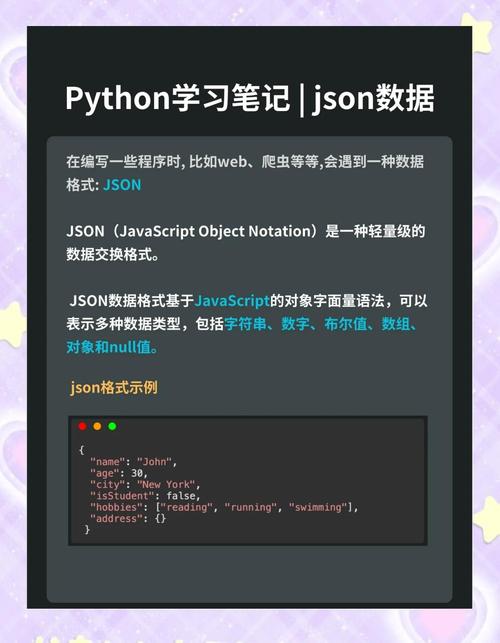
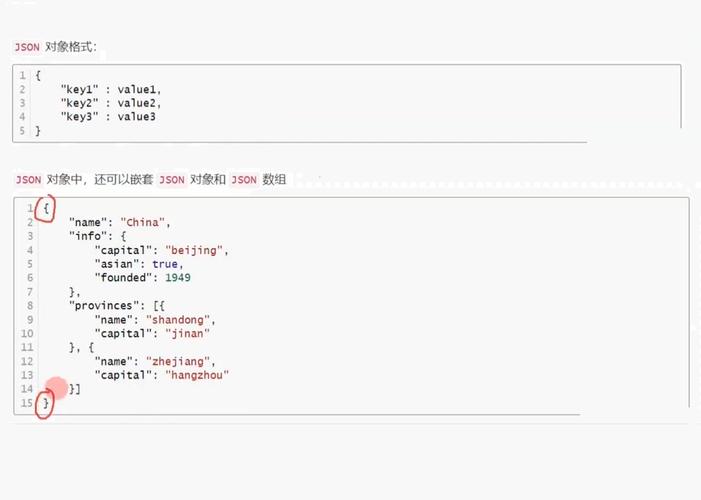
A JSONObject is a Java object that represents a JSON object. In JSON, an object is an unordered collection of key/value pairs, enclosed in curly braces . The keys are strings, and the values can be strings, numbers, booleans, other JSON objects, JSON arrays, or null.
The JSONObject class is part of the org.json library, a popular and lightweight open-source library for working with JSON in Java. It's important to note that this is not the same as the javax.json (JSON-P) or com.fasterxml.jackson.databind (Jackson) libraries, which are part of the Java EE/ Jakarta EE ecosystem and are also very common.
Adding the Dependency (Maven)
To use the org.json library, you need to add it to your project. If you're using Maven, add this dependency to your pom.xml file:
<dependency>
    <groupId>org.json</groupId>
    <artifactId>json</artifactId>
    <version>20251013</version> <!-- Use the latest version available -->
</dependency>
For Gradle, you would use:
implementation 'org.json:json:20251013'
Creating a JSONObject
You can create a JSONObject in several ways:
a) Creating an Empty Object
This is the most common way to start. You can then add data to it.
import org.json.JSONObject;
public class Main {
    public static void main(String[] args) {
        JSONObject jsonObject = new JSONObject();
        System.out.println("Empty JSON Object: " + jsonObject);
    }
}
// Output: Empty JSON Object: {}
b) Creating from a JSON String
If you have a JSON-formatted string, you can parse it directly into a JSONObject.
import org.json.JSONObject;
public class Main {
    public static void main(String[] args) {
        String jsonString = "{\"name\":\"John Doe\",\"age\":30,\"isStudent\":false}";
        JSONObject jsonObject = new JSONObject(jsonString);
        System.out.println("Parsed JSON Object: " + jsonObject);
    }
}
// Output: Parsed JSON Object: {"name":"John Doe","age":30,"isStudent":false}
c) Creating from a Java Map
You can create a JSONObject from a Map<String, Object>.
import org.json.JSONObject;
import java.util.HashMap;
import java.util.Map;
public class Main {
    public static void main(String[] args) {
        Map<String, Object> dataMap = new HashMap<>();
        dataMap.put("name", "Jane Doe");
        dataMap.put("age", 28);
        dataMap.put("isStudent", true);
        JSONObject jsonObject = new JSONObject(dataMap);
        System.out.println("Created from Map: " + jsonObject);
    }
}
// Output: Created from Map: {"name":"Jane Doe","age":28,"isStudent":true}
Putting and Getting Data
The JSONObject class provides put() and get() methods to add and retrieve data. The key is always a String.
Putting Data (put())
The put() method has several overloaded versions for different data types (String, int, boolean, JSONObject, JSONArray, etc.).
JSONObject user = new JSONObject();
user.put("username", "testuser");
user.put("email", "testuser@example.com");
user.put("age", 25);
user.put("isActive", true);
// You can also put another JSONObject inside
JSONObject address = new JSONObject();
address.put("street", "123 Main St");
address.put("city", "New York");
user.put("address", address);
System.out.println(user.toString());
Output:
{
  "username": "testuser",
  "email": "testuser@example.com",
  "age": 25,
  "isActive": true,
  "address": {
    "street": "123 Main St",
    "city": "New York"
  }
}
Getting Data (get() and opt())
The get() methods retrieve data. It's crucial to use the correct type (e.g., getString(), getInt()). If you try to get a value with the wrong type, it will throw a JSONException.
JSONObject user = new JSONObject("{\"username\":\"testuser\",\"age\":25}");
// Getting data with specific type methods (recommended)
String username = user.getString("username"); // "testuser"
int age = user.getInt("age"); // 25
System.out.println("Username: " + username);
System.out.println("Age: " + age);
The opt() methods are safer. They return a default value if the key doesn't exist, instead of throwing an exception.
// Using opt() methods
String email = user.optString("email", "default@example.com"); // "default@example.com"
String country = user.optString("country", "USA"); // "USA"
// If the key doesn't exist, getInt() throws an exception
try {
    int salary = user.getInt("salary"); // Throws JSONException
} catch (org.json.JSONException e) {
    System.out.println("Key 'salary' not found.");
}
// optInt() returns a default value
int salary = user.optInt("salary", 0); // 0
System.out.println("Salary: " + salary);
Working with Nested Objects and Arrays
JSONObject seamlessly handles other JSONObjects and JSONArrays.
String jsonString = "{\"name\":\"John\",\"pets\":[{\"type\":\"Dog\",\"name\":\"Buddy\"},{\"type\":\"Cat\",\"name\":\"Whiskers\"}]}";
JSONObject person = new JSONObject(jsonString);
// Get the nested array
org.json.JSONArray petsArray = person.getJSONArray("pets");
// Iterate through the array
for (int i = 0; i < petsArray.length(); i++) {
    JSONObject pet = petsArray.getJSONObject(i);
    String petType = pet.getString("type");
    String petName = pet.getString("name");
    System.out.println("Pet " + (i + 1) + ": " + petType + " named " + petName);
}
Output:
Pet 1: Dog named Buddy
Pet 2: Cat named Whiskers
Common Operations
a) Checking if a Key Exists
Use the has() method to check for the presence of a key.
JSONObject data = new JSONObject("{\"id\":101}");
System.out.println("Has 'id'? " + data.has("id")); // true
System.out.println("Has 'name'? " + data.has("name")); // false
b) Removing a Key
Use the remove() method to delete a key-value pair.
data.remove("id");
System.out.println("After removal: " + data); // {}
c) Getting All Keys
Use the keys() method to get an Iterator of all keys.
data.put("key1", "value1");
data.put("key2", "value2");
java.util.Iterator<String> keys = data.keys();
while (keys.hasNext()) {
    String key = keys.next();
    System.out.println("Key: " + key);
}
Output:
Key: key1
Key: key2
d) Converting to a Java Map
You can convert the JSONObject back to a Map.
Map<String, Object> map = data.toMap();
System.out.println("Converted to Map: " + map);
Output:
Converted to Map: {key1=value1, key2=value2}Example: Building and Parsing a Complex JSON
Here’s a complete example showing how to build a complex JSON structure and then parse it.
import org.json.JSONObject;
import org.json.JSONArray;
public class JsonComplexExample {
    public static void main(String[] args) {
        // 1. BUILDING THE JSON
        System.out.println("--- Building JSON ---");
        // Create the main user object
        JSONObject user = new JSONObject();
        user.put("id", 123);
        user.put("username", "alice");
        user.put("isActive", true);
        // Create the address object
        JSONObject address = new JSONObject();
        address.put("street", "456 Oak Avenue");
        address.put("city", "Wonderland");
        user.put("address", address);
        // Create an array of hobbies
        JSONArray hobbies = new JSONArray();
        hobbies.put("Reading");
        hobbies.put("Hiking");
        hobbies.put("Coding");
        user.put("hobbies", hobbies);
        System.out.println("Final JSON Object:\n" + user.toString(2)); // toString(2) for pretty-printing
        // 2. PARSING THE JSON
        System.out.println("\n--- Parsing JSON ---");
        String jsonToParse = user.toString();
        JSONObject parsedUser = new JSONObject(jsonToParse);
        // Get simple values
        System.out.println("User ID: " + parsedUser.getInt("id"));
        System.out.println("Username: " + parsedUser.getString("username"));
        // Get nested object
        JSONObject parsedAddress = parsedUser.getJSONObject("address");
        System.out.println("City: " + parsedAddress.getString("city"));
        // Get array and iterate
        JSONArray parsedHobbies = parsedUser.getJSONArray("hobbies");
        System.out.println("Hobbies:");
        for (int i = 0; i < parsedHobbies.length(); i++) {
            System.out.println(" - " + parsedHobbies.getString(i));
        }
    }
}
Output:
--- Building JSON ---
Final JSON Object:
{
  "id": 123,
  "username": "alice",
  "isActive": true,
  "address": {
    "street": "456 Oak Avenue",
    "city": "Wonderland"
  },
  "hobbies": [
    "Reading",
    "Hiking",
    "Coding"
  ]
}
--- Parsing JSON ---
User ID: 123
Username: alice
City: Wonderland
Hobbies:
 - Reading
 - Hiking
 - Coding
org.json vs. Other Libraries
| Feature | org.json (Simple Library) |
javax.json (JSON-P - Java API for JSON Processing) |
com.fasterxml.jackson (Jackson - De Facto Standard) |
|---|---|---|---|
| Primary Use | Simple, lightweight tasks. Good for small projects or quick parsing. | Standard, low-level API for parsing, generating, and querying JSON. Part of Jakarta EE. | High-performance, feature-rich library for data binding (JSON <-> POJOs). |
| Ease of Use | Very easy for simple put/get operations. Can be verbose for complex objects. | More verbose than org.json. Requires creating JsonReader, JsonWriter, etc. |
Extremely powerful with annotations (@JsonProperty, @JsonCreator). Can map JSON directly to Java objects (POJOs) with one line. |
| Data Binding | Manual. You must get values and build objects yourself. | Manual. You traverse the JSON tree (object model) yourself. | Excellent. Automatic mapping between JSON and Plain Old Java Objects (POJOs) is its main strength. |
| Performance | Good for its simplicity. | Generally good. | Generally the fastest and most memory-efficient. |
| When to Use | Quick scripts, small tools, when you only need basic JSON manipulation. | When you need a standard, low-level API and don't want to add a heavy dependency. | Most production applications, REST API clients/servers (e.g., with Spring Boot), complex data models. |
Recommendation: For most modern Java applications, especially web services using frameworks like Spring Boot, Jackson is the recommended choice due to its power and seamless integration. However, for simpler, standalone tasks, the org.json library is perfectly fine and very easy to use.