Of course! Here is a comprehensive guide to using UDP sockets in Java, covering the basics, a complete client-server example, and best practices.
What is UDP?
UDP (User Datagram Protocol) is a connectionless, unreliable, and datagram-oriented transport layer protocol. This means:
- Connectionless: Before sending data, the client and server do not need to establish a dedicated connection (like a phone call). The client just sends a packet to the server's address.
- Unreliable: UDP does not guarantee that datagrams will arrive in order, or even that they will arrive at all. There is no built-in error correction, retransmission, or flow control.
- Datagram-Oriented: Data is sent in discrete chunks called datagrams. Each datagram is self-contained with its own header (source/destination port, length, checksum) and payload.
When to Use UDP
UDP is ideal for applications where:
- Speed is more important than reliability. (e.g., online gaming, live video/audio streaming).
- The application can handle lost or out-of-order packets itself.
- You are sending small, frequent messages.
Key Java Classes for UDP
Java provides classes in the java.net package to handle UDP communication:
DatagramSocket: This is the main socket for sending and receivingDatagramPackets. It's like a mailbox. You can use it to both send and receive, or you can create one socket for sending and another for receiving.DatagramPacket: This represents a single datagram. It contains the data to be sent, the length of the data, the destination IP address, and the destination port. When receiving, it's populated with the source information of the incoming datagram.InetAddress: This class represents an IP address (either IPv4 or IPv6). You use it to identify the network location of the host you want to send data to or receive data from.
Simple UDP Client-Server Example
This example consists of two parts: a UDPServer that listens for messages and a UDPClient that sends a message to the server.
Step 1: The UDP Server (UDPServer.java)
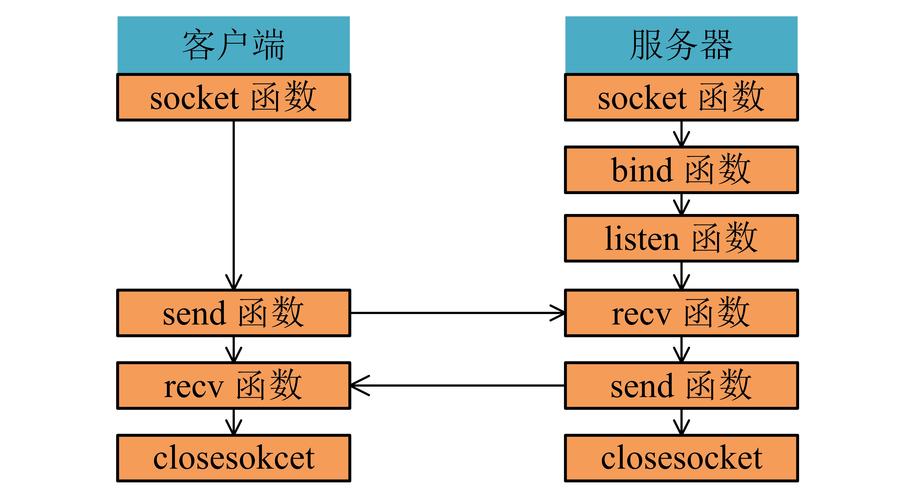
The server's job is to:
- Create a
DatagramSocketon a specific port. - Create a buffer to hold the incoming data.
- Create a
DatagramPacketto receive the data. - Wait (block) indefinitely for a packet to arrive.
- When a packet arrives, process it (e.g., print the message and the sender's address).
- (Optional) Send a response back to the client.
// UDPServer.java
import java.io.IOException;
import java.net.DatagramPacket;
import java.net.DatagramSocket;
import java.net.InetAddress;
import java.net.SocketException;
public class UDPServer {
    public static void main(String[] args) {
        // The port the server will listen on
        int port = 9876;
        try (DatagramSocket socket = new DatagramSocket(port)) {
            System.out.println("Server is running and waiting for messages on port " + port + "...");
            // Create a buffer to receive data
            byte[] receiveBuffer = new byte[1024];
            while (true) {
                // Create a DatagramPacket to receive data
                DatagramPacket receivePacket = new DatagramPacket(receiveBuffer, receiveBuffer.length);
                // Block until a datagram is received
                socket.receive(receivePacket);
                // Get the data from the packet
                String receivedMessage = new String(receivePacket.getData(), 0, receivePacket.getLength());
                System.out.println("Received message: '" + receivedMessage + "'");
                // Get the client's address and port
                InetAddress clientAddress = receivePacket.getAddress();
                int clientPort = receivePacket.getPort();
                // Send a response back to the client
                String responseMessage = "Hello from UDP Server!";
                byte[] sendData = responseMessage.getBytes();
                DatagramPacket sendPacket = new DatagramPacket(sendData, sendData.length, clientAddress, clientPort);
                socket.send(sendPacket);
                System.out.println("Sent response to " + clientAddress + ":" + clientPort);
            }
        } catch (SocketException e) {
            System.err.println("Socket error: " + e.getMessage());
        } catch (IOException e) {
            System.err.println("I/O error: " + e.getMessage());
        }
    }
}
Step 2: The UDP Client (UDPClient.java)
The client's job is to:
- Create a
DatagramSocket(it can use any available port). - Get the server's IP address and port.
- Create a
DatagramPacketwith the message to send. - Send the packet.
- Create a buffer to receive the response.
- Create a
DatagramPacketto receive the response. - Wait for the response.
- Process the received data.
// UDPClient.java
import java.io.IOException;
import java.net.DatagramPacket;
import java.net.DatagramSocket;
import java.net.InetAddress;
import java.net.UnknownHostException;
public class UDPClient {
    public static void main(String[] args) {
        // Server's address and port
        String serverName = "localhost"; // Use the server's IP address if it's remote
        int serverPort = 9876;
        String messageToSend = "Hello from UDP Client!";
        try (DatagramSocket socket = new DatagramSocket()) {
            // Get the server's IP address
            InetAddress serverAddress = InetAddress.getByName(serverName);
            // Convert the message to bytes
            byte[] sendBuffer = messageToSend.getBytes();
            // Create a DatagramPacket to send the data
            DatagramPacket sendPacket = new DatagramPacket(sendBuffer, sendBuffer.length, serverAddress, serverPort);
            // Send the packet
            System.out.println("Sending message to " + serverName + ":" + serverPort);
            socket.send(sendPacket);
            // Create a buffer to receive the response
            byte[] receiveBuffer = new byte[1024];
            DatagramPacket receivePacket = new DatagramPacket(receiveBuffer, receiveBuffer.length);
            // Wait for the response (block until a packet is received)
            System.out.println("Waiting for server response...");
            socket.receive(receivePacket);
            // Get the data from the response packet
            String receivedMessage = new String(receivePacket.getData(), 0, receivePacket.getLength());
            System.out.println("Received response: '" + receivedMessage + "'");
        } catch (UnknownHostException e) {
            System.err.println("Unknown host: " + serverName);
        } catch (IOException e) {
            System.err.println("I/O error: " + e.getMessage());
        }
    }
}
How to Run the Example
- Save the two code blocks as
UDPServer.javaandUDPClient.java. - Compile both files:
javac UDPServer.java UDPClient.java - First, run the server:
java UDPServer- You will see:
Server is running and waiting for messages on port 9876...
- You will see:
- In a separate terminal, run the client:
java UDPClient- The client will send a message and wait for a response.
- You will see output on the client side like:
Sending message to localhost:9876 Waiting for server response... Received response: 'Hello from UDP Server!' - You will see output on the server side like:
Received message: 'Hello from UDP Client!'
Sent response to localhost:54321 // (port may vary)
Key Differences and Considerations
| Feature | TCP (Sockets) | UDP (DatagramSockets) |
|---|---|---|
| Connection | Connection-oriented (handshake) | Connectionless (no handshake) |
| Reliability | Reliable (guaranteed delivery, ordered) | Unreliable (no guarantees) |
| Protocol | Socket, ServerSocket |
DatagramSocket, DatagramPacket |
| Data Stream | Stream-oriented (byte stream) | Datagram-oriented (discrete packets) |
| Performance | Slower due to connection and overhead | Faster, lower overhead |
| Use Case | Web browsing, file transfer, email | Gaming, video conferencing, DNS |
Important UDP Best Practices
-
Handle Packet Loss: Since UDP is unreliable, your application must be designed to handle lost packets. This might involve:
- Implementing your own acknowledgment (ACK) and retransmission logic.
- Designing the protocol to be stateless so that the loss of one datagram doesn't corrupt the entire communication.
- Using checksums or other validation to detect corrupted data.
-
Manage Packet Size: UDP datagrams have a theoretical maximum size of 65,507 bytes (65,535 - 8 bytes for the UDP header). In practice, the maximum size is often smaller due to network layer (IP) fragmentation. For large data, it's better to split it into multiple smaller datagrams.
-
Thread Your Server: A simple UDP server like the one above processes one request at a time. If you need to handle multiple clients concurrently, you should handle each incoming request in a new thread. A common pattern is to have a main thread that just receives packets and a thread pool that processes them.
// A more robust server structure
try (DatagramSocket socket = new DatagramSocket(port)) {
    ExecutorService executor = Executors.newFixedThreadPool(10); // Use a thread pool
    byte[] receiveBuffer = new byte[1024];
    while (true) {
        DatagramPacket packet = new DatagramPacket(receiveBuffer, receiveBuffer.length);
        socket.receive(packet);
        // Submit the task to the thread pool
        executor.submit(new ClientHandler(socket, packet));
    }
}
// A separate class to handle each client request
class ClientHandler implements Runnable {
    private final DatagramSocket socket;
    private final DatagramPacket packet;
    public ClientHandler(DatagramSocket socket, DatagramPacket packet) {
        this.socket = socket;
        this.packet = packet;
    }
    @Override
    public void run() {
        // Process the packet and send a response
        String message = new String(packet.getData(), 0, packet.getLength());
        System.out.println("Handled by thread: " + Thread.currentThread().getName());
        System.out.println("Received: " + message);
        // ... send response ...
    }
}