Of course! Let's dive deep into Java Socket NIO. This is a fundamental topic for building high-performance, scalable network applications in Java.
I'll structure this explanation from the basics to a complete, practical example.
The "Why": Why NIO over Traditional I/O?
First, let's understand the problem that NIO solves.
Traditional Blocking I/O (BIO)
In the traditional java.net.Socket model, network I/O is blocking.
ServerSocket.accept(): This method blocks until a new client connection is accepted. While it's blocked, the entire thread is idle and can't do anything else.Socket.getInputStream().read(): This method blocks until data is available from the network. Again, the thread is idle.Socket.getOutputStream().write(): This method blocks until the data is completely sent to the operating system's network buffer.
The Consequence: The One-Thread-Per-Connection Model
To handle multiple clients, you typically need one thread per connection. If you have 10,000 concurrent clients, you need 10,000 threads. This approach has significant drawbacks:
- High Memory Consumption: Each thread consumes a significant amount of memory (for its stack, etc.).
- Context Switching Overhead: The operating system has to constantly switch between thousands of threads, which is CPU-intensive and inefficient.
- Scalability Limit: You quickly hit the limit of how many threads a single machine can handle effectively.
New I/O (NIO) - The Non-Blocking Approach
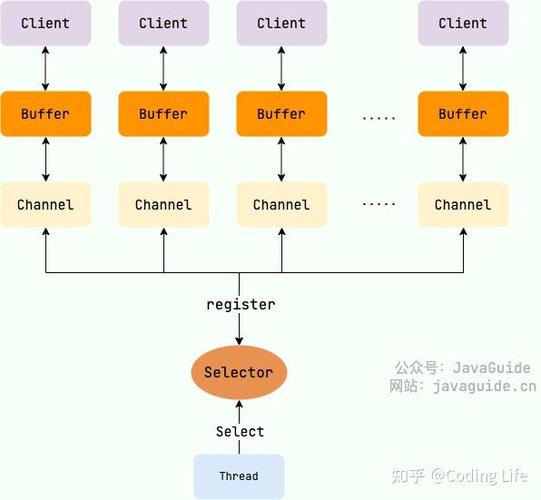
NIO was introduced in Java 1.4 to solve these scalability problems. Its core principle is non-blocking I/O combined with a multiplexing model.
- Non-Blocking Operations: Methods like
socketChannel.configureBlocking(false)make I/O operations return immediately. If there's no data to read,read()doesn't block; it simply returns 0. If no connection is ready,accept()returns null. - The Selector - The Heart of NIO: A
Selectoris a special object that can monitor multipleSelectableChannelinstances (likeSocketChannelorServerSocketChannel) for "events" of interest.- Events: Typically, these are
SelectionKey.OP_ACCEPT(a new connection is ready),SelectionKey.OP_READ(data is ready to be read), andSelectionKey.OP_WRITE(the channel is ready to write data). - Multiplexing: Instead of one thread per channel, you can have one thread managing many channels. The thread asks the
Selector, "Which of my channels are ready for I/O?" TheSelectorreturns a list of channels that have events ready. The thread then processes only those channels.
- Events: Typically, these are
The Consequence: The Reactor Pattern
This one-thread-to-many-channels model is known as the Reactor Pattern. It's incredibly efficient because:
- Low Memory Usage: You only need a small, fixed number of threads (often just one).
- High Scalability: A single machine can handle tens of thousands or even hundreds of thousands of connections.
- CPU Efficiency: The thread is only active when there's actual work to do (i.e., when an event occurs), minimizing idle time.
Core NIO Concepts
Let's break down the key components of the NIO package (java.nio).
| Component | Description | Analogy |
|---|---|---|
Channel (Channel) |
A bidirectional connection to an I/O source (like a file or a socket). Unlike streams, channels can be used for both reading and writing. | A two-way pipe. |
Buffer (Buffer) |
A fixed-size container for data that is being read from or written to a channel. All data in NIO passes through a buffer. | A water bucket. You fill it from a source (Channel) or empty it into a destination. |
Selector (Selector) |
A multiplexer that allows a single thread to monitor multiple SelectableChannel instances for events. |
A security guard who watches many doors (Channels) and only opens the one that rings (has an event). |
SelectionKey (SelectionKey) |
An object that represents the registration of a Channel with a Selector. It contains the information about which operations a channel is interested in and the channel itself. |
A keycard that grants access to a specific door for specific actions (read/write). |
The Buffer is Crucial
You cannot interact with a Channel directly without a Buffer. The process is always:
- Read from Channel into Buffer:
channel.read(buffer) - Flip the Buffer:
buffer.flip()- This switches the buffer from "write mode" (for filling) to "read mode" (for emptying). It sets the limit to the current position and resets the position to 0. - Process data from Buffer: You read from the buffer using
get()methods. - Clear or Compact the Buffer:
buffer.clear()orbuffer.compact()- Prepares the buffer to be filled again from the channel.
NIO Server-Client Example
Let's build a simple NIO echo server and a client to demonstrate these concepts.
NIO Echo Server
This server will accept connections and echo back any message it receives.
import java.io.IOException;
import java.net.InetSocketAddress;
import java.nio.ByteBuffer;
import java.nio.channels.*;
import java.util.Iterator;
import java.util.Set;
public class NioEchoServer {
    private Selector selector;
    private ServerSocketChannel serverChannel;
    private final int port;
    public NioEchoServer(int port) {
        this.port = port;
    }
    public void start() throws IOException {
        // 1. Create a Selector and a ServerSocketChannel
        selector = Selector.open();
        serverChannel = ServerSocketChannel.open();
        // 2. Configure the server channel to be non-blocking
        serverChannel.configureBlocking(false);
        // 3. Bind the server channel to the port
        serverChannel.bind(new InetSocketAddress(port));
        // 4. Register the server channel with the selector for OP_ACCEPT events
        serverChannel.register(selector, SelectionKey.OP_ACCEPT);
        System.out.println("Server started on port " + port);
        // 5. The main event loop
        while (true) {
            // Wait for events (blocking call until at least one channel is ready)
            int readyChannels = selector.select();
            // If no channels are ready, continue the loop
            if (readyChannels == 0) {
                continue;
            }
            // Get the set of selected keys
            Set<SelectionKey> selectedKeys = selector.selectedKeys();
            Iterator<SelectionKey> keyIterator = selectedKeys.iterator();
            // Iterate over the selected keys
            while (keyIterator.hasNext()) {
                SelectionKey key = keyIterator.next();
                // Handle the key
                if (key.isAcceptable()) {
                    accept(key);
                }
                if (key.isReadable()) {
                    read(key);
                }
                // IMPORTANT: Must remove the key from the set when done
                keyIterator.remove();
            }
        }
    }
    private void accept(SelectionKey key) throws IOException {
        ServerSocketChannel serverChannel = (ServerSocketChannel) key.channel();
        // Accept the new connection
        SocketChannel clientChannel = serverChannel.accept();
        if (clientChannel != null) {
            System.out.println("Accepted connection from " + clientChannel.getRemoteAddress());
            // Configure the client channel to be non-blocking
            clientChannel.configureBlocking(false);
            // Register the new channel with the selector for OP_READ events
            clientChannel.register(selector, SelectionKey.OP_READ);
        }
    }
    private void read(SelectionKey key) throws IOException {
        SocketChannel clientChannel = (SocketChannel) key.channel();
        ByteBuffer buffer = ByteBuffer.allocate(1024);
        try {
            int bytesRead = clientChannel.read(buffer);
            if (bytesRead == -1) {
                // Client closed the connection
                System.out.println("Connection closed by " + clientChannel.getRemoteAddress());
                key.cancel(); // Cancel the key
                clientChannel.close();
                return;
            }
            // Flip the buffer to read the data
            buffer.flip();
            // Convert bytes to string and print
            byte[] data = new byte[buffer.limit()];
            buffer.get(data);
            String message = new String(data);
            System.out.println("Received from " + clientChannel.getRemoteAddress() + ": " + message.trim());
            // Echo the message back to the client
            // We register for OP_WRITE to ensure we only write when the channel is ready
            key.interestOps(SelectionKey.OP_WRITE);
            // Attach the data to the key to be written later
            key.attach(ByteBuffer.wrap(data));
        } catch (IOException e) {
            // Client abruptly closed the connection
            System.out.println("Connection lost with " + clientChannel.getRemoteAddress());
            key.cancel();
            clientChannel.close();
        }
    }
    // A separate method to handle writing
    // In a more complex server, you might check for OP_WRITE in the main loop
    // For simplicity, we'll attach data and change interest to OP_WRITE here,
    // and then handle it in the main loop.
    // Let's refactor the main loop slightly to handle write operations.
    // (For brevity, the initial example combined read/write logic. A better approach is below.)
    public static void main(String[] args) throws IOException {
        new NioEchoServer(8080).start();
    }
}
A More Robust Server (Handling OP_WRITE)
The initial server has a small flaw: it assumes the channel is always ready for writing after a read. A better practice is to register for OP_WRITE and only write when the selector tells you the channel is ready. This prevents potential blocking if the TCP send buffer is full.
Here's the improved main loop and write method:
// ... (inside the NioEchoServer class) ...
// In the start() method's while loop:
while (true) {
    selector.select();
    Set<SelectionKey> selectedKeys = selector.selectedKeys();
    Iterator<SelectionKey> keyIterator = selectedKeys.iterator();
    while (keyIterator.hasNext()) {
        SelectionKey key = keyIterator.next();
        try {
            if (key.isAcceptable()) {
                accept(key);
            }
            if (key.isReadable()) {
                read(key);
            }
            if (key.isWritable()) {
                write(key);
            }
        } catch (IOException e) {
            // Handle exceptions (e.g., client disconnects abruptly)
            System.err.println("Error processing key: " + e.getMessage());
            key.cancel();
            if (key.channel() instanceof SocketChannel) {
                ((SocketChannel) key.channel()).close();
            }
        }
        keyIterator.remove();
    }
}
private void read(SelectionKey key) throws IOException {
    SocketChannel clientChannel = (SocketChannel) key.channel();
    ByteBuffer buffer = ByteBuffer.allocate(1024);
    int bytesRead = clientChannel.read(buffer);
    if (bytesRead == -1) {
        System.out.println("Connection closed by " + clientChannel.getRemoteAddress());
        key.cancel();
        clientChannel.close();
        return;
    }
    buffer.flip();
    // For an echo server, we can just write the buffer back
    // We attach the buffer to the key and register for OP_WRITE
    key.attach(buffer);
    key.interestOps(SelectionKey.OP_WRITE); // Switch interest to writing
}
private void write(SelectionKey key) throws IOException {
    SocketChannel clientChannel = (SocketChannel) key.channel();
    ByteBuffer buffer = (ByteBuffer) key.attach(null); // Retrieve and remove the buffer
    if (buffer == null || !buffer.hasRemaining()) {
        // Nothing left to write, switch back to reading
        key.interestOps(SelectionKey.OP_READ);
        return;
    }
    clientChannel.write(buffer);
    // If there's still data left in the buffer, we need to keep it registered for OP_WRITE
    if (buffer.hasRemaining()) {
        key.attach(buffer); // Re-attach the partially filled buffer
    } else {
        // All data was written, switch back to reading
        key.interestOps(SelectionKey.OP_READ);
    }
}
// ... (rest of the class) ...
NIO Echo Client
The client is also non-blocking, but it's simpler as it only manages one connection.
import java.io.IOException;
import java.net.InetSocketAddress;
import java.nio.ByteBuffer;
import java.nio.channels.SocketChannel;
import java.util.Scanner;
public class NioEchoClient {
    public static void main(String[] args) throws IOException {
        SocketChannel channel = SocketChannel.open();
        channel.configureBlocking(false);
        // Connect to the server
        channel.connect(new InetSocketAddress("localhost", 8080));
        // Wait for the connection to be established
        while (!channel.finishConnect()) {
            // Do something else, or just sleep
            System.out.println("Connecting...");
            try {
                Thread.sleep(100);
            } catch (InterruptedException e) {
                e.printStackTrace();
            }
        }
        System.out.println("Connected to server. Type messages (or 'exit' to quit):");
        ByteBuffer readBuffer = ByteBuffer.allocate(1024);
        Scanner scanner = new Scanner(System.in);
        while (true) {
            // Read user input
            System.out.print("> ");
            String message = scanner.nextLine();
            if ("exit".equalsIgnoreCase(message)) {
                break;
            }
            // Send message to server
            ByteBuffer writeBuffer = ByteBuffer.wrap(message.getBytes());
            channel.write(writeBuffer);
            // Read response from server
            readBuffer.clear();
            int bytesRead = channel.read(readBuffer);
            if (bytesRead > 0) {
                readBuffer.flip();
                byte[] responseBytes = new byte[readBuffer.limit()];
                readBuffer.get(responseBytes);
                System.out.println("Server echoed: " + new String(responseBytes));
            }
        }
        channel.close();
        scanner.close();
    }
}
Modern Evolution: N.2 (NIO 2) - Asynchronous I/O (AIO)
While NIO's Selector-based model is a huge improvement, it's still I/O multiplexing. The single thread is still responsible for the entire event loop, which can become a bottleneck if the processing per event is heavy.
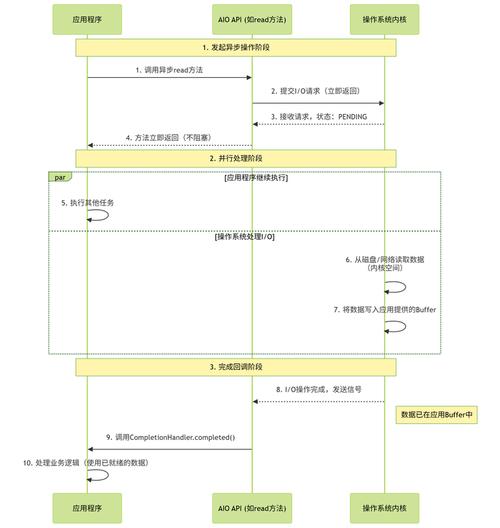
Java 7 introduced Asynchronous I/O (AIO), also known as NIO.2. This model is different:
- True Asynchrony: Instead of a single thread managing everything, AIO uses an asynchronous channel and a completion handler (a callback).
- How it works: You initiate an I/O operation (e.g., read or write) and immediately provide a callback object. The operation is handled by an underlying OS-level mechanism (like
epollon Linux orIOCPon Windows), and your callback is invoked by a separate thread from a thread pool when the operation completes. - Benefit: This frees your main application thread completely. It doesn't wait or manage events. It just fires off I/O tasks and gets notified when they are done. This is ideal for I/O-bound applications where the network latency is high.
AIO is more complex to set up but offers the highest potential throughput and scalability for certain types of applications. For many use cases, however, the well-understood and battle-tested NIO Selector model is more than sufficient.
Summary: NIO vs. BIO
| Feature | Traditional I/O (BIO) | New I/O (NIO) |
|---|---|---|
| Model | Blocking, One-thread-per-connection | Non-blocking, One-thread-for-many-channels (Reactor) |
| Scalability | Low (limited by threads) | High (can handle thousands of connections) |
| Complexity | Simple to understand and code | More complex (event loop, buffer management) |
| Thread Usage | High (many threads) | Low (one or a few threads) |
| Best For | Simple applications, low-concurrency scenarios | High-performance servers, chat apps, proxy servers, etc. |