Of course! Let's dive deep into creating threads in Java using the Runnable interface. This is a fundamental concept in Java concurrency.
What is a Thread?
Think of a program as a recipe. A thread is like a cook following that recipe. A single program can have multiple cooks (threads) working on different parts of the recipe at the same time. This is called multithreading.
- Process: An instance of a running program. It has its own memory space.
- Thread: The smallest unit of a process. It's a lightweight process that shares the memory space of its parent process. Multiple threads can run concurrently within a single program.
Why Use the Runnable Interface?
There are two primary ways to create a thread in Java:
- Extending the
Threadclass. - Implementing the
Runnableinterface.
Using Runnable is generally the preferred and more flexible approach for these reasons:
- Avoids Single Inheritance Limitation: Java does not support multiple inheritance of classes. If your class already extends another class (e.g.,
public class MyAnimation extends JPanel), you cannot also extendThread. You can, however, implementRunnablein addition to extending another class. - Promotes Loose Coupling: The
Runnableinterface represents a "task" to be executed. By separating the task (Runnable) from the execution mechanism (Thread), your code becomes more modular and reusable. You can run the same task in different ways (e.g., in a new thread, in a thread pool, etc.) without changing the task's code.
The Core Concept: Runnable vs. Thread
It's crucial to understand the difference:
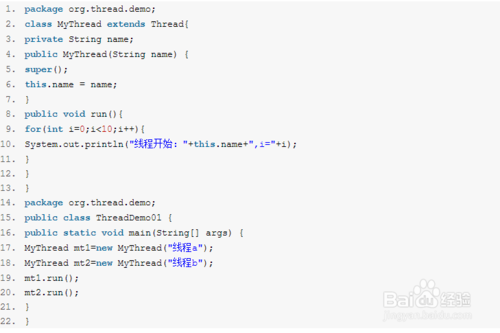
java.lang.Runnable: This is an interface, not a class. It defines a single method:public void run(). ARunnableobject is a task—a piece of code you want to execute in a separate thread.java.lang.Thread: This is a class. AThreadobject is the execution mechanism. It takes aRunnabletask and runs it.
The relationship is: A Thread executes a Runnable.
How to Create and Run a Thread with Runnable (The Classic Way)
Here is the step-by-step process:
Step 1: Create a class that implements the Runnable interface.
Inside this class, you must implement the run() method. This is where you put the code you want to execute in the new thread.
Step 2: Create an instance of your Runnable class.
This is just a regular object; no thread has been started yet.
Step 3: Create an instance of the Thread class.
Pass your Runnable object to the Thread's constructor.
Step 4: Call the start() method on the Thread object.
This is the most important step. start() tells the Java Virtual Machine (JVM) to create a new thread and execute the run() method of your Runnable object in that new thread.
⚠️ Important: Do NOT call the run() method directly! If you do, the code will execute in the current thread, not a new one. start() is what schedules the thread for execution.
Code Example
Let's see a simple example. We'll create two threads that count to five, demonstrating that they run concurrently.
// Step 1: Create a class that implements Runnable
class MyTask implements Runnable {
    private String threadName;
    public MyTask(String name) {
        this.threadName = name;
    }
    @Override
    public void run() {
        try {
            for (int i = 1; i <= 5; i++) {
                System.out.println(threadName + " count: " + i);
                // Sleep for a bit to simulate work and let other threads run
                Thread.sleep(500); // 500 milliseconds
            }
        } catch (InterruptedException e) {
            System.out.println(threadName + " interrupted.");
        }
        System.out.println(threadName + " finished.");
    }
}
// Main class to run the example
public class RunnableExample {
    public static void main(String[] args) {
        System.out.println("Main thread started.");
        // Step 2: Create instances of the Runnable task
        MyTask task1 = new MyTask("Thread-A");
        MyTask task2 = new MyTask("Thread-B");
        // Step 3: Create Thread objects, passing the Runnable tasks
        Thread thread1 = new Thread(task1);
        Thread thread2 = new Thread(task2);
        // Step 4: Start the threads
        thread1.start();
        thread2.start();
        // The main thread continues its execution
        try {
            // Main thread waits for thread1 and thread2 to finish
            thread1.join();
            thread2.join();
        } catch (InterruptedException e) {
            System.out.println("Main thread interrupted.");
        }
        System.out.println("Main thread finished.");
    }
}
Expected Output (Order may vary due to concurrency):
Main thread started.
Thread-A count: 1
Thread-B count: 1
Thread-A count: 2
Thread-B count: 2
Thread-A count: 3
Thread-B count: 3
Thread-A count: 4
Thread-B count: 4
Thread-A count: 5
Thread-B count: 5
Thread-A finished.
Thread-B finished.
Main thread finished.
Notice how both Thread-A and Thread-B are interleaving their output, proving they are running at the same time.
The Modern Way: Using Lambda Expressions (Java 8+)
Since Runnable is a functional interface (it has only one abstract method, run), you can use a lambda expression to make your code much more concise and readable.
You can skip creating a separate MyTask class entirely.
public class RunnableLambdaExample {
    public static void main(String[] args) {
        System.out.println("Main thread started.");
        // Using a lambda expression to define the task
        Thread thread1 = new Thread(() -> {
            try {
                for (int i = 1; i <= 3; i++) {
                    System.out.println("Lambda-Thread count: " + i);
                    Thread.sleep(300);
                }
            } catch (InterruptedException e) {
                System.out.println("Lambda-Thread interrupted.");
            }
            System.out.println("Lambda-Thread finished.");
        });
        thread1.start();
        System.out.println("Main thread continues while the new thread runs...");
    }
}
This is the most common and idiomatic way to create simple threads in modern Java.
Key Methods of the Thread Class
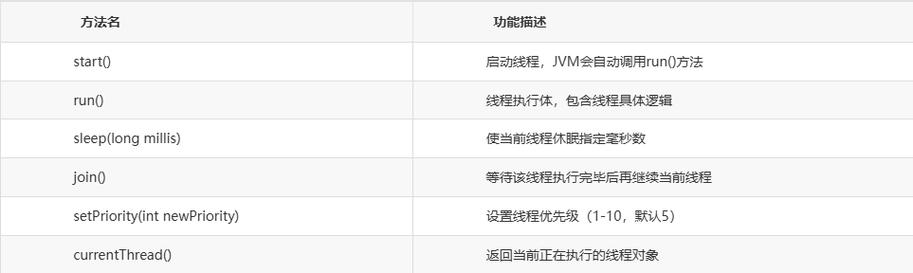
start(): Creates a new thread and calls therun()method on it.run(): The method containing the code for the thread. It's called bystart().sleep(long millis): Pauses the currently executing thread for the specified number of milliseconds. It's astaticmethod.join(): Waits for the thread on which it's called to terminate. This is useful for coordinating threads.interrupt(): Interrupts a thread. It's a polite way to ask a thread to stop what it's doing. The thread should periodically check its interrupted status (e.g., in a loop withThread.currentThread().isInterrupted()).
Summary: Runnable vs. extends Thread
| Feature | implements Runnable |
extends Thread |
|---|---|---|
| Flexibility | High. Can extend another class. | Low. Cannot extend another class. |
| Design | Preferred. Separates task from execution mechanism. | Tightly couples the task to the thread. |
| Syntax | Requires creating a Thread object and passing the Runnable to it. |
Simply create an instance and call start(). |
| Modern Java | Works perfectly with lambda expressions. | Can also use lambdas, but the design is less flexible. |
Conclusion: For almost all new Java code, prefer implementing Runnable, especially when using lambda expressions. It leads to more flexible, maintainable, and object-oriented designs.