Of course! Let's dive deep into String.valueOf() in Java. It's a fundamental and very useful method in the java.lang.String class.
What is String.valueOf()?
In simple terms, String.valueOf() is a static method that converts any given Java object or primitive data type into its string representation.
Think of it as a universal translator that takes various kinds of data (like numbers, booleans, characters, or even null) and turns them into a String object that you can use, display, or concatenate.
The Method Signatures (Overloads)
The power of String.valueOf() comes from its multiple overloaded versions. This means the method name is the same, but it accepts different types of arguments. Here are the most common ones:
-
For Primitive Types:
 (图片来源网络,侵删)
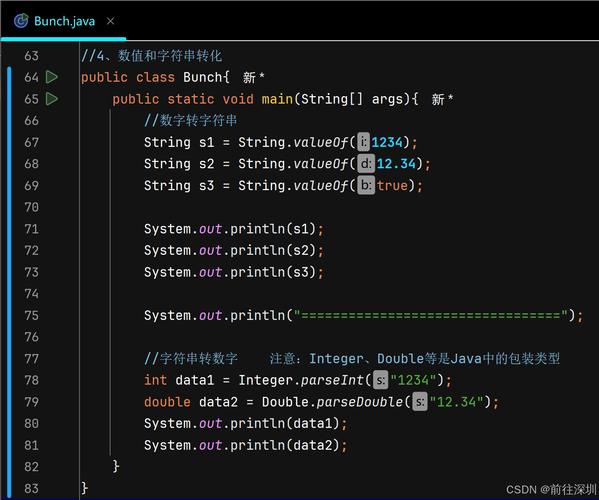
String.valueOf(boolean b)String.valueOf(char c)String.valueOf(char[] data)String.valueOf(char[] data, int offset, int count)String.valueOf(double d)String.valueOf(float f)String.valueOf(int i)String.valueOf(long l)
-
For Objects:
String.valueOf(Object obj)
How It Works: The Core Logic
The behavior of String.valueOf() depends on the type of the input argument:
For Primitive Types (e.g., int, double, boolean)
When you pass a primitive type, valueOf() simply returns a new String object that contains the textual representation of that value.
String.valueOf(123)->"123"String.valueOf(99.99)->"99.99"String.valueOf(true)->"true"String.valueOf('A')->"A"
For Objects (Object obj)
This is where it gets interesting and very useful. When you pass an object, valueOf() follows a specific, two-step process:
-
Check for
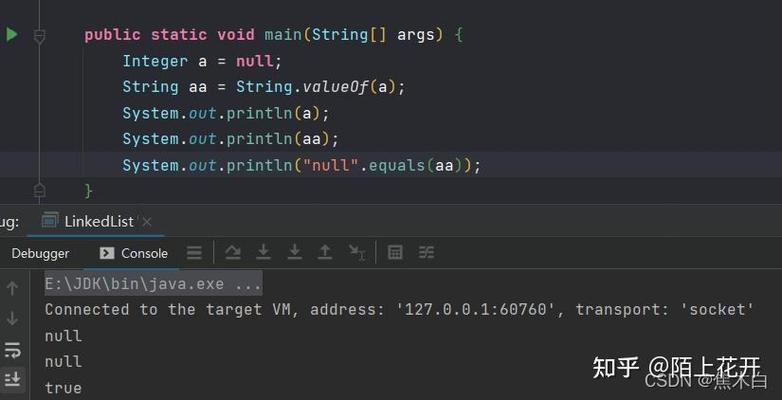
null: If the object reference isnull, the method returns the string literal"null".String.valueOf(null)->"null"(This is a string with four characters: 'n', 'u', 'l', 'l')
-
Call the object's
toString()method: If the object is notnull,valueOf()internally calls thetoString()method on that object and returns the result.- If the object has a well-defined
toString()method (like most Java library classes do), you get its meaningful string representation.String.valueOf(new Date())-> e.g.,"Wed Oct 26 10:30:45 GMT 2025"String.valueOf(123)(using theIntegerobject) ->"123"
- If the object's class does not override the
Object.toString()method, it inherits the default version, which returns a string in the format"ClassName@hashCode".class MyClass {}MyClass obj = new MyClass();String.valueOf(obj)->"MyClass@15db9742"
- If the object has a well-defined
Why Use String.valueOf() Instead of Other Methods?
This is the most important question. You have a few ways to convert things to strings:
- Empty String Concatenation (
"" + x) Object.toString()String.valueOf()
Here’s a comparison and why valueOf() is often the best choice.
| Method | Example | Pros | Cons / Why to Avoid |
|---|---|---|---|
String.valueOf(x) |
String.valueOf(myObject) |
Safe: Handles null gracefully. Clear: Intent is explicit. Overloaded: Works for all primitives and objects. |
Slightly more verbose than "" + x. |
"" + x |
"" + myObject |
Concise: Very short and easy to write. | Unsafe: Throws a NullPointerException if myObject is null. Inefficient: Can create unnecessary intermediate StringBuilder objects. |
myObject.toString() |
myObject.toString() |
Direct: Calls the object's own toString method. |
Unsafe: Throws a NullPointerException if myObject is null. Unreliable: If the object's toString() is poorly implemented, you get a useless string. |
Key Takeaway: String.valueOf() is the safest and most reliable way to convert any object or primitive to a string because it explicitly handles the null case without crashing.
Code Examples
Let's see valueOf() in action.
Example 1: Converting Primitives
int number = 100;
double price = 19.99;
boolean isActive = true;
char grade = 'A';
String strNumber = String.valueOf(number);      // "100"
String strPrice = String.valueOf(price);        // "19.99"
String strStatus = String.valueOf(isActive);    // "true"
String strGrade = String.valueOf(grade);        // "A"
System.out.println(strNumber);
System.out.println(strPrice);
System.out.println(strStatus);
System.out.println(strGrade);
Example 2: Converting Objects (The Power of valueOf)
This example clearly shows the difference between valueOf(), toString(), and the empty string trick.
class Person {
    private String name;
    public Person(String name) {
        this.name = name;
    }
    // We override toString to provide a meaningful string representation
    @Override
    public String toString() {
        return "Person: " + this.name;
    }
}
public class Main {
    public static void main(String[] args) {
        Person person = new Person("Alice");
        Person nullPerson = null;
        System.out.println("--- Using String.valueOf() ---");
        // Safe for non-null objects
        System.out.println("Value: " + String.valueOf(person)); // Output: Value: Person: Alice
        // Safe for null objects
        System.out.println("Value: " + String.valueOf(nullPerson)); // Output: Value: null
        System.out.println("\n--- Using .toString() directly ---");
        // Unsafe for non-null objects
        System.out.println("Value: " + person.toString()); // Output: Value: Person: Alice
        // UNSAFE for null objects - This will crash!
        try {
            System.out.println("Value: " + nullPerson.toString());
        } catch (NullPointerException e) {
            System.out.println("Caught NullPointerException: " + e.getMessage());
        }
        System.out.println("\n--- Using Empty String Concatenation (\"\" + x) ---");
        // Unsafe for non-null objects
        System.out.println("Value: " + ("" + person)); // Output: Value: Person: Alice
        // UNSAFE for null objects - This will also crash!
        try {
            System.out.println("Value: " + ("" + nullPerson));
        } catch (NullPointerException e) {
            System.out.println("Caught NullPointerException: " + e.getMessage());
        }
    }
}
Output of the code above:
--- Using String.valueOf() ---
Value: Person: Alice
Value: null
--- Using .toString() directly ---
Value: Person: Alice
Caught NullPointerException: null
--- Using Empty String Concatenation ("" + x) ---
Value: Person: Alice
Caught NullPointerException: null
When to Use String.valueOf()
You should prefer String.valueOf() in the following scenarios:
- When the input might be
null: This is the primary reason. If you have a method that can receive anullobject and you need to convert it to a string,valueOf()is your safest bet. - For API Design: When writing a method that needs to convert any type to a string, using
String.valueOf()makes your code robust and clear. - When you want explicit intent:
String.valueOf(myVar)clearly states "I want the string representation of this variable." It's more self-documenting than"" + myVar.
Summary
| Feature | Description |
|---|---|
| Purpose | To convert any Java object or primitive type into its String representation. |
| Safety | Safe with null. Returns the string "null" instead of throwing an exception. |
| Mechanism | For primitives, it creates a string of the value. For objects, it calls toString(). |
| Key Advantage | It's the most robust and reliable way to handle-to-string conversions, especially when null is a possibility. |
| Alternatives | "" + x (concise but unsafe with null) and obj.toString() (direct but unsafe with null). |