Of course! In Python, changing font color primarily depends on the environment you're working in.
Here’s a comprehensive guide covering the most common scenarios:
- Terminal / Command Line (for scripts)
- Jupyter Notebooks and IPython
- Graphical User Interfaces (GUI) with Tkinter
- Web Development (HTML/CSS)
Terminal / Command Line (for Scripts)
This is the most common way to add color to console output. The standard method uses ANSI escape codes.
How it Works
You insert special character sequences into your string that the terminal interprets as formatting commands. The general format is:
'\033[<style>;<color>m'
\033[is the escape character.<style>is an optional code for text style (e.g.,1for bold,0to reset).<color>is a code for the foreground (text) color.mmarks the end of the code.
All text after this code will be formatted until you reset it with '\033[0m'.

Color Codes
| Color | Code | Style Code |
|---|---|---|
| Black | 30 |
1 (Bold) |
| Red | 31 |
0 (Reset) |
| Green | 32 |
|
| Yellow | 33 |
|
| Blue | 34 |
|
| Magenta | 35 |
|
| Cyan | 36 |
|
| White | 37 |
Example Code
# --- Basic Colors ---
print("\033[31mThis text is red.\033[0m")
print("\033[32mThis text is green.\033[0m")
print("\033[34mThis text is blue.\033[0m")
# --- Combining Style and Color ---
print("\033[1;31mThis bold red text stands out!\033[0m")
# --- Making it Reusable (Recommended) ---
class bcolors:
    HEADER = '\033[95m'
    OKBLUE = '\033[94m'
    OKCYAN = '\033[96m'
    OKGREEN = '\033[92m'
    WARNING = '\033[93m'
    FAIL = '\033[91m'
    ENDC = '\033[0m'  # End color
    BOLD = '\033[1m'
    UNDERLINE = '\033[4m'
print(f"{bcolors.FAIL}This is an error message.{bcolors.ENDC}")
print(f"{bcolors.OKGREEN}This is a success message.{bcolors.ENDC}")
print(f"{bcolors.BOLD}{bcolors.WARNING}This is a warning with bold text.{bcolors.ENDC}")
Note: This method works on most modern terminals (Linux, macOS, modern Windows Terminal/PowerShell). The old Windows Command Prompt (
cmd.exe) has limited support, but thecoloramalibrary can fix this.
Using the colorama Library (Cross-Platform)
colorama is a fantastic library that makes ANSI codes work on Windows automatically.
Installation:
pip install colorama
Example:

import colorama
# Initializes colorama for Windows
colorama.init()
print(colorama.Fore.RED + 'This text is red in any terminal.' + colorama.Style.RESET_ALL)
print(colorama.Fore.GREEN + 'This text is green.' + colorama.Style.RESET_ALL)
print(colorama.Style.BRIGHT + colorama.Fore.BLUE + 'This bright blue text is very visible.' + colorama.Style.RESET_ALL)
# It's good practice to de-initialize
colorama.deinit()
colorama provides much more readable constants like colorama.Fore.RED instead of '\033[31m'.
Jupyter Notebooks and IPython
In Jupyter, you can use HTML and CSS directly within your output cells.
Method 1: The display HTML Function
This is the most robust method. You can wrap your text in HTML <span> tags and use the style attribute.
from IPython.display import display, HTML
# Using inline CSS
html_text = "<span style='color: red; font-weight: bold;'>This is bold red text in a Jupyter cell.</span>"
display(HTML(html_text))
html_text_green = "<span style='color: green;'>This is green text.</span>"
display(HTML(html_text_green))
Method 2: The %%html Magic Command
For quick, one-off cells, you can use the %%html magic command.
%%html
<p style="color: blue; font-size: 1.2em;">This is a blue paragraph.</p>
<p style="color: #800080;">This is a purple paragraph using a hex code.</p>
Graphical User Interfaces (GUI) with Tkinter
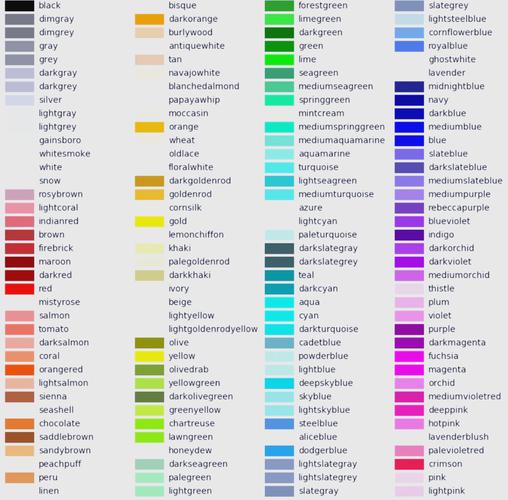
When building a desktop application with Tkinter, you specify the color using the fg (foreground) option.
import tkinter as tk
import tkinter.font as tkfont
# Create the main window
root = tk.Tk()"Tkinter Font Color")
root.geometry("400x200")
# --- Method 1: Using named colors ---
label1 = tk.Label(root, text="This is a standard blue label.", fg="blue")
label1.pack(pady=10)
# --- Method 2: Using hex color codes (more common) ---
# Hex codes start with a # followed by RGB values in hex (e.g., #RRGGBB)
label2 = tk.Label(root, text="This is a custom purple label.", fg="#800080")
label2.pack(pady=10)
# --- Method 3: Changing font and color together ---
# Create a custom font object
custom_font = tkfont.Font(family="Helvetica", size=14, weight="bold")
label3 = tk.Label(root, text="This is bold and orange!", fg="orange", font=custom_font)
label3.pack(pady=10)
root.mainloop()
Web Development (HTML/CSS)
In web development, Python is typically used to generate HTML content. The color is set in the HTML/CSS, not directly in the Python script itself.
Example: Using a Web Framework like Flask
Python (Flask) generates the HTML, and the HTML contains the styling.
Python file (app.py):
from flask import Flask, render_template
app = Flask(__name__)
@app.route('/')
def home():
    # We pass data to the HTML template
    user_name = "Alice"
    message = "Welcome to the website!"
    return render_template('index.html', name=user_name, msg=message)
if __name__ == '__main__':
    app.run(debug=True)
HTML file (templates/index.html):
<!DOCTYPE html>
<html lang="en">
<head>
    <meta charset="UTF-8">Colored Text</title>
</head>
<body>
    <h1 style="color: navy;">Hello, {{ name }}!</h1>
    <p style="color: #008000; font-size: 1.2em;">{{ msg }}</p>
    <p>This paragraph has its default color.</p>
</body>
</html>
Summary Table
| Environment | Method | Key Concept |
|---|---|---|
| Terminal | ANSI Escape Codes or colorama library |
Insert special characters into the string to change the terminal's text rendering. |
| Jupyter | display(HTML(...)) or %%html magic |
Use HTML <span> tags with a style attribute to apply CSS. |
| Tkinter GUI | fg (foreground) option |
Set the fg parameter of a widget (like Label) to a color name or hex code. |
| Web (HTML) | HTML/CSS in templates | Python generates the HTML, and the color is defined within the HTML using the style attribute or a separate CSS file. |