Of course! Let's dive deep into json.decoder.JSONDecoder in Python.
What is json.JSONDecoder?
In Python's standard json library, there are two main classes:
json.JSONEncoder: Responsible for converting Python objects (likedict,list,str,int) into a JSON formatted string.json.JSONDecoder: Responsible for the reverse process: taking a JSON formatted string and converting it back into a Python object.
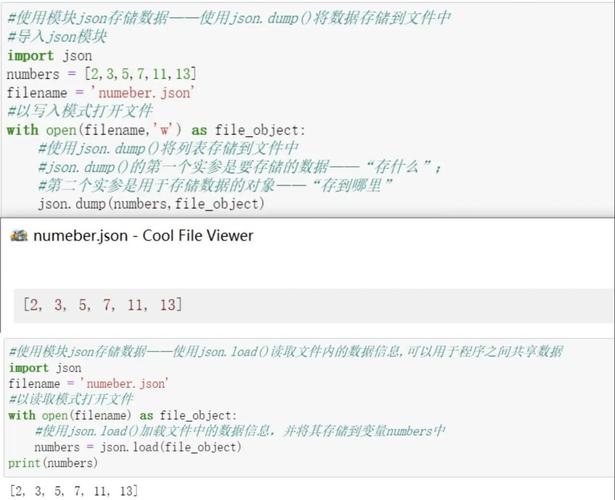
While you'll often use the convenient shortcut functions like json.loads() (load string) and json.load() (load from file), these are just wrappers around JSONDecoder. Understanding JSONDecoder gives you more power and control, especially when dealing with non-standard JSON.
The Simple Way: json.loads()
Before we look at the decoder, let's see the simple way. This is what 99% of users will need.
import json
json_string = '{"name": "Alice", "age": 30, "isStudent": false, "courses": ["History", "Math"]}'
# The easy way
python_object = json.loads(json_string)
print(python_object)
# Output: {'name': 'Alice', 'age': 30, 'isStudent': False, 'courses': ['History', 'Math']}
print(type(python_object))
# Output: <class 'dict'>
Under the hood, json.loads() creates a JSONDecoder instance and calls its decode() method.
The "Hard Way" (and more powerful): JSONDecoder
The JSONDecoder class is useful when you need to customize the decoding process. The most common reason for this is to handle custom data types that are not part of the standard JSON specification.
Key Methods of JSONDecoder
decode(s: str) -> any: This is the core method. It takes a JSON stringsand returns the corresponding Python object.raw_decode(s: str) -> tuple: This is a very useful method for parsing a string that might contain more than just JSON. It returns a tuple:(python_object, index). Theindextells you where in the string the JSON object ended. This is perfect for parsing JSON from a larger text block.
Basic Usage of decode()
This is essentially what json.loads() does for you.
import json
json_string = '{"city": "New York", "population": 8400000}'
# 1. Create a decoder instance
decoder = json.JSONDecoder()
# 2. Use the decode() method
python_object = decoder.decode(json_string)
print(python_object)
# Output: {'city': 'New York', 'population': 8400000}
This is functionally identical to json.loads(json_string). The advantage is that you can now customize the decoder.
The Real Power: Custom Decoding with object_hook
The most powerful feature of JSONDecoder is the object_hook. This is a function that you can pass to the decoder's constructor. This function is called for every JSON object () that is decoded.
The hook function receives a single argument: the Python dict that was just created from a JSON object. You can then modify this dictionary, return it as-is, or return a completely different Python object.
Example: Decoding Datetimes
JSON has no native concept of dates or times. They are typically serialized as strings. Let's say we have JSON that looks like this:
{
  "event_id": "xyz123",
  "timestamp": "2025-10-27T10:00:00Z"
}
We want the "timestamp" string to be automatically converted into a Python datetime object.
import json
from datetime import datetime
def datetime_decoder(dct):
    """
    object_hook function to convert ISO 8601 formatted strings
    into datetime objects.
    """
    if 'timestamp' in dct:
        # Convert the string to a datetime object
        dct['timestamp'] = datetime.fromisoformat(dct['timestamp'].replace('Z', '+00:00'))
    return dct
# Our JSON string with a date
json_string_with_date = '{"event_id": "xyz123", "timestamp": "2025-10-27T10:00:00Z"}'
# 1. Create a decoder instance, passing our custom hook
decoder = json.JSONDecoder(object_hook=datetime_decoder)
# 2. Decode the string
python_data = decoder.decode(json_string_with_date)
print(python_data)
# Output: {'event_id': 'xyz123', 'timestamp': datetime.datetime(2025, 10, 27, 10, 0, tzinfo=datetime.timezone.utc)}
print(type(python_data['timestamp']))
# Output: <class 'datetime.datetime'>
Now, whenever the decoder sees a key named "timestamp", it automatically transforms its value from a string into a datetime object.
The raw_decode() Method: Parsing Embedded JSON
Imagine you have a log file where each line is a message, and some messages contain JSON data.
INFO: User logged in.
DEBUG: Processing request: {"action": "get_data", "id": 456}
ERROR: Critical failure.
json.loads() would fail on the first and third lines. raw_decode() is the perfect tool.
import json
log_lines = [
    "INFO: User logged in.",
    'DEBUG: Processing request: {"action": "get_data", "id": 456}',
    "ERROR: Critical failure.",
    'INFO: Another request: {"user": "Bob", "query": "status"}'
]
decoder = json.JSONDecoder()
for line in log_lines:
    try:
        # Try to decode the line
        data, idx = decoder.raw_decode(line)
        print(f"Found JSON in line: {data}")
        print(f"JSON ended at character index: {idx}\n")
    except json.JSONDecodeError:
        # This line is not valid JSON, so we ignore it
        print(f"Skipping non-JSON line: {line}\n")
# Output:
# Skipping non-JSON line: INFO: User logged in.
#
# Found JSON in line: {'action': 'get_data', 'id': 456}
# JSON ended at character index: 50
#
# Skipping non-JSON line: ERROR: Critical failure.
#
# Found JSON in line: {'user': 'Bob', 'query': 'status'}
# JSON ended at character index: 44
Summary: json.loads() vs. json.JSONDecoder
| Feature | json.loads(s) |
json.JSONDecoder(s, ...) |
|---|---|---|
| Purpose | Quick and easy parsing of a complete JSON string. | Powerful, customizable parsing of JSON strings. |
| Usage | data = json.loads(my_json_string) |
decoder = json.JSONDecoder(object_hook=my_hook)data = decoder.decode(my_json_string) |
| Customization | None. | High. You can use object_hook and parse_constant. |
| Special Features | N/A | raw_decode() for parsing embedded JSON. |
| When to Use | For 95% of all standard JSON parsing tasks. | When you need to convert custom data types (like dates) or parse JSON from a larger, mixed text file. |
In short, start with json.loads(). When you hit a limitation—like needing to parse dates from strings or extract JSON from a larger document—reach for json.JSONDecoder.