Of course! This is a very common and powerful combination in big data ecosystems. Here’s a comprehensive guide covering the concepts, how to set it up, code examples, and best practices for using Spark with HDFS in Java.
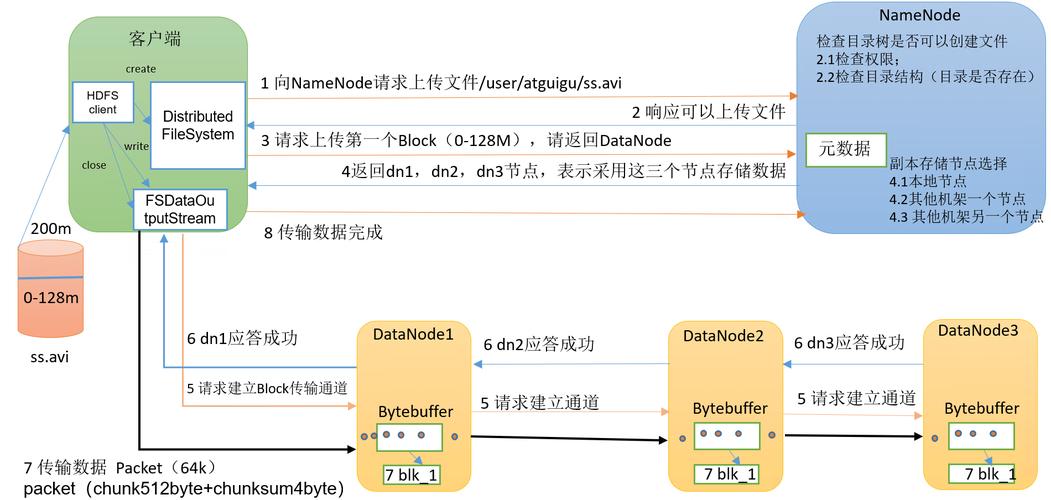
The Big Picture: Why Spark + HDFS?
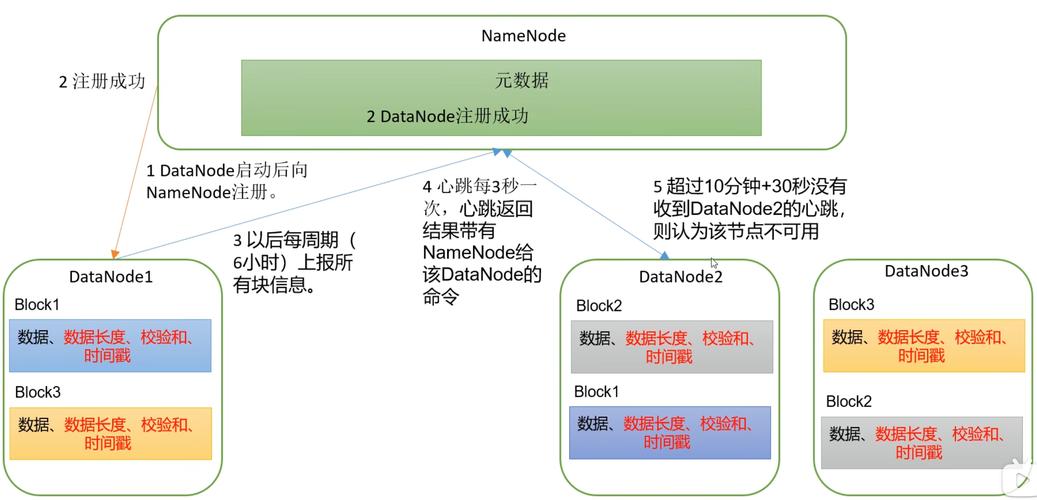
- HDFS (Hadoop Distributed File System): This is the storage layer. It's a distributed, fault-tolerant file system designed to store very large files (terabytes or petabytes) across many machines in a cluster. It's the "data lake" or the "hard drive" for your big data.
- Apache Spark: This is the processing engine. It's a fast, general-purpose cluster computing system. It's designed to perform large-scale data processing and analytics in memory. It's the "CPU" that crunches the data.
The Workflow:
- Your raw data is stored in HDFS (e.g.,
/user/data/input/). - You submit a Spark application to the cluster.
- Spark reads the data directly from HDFS.
- Spark performs transformations (e.g., filtering, mapping, aggregating) on the data.
- The results can be written back to HDFS (e.g., to
/user/data/output/).
This combination leverages the strengths of both: HDFS for reliable, scalable storage and Spark for fast, in-memory computation.
Prerequisites
Before you write any code, you need the right environment.
- Java Development Kit (JDK): Spark is written in Scala, which runs on the JVM. You need a JDK (version 8 or 11 are common choices).
- Maven: To manage project dependencies (like Spark and Hadoop).
- A HDFS Cluster: You need access to a running HDFS cluster. This could be a simple pseudo-distributed setup on your local machine or a full-fledged cluster on cloud providers (AWS EMR, Azure HDInsight, GCP Dataproc).
- Apache Spark: Download a pre-built version of Spark for Hadoop. The version must be compatible with your Hadoop distribution (e.g., Spark 3.3.x works with Hadoop 3.x).
Project Setup with Maven
The easiest way to manage Spark and Hadoop dependencies is with a pom.xml file.
pom.xml
<project xmlns="http://maven.apache.org/POM/4.0.0"
         xmlns:xsi="http://www.w3.org/2001/XMLSchema-instance"
         xsi:schemaLocation="http://maven.apache.org/POM/4.0.0 http://maven.apache.org/xsd/maven-4.0.0.xsd">
    <modelVersion>4.0.0</modelVersion>
    <groupId>com.example</groupId>
    <artifactId>spark-hdfs-java-example</artifactId>
    <version>1.0-SNAPSHOT</version>
    <properties>
        <maven.compiler.source>1.8</maven.compiler.source>
        <maven.compiler.target>1.8</maven.compiler.target>
        <spark.version>3.3.2</spark.version>
        <hadoop.version>3.3.4</hadoop.version>
    </properties>
    <dependencies>
        <!-- Spark Core for the main Spark functionality -->
        <dependency>
            <groupId>org.apache.spark</groupId>
            <artifactId>spark-core_2.12</artifactId>
            <version>${spark.version}</version>
        </dependency>
        <!-- This is crucial for HDFS support -->
        <!-- It includes the Hadoop Client libraries needed to talk to HDFS -->
        <dependency>
            <groupId>org.apache.spark</groupId>
            <artifactId>spark-hadoop_2.12</artifactId>
            <version>${spark.version}</version>
        </dependency>
        <!-- Explicitly adding Hadoop AWS client if you use S3 (optional but good practice) -->
        <!-- <dependency>
            <groupId>org.apache.hadoop</groupId>
            <artifactId>hadoop-aws</artifactId>
            <version>${hadoop.version}</version>
        </dependency> -->
    </dependencies>
    <build>
        <plugins>
            <plugin>
                <groupId>org.apache.maven.plugins</groupId>
                <artifactId>maven-shade-plugin</artifactId>
                <version>3.2.4</version>
                <executions>
                    <execution>
                        <phase>package</phase>
                        <goals>
                            <goal>shade</goal>
                        </goals>
                        <configuration>
                            <transformers>
                                <transformer implementation="org.apache.maven.plugins.shade.resource.ManifestResourceTransformer">
                                    <mainClass>com.example.SparkHdfsExample</mainClass>
                                </transformer>
                            </transformers>
                        </configuration>
                    </execution>
                </executions>
            </plugin>
        </plugins>
    </build>
</project>
Key Points:
spark-core_2.12: The main Spark library._2.12is the Scala version it's built against.spark-hadoop_2.12: This is essential. It bundles the necessary Hadoop libraries that allow Spark to communicate with HDFS. Without it, Spark won't know whathdfs://means.maven-shade-plugin: This plugin packages your application and all its dependencies into a single, fat JAR file (spark-hdfs-java-example-1.0-SNAPSHOT.jar). This makes it easy to submit to a Spark cluster.
Java Code Examples
Let's create a simple application that reads a text file from HDFS, counts the occurrences of each word, and writes the result back to HDFS.
Step 1: Create Sample Data in HDFS
First, you need some data in HDFS. Let's assume you have a file named words.txt.
# Create a local file with some text
echo "hello spark spark hello hdfs hdfs hdfs" > words.txt
# Copy the file to your HDFS cluster
# Replace 'namenode' with your HDFS NameNode host and port
hdfs dfs -put words.txt /user/data/input/words.txt
# Verify it's there
hdfs dfs -ls /user/data/input/
hdfs dfs -cat /user/data/input/words.txt
Step 2: Write the Java Application
Create the main class file: src/main/java/com/example/SparkHdfsExample.java
package com.example;
import org.apache.spark.SparkConf;
import org.apache.spark.api.java.JavaPairRDD;
import org.apache.spark.api.java.JavaRDD;
import org.apache.spark.api.java.JavaSparkContext;
import scala.Tuple2;
import java.util.Arrays;
public class SparkHdfsExample {
    public static void main(String[] args) {
        // 1. Create a SparkConf and JavaSparkContext
        // The master URL can be "local" for local testing or "yarn" for a YARN cluster.
        SparkConf conf = new SparkConf().setAppName("SparkHdfsJavaExample").setMaster("local[*]");
        JavaSparkContext sc = new JavaSparkContext(conf);
        // 2. Define the HDFS input and output paths
        // The hdfs:// URI tells Spark to use the HadoopFileSystem.
        String inputPath = "hdfs://namenode:8020/user/data/input/words.txt";
        String outputPath = "hdfs://namenode:8020/user/data/output/wordcount";
        try {
            // 3. Read the text file from HDFS into an RDD
            // Spark will use the HDFS API to read the file.
            JavaRDD<String> textFile = sc.textFile(inputPath);
            System.out.println("Number of partitions: " + textFile.getNumPartitions());
            System.out.println("First 5 lines from HDFS:");
            textFile.take(5).forEach(System.out::println);
            // 4. Perform transformations to count words
            // flatMap: Split each line into words
            JavaRDD<String> words = textFile.flatMap(line -> Arrays.asList(line.split(" ")).iterator());
            // mapToPair: Create a pair (word, 1) for each word
            JavaPairRDD<String, Integer> pairs = words.mapToPair(word -> new Tuple2<>(word, 1));
            // reduceByKey: Sum the counts for each word
            JavaPairRDD<String, Integer> counts = pairs.reduceByKey((a, b) -> a + b);
            // 5. Write the results back to HDFS
            // saveAsTextFile will create a directory in HDFS.
            // The output will be in multiple part files (e.g., part-00000, part-00001).
            counts.saveAsTextFile(outputPath);
            System.out.println("Word count job completed. Results saved to: " + outputPath);
        } catch (Exception e) {
            System.err.println("Error during Spark job: " + e.getMessage());
            e.printStackTrace();
        } finally {
            // 6. Stop the SparkContext to release resources
            sc.stop();
        }
    }
}
Step 3: Compile and Package
Run the following Maven command to compile your code and create the fat JAR:
mvn clean package
This will create the JAR file in the target/ directory: target/spark-hdfs-java-example-1.0-SNAPSHOT.jar.
Step 4: Run the Application
You can run this application in two ways:
A. Locally (for testing)
This runs Spark on your local machine but still reads/writes to the remote HDFS cluster.
# Run the main class from the fat JAR
java -cp target/spark-hdfs-java-example-1.0-SNAPSHOT.jar com.example.SparkHdfsExample
B. On a Spark Cluster (e.g., YARN)
This is the typical production scenario. You submit your JAR to the cluster's resource manager.
# Replace paths and versions as needed
# --master: The cluster manager (yarn, k8s, spark://...)
# --deploy-mode: Whether to deploy your driver on the worker (cluster) or locally (client)
# --class: The main class to run
# --jars: Any additional JARs (not needed if using the shade plugin)
# Your application JAR is the last argument
./spark-3.3.2-bin-hadoop3/bin/spark-submit \
  --master yarn \
  --deploy-mode client \
  --class com.example.SparkHdfsExample \
  --driver-memory 1g \
  --executor-memory 1g \
  --num-executors 2 \
  target/spark-hdfs-java-example-1.0-SNAPSHOT.jar
Step 5: Verify the Output in HDFS
After the job finishes, check the output directory in HDFS.
# List the output directory
hdfs dfs -ls /user/data/output/wordcount
# You should see a '_SUCCESS' file and one or more 'part-xxxxx' files.
# -rw-r--r--   1 user supergroup          0 2025-10-27 10:00 /user/data/output/wordcount/_SUCCESS
# -rw-r--r--   1 user supergroup         32 2025-10-27 10:00 /user/data/output/wordcount/part-00000
# View the contents of one of the part files
hdfs dfs -cat /user/data/output/wordcount/part-00000
# Expected output:
# (hello,2)
# (spark,2)
# (hdfs,3)
Best Practices and Important Considerations
-
Hadoop Configuration (
core-site.xml,hdfs-site.xml):- If your Spark cluster is on the same machines as your HDFS cluster, Spark will automatically pick up the Hadoop configuration files (
core-site.xml,hdfs-site.xml) from the classpath. - If Spark is on a different machine (e.g., your laptop), you need to provide these configuration files. The easiest way is to package them inside your JAR or point to them using the
--filesoption inspark-submit.
spark-submit --files /path/to/core-site.xml,/path/to/hdfs-site.xml ...
- If your Spark cluster is on the same machines as your HDFS cluster, Spark will automatically pick up the Hadoop configuration files (
-
Performance:
- Data Locality: Spark is smart. It will try to schedule tasks on the same worker nodes where the HDFS data blocks are stored. This minimizes network traffic and is a key reason for the performance of Spark-on-HDFS.
- Partitioning: The number of input partitions is determined by the number of HDFS blocks in your input file. You can control this with
sc.textFile(path, minPartitions). For output,saveAsTextFilewill create one file per partition.
-
File Formats:
- While text files are easy, they are not efficient. For production workloads, use more efficient columnar formats like Parquet or ORC.
- Spark has built-in, highly optimized support for these formats. Reading and writing Parquet is just as easy as with text files.
// Reading Parquet Dataset<Row> df = spark.read().parquet("hdfs://path/to/parquet/data"); // Writing Parquet df.write().parquet("hdfs://path/to/output/parquet"); -
Error Handling:
- Always wrap your Spark logic in a
try...finallyblock to ensuresc.stop()is called. If the driver JVM exits without stopping the Spark context, you can leave resources (like executors) running on the cluster. - Handle
SparkExceptionand other relevant exceptions gracefully.
- Always wrap your Spark logic in a