Of course. This is a great question that touches on a common point of confusion for Python developers, especially those who have used older versions of the language or other functional programming languages.

Here’s a complete breakdown of reduce in Python 3.4 and beyond.
The Short Answer: Is reduce Available in Python 3.4?
Yes, it is available, but it's not a built-in function.
In Python 3, reduce() was moved from the global built-in namespace into the functools module. This was a deliberate design decision to encourage the use of more "Pythonic" and readable alternatives like list comprehensions and the sum() function for simple cases.
To use reduce in Python 3.4, you must first import it:
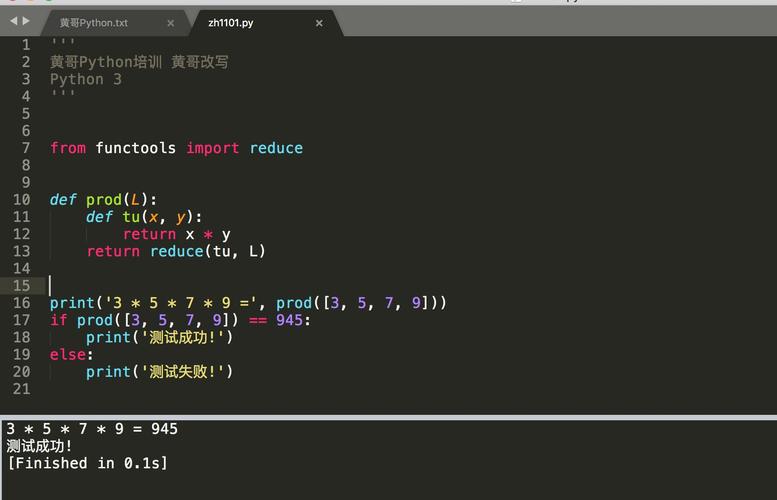
from functools import reduce
What is reduce()?
reduce() is a functional programming tool that applies a function of two arguments cumulatively to the items of an iterable, from left to right, so as to reduce the iterable to a single value.
Think of it as a way to "fold" or "collapse" a list down to one value by repeatedly applying an operation.
The Syntax
functools.reduce(function, iterable[, initializer])
function: A function that takes two arguments. This function will be applied to the items of the iterable.iterable: An iterable (like a list, tuple, etc.) that you want to reduce.initializer(optional): A value to be placed before the items of the iterable in the calculation. If provided, the reduction starts withinitializerand the first item of the iterable. If not provided, the first item of the iterable is used as the initial value, and the reduction starts with the second item.
How reduce() Works: Step-by-Step
Let's trace the execution with a simple example: reduce(lambda x, y: x + y, [1, 2, 3, 4])
- Initial Call: The function
lambda x, y: x + yis called with the first two elements of the list:1and2.- Result:
1 + 2 = 3
- Result:
- Second Call: The function is called again, but this time with the result from the previous step (
3) and the next element in the list (3).- Result:
3 + 3 = 6
- Result:
- Third Call: The function is called again with the result from the previous step (
6) and the last element in the list (4).- Result:
6 + 4 = 10
- Result:
- Final Result: Since there are no more elements in the list, the final result,
10, is returned.
This is equivalent to the expression: ((1 + 2) + 3) + 4.

Code Examples in Python 3.4
Here are some practical examples demonstrating reduce() in a Python 3.4 environment.
Example 1: Summing a List (Classic Use Case)
This is the most common example. While sum() is better for this, it's great for understanding reduce.
from functools import reduce
# Using a lambda function
numbers = [1, 2, 3, 4, 5]
total = reduce(lambda x, y: x + y, numbers)
print(f"The sum is: {total}")  # Output: The sum is: 15
# Using a named function for clarity
def add(a, b):
    return a + b
total_named = reduce(add, numbers)
print(f"The sum (with named function) is: {total_named}") # Output: The sum (with named function) is: 15
Example 2: Finding the Maximum Value in a List
This is a great use case where reduce can be very elegant.
from functools import reduce
numbers = [10, 5, 25, 8, 30, 15]
# The lambda function returns the larger of the two arguments
max_value = reduce(lambda a, b: a if a > b else b, numbers)
print(f"The maximum value is: {max_value}") # Output: The maximum value is: 30
Example 3: Using the initializer
The initializer is useful when you want to start with a specific value, especially when the iterable might be empty.
from functools import reduce
# Case 1: Without initializer
# If the list is empty, this will raise a TypeError
empty_list = []
try:
    reduce(lambda x, y: x + y, empty_list)
except TypeError as e:
    print(f"Error without initializer: {e}")
    # Output: Error without initializer: reduce() of empty sequence with no initial value
# Case 2: With an initializer
# If the list is empty, the initializer is returned.
# If the list is not empty, the initializer is used as the starting value.
numbers = [1, 2, 3]
# Sum starting with 10
total_with_init = reduce(lambda x, y: x + y, numbers, 10)
print(f"Sum with initializer 10: {total_with_init}") # Output: Sum with initializer 10: 16 (10 + 1 + 2 + 3)
# Handling an empty list safely
safe_sum = reduce(lambda x, y: x + y, empty_list, 0)
print(f"Safe sum of empty list: {safe_sum}") # Output: Safe sum of empty list: 0
Example 4: Concatenating a List of Strings
from functools import reduce
words = ['Hello', ' ', 'world', '!']
sentence = reduce(lambda x, y: x + y, words)
print(f"The sentence is: '{sentence}'") # Output: The sentence is: 'Hello world !'
When to Use reduce() vs. Alternatives
The Python community generally prefers more explicit and readable constructs. Here’s a guide.
| Task | reduce() |
Pythonic Alternative | When to Use reduce |
|---|---|---|---|
| Summation | reduce(lambda x, y: x+y, my_list) |
sum(my_list) |
Almost never. sum() is clearer and faster. |
| Multiplication | reduce(lambda x, y: x*y, my_list) |
math.prod(my_list) (Python 3.8+) |
If you are on Python < 3.8, reduce is a good choice. |
| Finding Max/Min | reduce(lambda a,b: a if a>b else b, my_list) |
max(my_list) / min(my_list) |
Almost never. The built-ins are clearer. |
| Custom Operation | reduce(my_custom_func, my_list) |
List Comprehension or a for-loop | This is the sweet spot for reduce. For complex, non-standard operations that are hard to express with a simple loop comprehension. |
Recommendation: Use reduce() when a simple for loop or list comprehension would be less readable and more verbose. For standard operations like sum, product, max, min, etc., always prefer the built-in functions.
The "Pythonic" Alternative: The for Loop
For almost any task, a simple for loop is the most readable and Pythonic solution.
Let's rewrite the "finding the maximum" example using a for loop.
numbers = [10, 5, 25, 8, 30, 15]
# Initialize a variable to hold the maximum value
max_value = numbers[0] # Start with the first element
# Loop through the rest of the list
for number in numbers[1:]:
    if number > max_value:
        max_value = number
print(f"The maximum value (using a for-loop) is: {max_value}")
# Output: The maximum value (using a for-loop) is: 30
This code is arguably more explicit and easier for a beginner to understand than the reduce version. However, for very complex reductions, a reduce with a well-named helper function can be more concise.