Of course! This is a very common task, and it's great to see how the same concept is implemented in two popular languages.
Here’s a comprehensive guide covering encoding and decoding in both PHP and Java, including common pitfalls and best practices.
The Core Concept
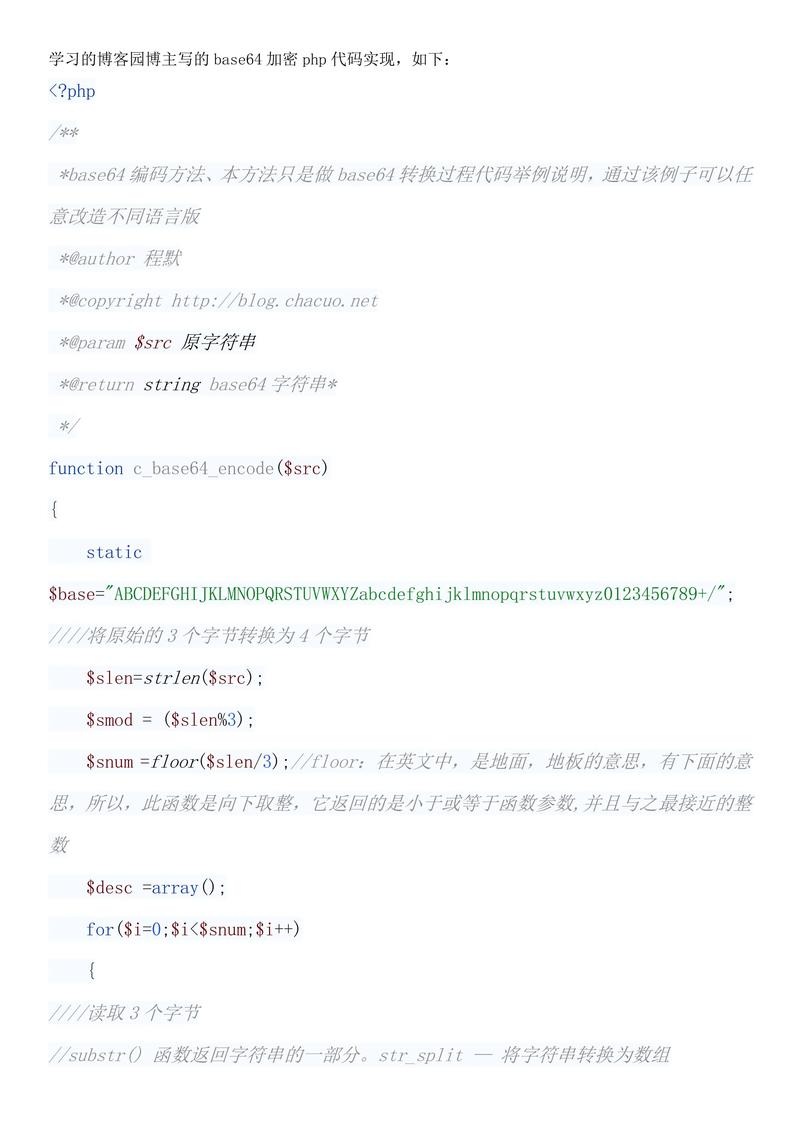
Base64 is an encoding scheme, not an encryption algorithm. It converts binary data into a text string using a set of 64 characters (A-Z, a-z, 0-9, '+', '/'). This is useful for sending data through text-based systems like email or JSON.
The core functions are:
- Encode: Convert binary data (bytes) to a Base64 string.
- Decode: Convert a Base64 string back to the original binary data.
PHP
PHP has built-in functions that make this process very straightforward.
Encoding in PHP
Use the base64_encode() function. It takes a string (which is treated as a sequence of bytes) and returns the Base64 encoded string.
<?php
// The original data to be encoded.
// It can be a string, which PHP treats as a byte sequence.
$original_string = 'Hello, World! This is a test.';
// Encode the string to Base64
$encoded_string = base64_encode($original_string);
echo "Original String: " . $original_string . "\n";
echo "Encoded String: " . $encoded_string . "\n";
// Example with binary data (like an image)
$image_data = file_get_contents('path/to/your/image.png');
$encoded_image = base64_encode($image_data);
// The result is a very long string
// echo "Encoded Image: " . $encoded_image . "\n";
?>
Output:
Original String: Hello, World! This is a test.
Encoded String: SGVsbG8sIFdvcmxkISBUaGlzIGlzIGEgdGVzdC4=
Decoding in PHP
Use the base64_decode() function. It takes a Base64 encoded string and returns the original binary data. You should always check if the decoding was successful.
<?php
$encoded_string = 'SGVsbG8sIFdvcmxkISBUaGlzIGlzIGEgdGVzdC4=';
$decoded_string = base64_decode($encoded_string);
// It's good practice to check if decoding was successful
if ($decoded_string === false) {
    echo "Error: Invalid Base64 string.\n";
} else {
    echo "Decoded String: " . $decoded_string . "\n";
}
// Example with the encoded image data
// $decoded_image_data = base64_decode($encoded_image);
// file_put_contents('path/to/decoded_image.png', $decoded_image_data);
?>
Output:
Decoded String: Hello, World! This is a test.Java
In Java, you typically work with byte[] (byte arrays) for binary data. The java.util.Base64 class (available since Java 8) provides the necessary tools.
Encoding in Java
You use the Base64.Encoder to get an encoder and then call its encode() method, which accepts a byte[].
import java.util.Base64;
public class Base64JavaExample {
    public static void main(String[] args) {
        // The original data to be encoded.
        String originalString = "Hello, World! This is a test.";
        // 1. Get the encoder
        Base64.Encoder encoder = Base64.getEncoder();
        // 2. Encode the string (must be converted to bytes first)
        byte[] encodedBytes = encoder.encode(originalString.getBytes());
        // 3. Convert the byte array back to a string for display
        String encodedString = new String(encodedBytes);
        System.out.println("Original String: " + originalString);
        System.out.println("Encoded String: " + encodedString);
    }
}
Output:
Original String: Hello, World! This is a test.
Encoded String: SGVsbG8sIFdvcmxkISBUaGlzIGlzIGEgdGVzdC4=
Alternative (more concise): The encodeToString() method combines steps 2 and 3.
// More concise encoding
String encodedStringConcise = Base64.getEncoder().encodeToString(originalString.getBytes());
System.out.println("Encoded String (Concise): " + encodedStringConcise);
Decoding in Java
You use the Base64.Decoder to get a decoder and then call its decode() method. This can return a byte[] or a String.
import java.util.Base64;
public class Base64JavaExample {
    public static void main(String[] args) {
        String encodedString = "SGVsbG8sIFdvcmxkISBUaGlzIGlzIGEgdGVzdC4=";
        // 1. Get the decoder
        Base64.Decoder decoder = Base64.getDecoder();
        try {
            // 2. Decode the string. This returns a byte array.
            byte[] decodedBytes = decoder.decode(encodedString);
            // 3. Convert the byte array back to a String
            String decodedString = new String(decodedBytes);
            System.out.println("Encoded String: " + encodedString);
            System.out.println("Decoded String: " + decodedString);
        } catch (IllegalArgumentException e) {
            System.err.println("Error: Invalid Base64 string.");
            e.printStackTrace();
        }
    }
}
Output:
Encoded String: SGVsbG8sIFdvcmxkISBUaGlzIGlzIGEgdGVzdC4=
Decoded String: Hello, World! This is a test.
Alternative (more concise): The decode() method can also directly decode into a String if you provide a Charset.
// More concise decoding
String decodedStringConcise = new String(decoder.decode(encodedString));
System.out.println("Decoded String (Concise): " + decodedStringConcise);
Comparison and Key Differences
| Feature | PHP | Java |
|---|---|---|
| Primary Type | Operates on strings. A string is a sequence of bytes. | Operates on byte[]. Explicit conversion to/from string is needed. |
| Encoding Function | base64_encode($data) |
Base64.getEncoder().encode($bytes) or encodeToString() |
| Decoding Function | base64_decode($data) |
Base64.getDecoder().decode($bytes) or decodeToString() |
| Error Handling | Returns false on failure. |
Throws IllegalArgumentException on failure. |
| URL-Safe Encoding | base64_encode() with strtr() and rtrim(). |
Base64.getUrlEncoder() (uses and _ instead of and ). |
| MIME Encoding | chunk_split(base64_encode($data)) |
Base64.getMimeEncoder() (adds line breaks every 76 characters). |
Common Pitfalls & Best Practices
-
Character Encoding (Crucial in Java):
- When you convert a
Stringtobyte[]in Java usinggetBytes(), it uses the platform's default character set. This can lead to inconsistencies if you run the code on different machines (e.g., one uses UTF-8, another uses ISO-8859-1). - Best Practice: Always specify the character set explicitly.
// Good
byte[] bytes = myString.getBytes(StandardCharsets.UTF_8);
// Bad (depends on the platform)
byte[] bytes = myString.getBytes();
- When you convert a
-
Padding ():
- Base64 padding uses the character. Some systems or protocols (like URLs) may not handle it well. Both PHP and Java provide URL-safe variants that replace with and with
_and remove padding. - PHP URL-Safe:
$url_safe_encoded = str_replace(['+', '/', '='], ['-', '_', ''], base64_encode($data));
- Java URL-Safe:
Base64.Encoder urlEncoder = Base64.getUrlEncoder();
String urlSafeEncoded = urlEncoder.encodeToString(data.getBytes(StandardCharsets.UTF_8));
- Base64 padding uses the character. Some systems or protocols (like URLs) may not handle it well. Both PHP and Java provide URL-safe variants that replace with and with
-
Line Breaks (MIME):
- Base64 data can become very long. For email attachments (MIME standard), it's broken into lines of no more than 76 characters. Java has a built-in
MimeEncoderfor this. PHP requires manual chunking.
// PHP: Add line breaks every 76 characters
$mime_encoded = chunk_split(base64_encode($data), 76, "\n");
- Base64 data can become very long. For email attachments (MIME standard), it's broken into lines of no more than 76 characters. Java has a built-in
Summary: PHP to Java Conversion
| Task | PHP Code | Java Code |
|---|---|---|
| Encode | base64_encode($string) |
Base64.getEncoder().encodeToString($string.getBytes(StandardCharsets.UTF_8)) |
| Decode | base64_decode($string) |
new String(Base64.getDecoder().decode($string), StandardCharsets.UTF_8) |
| URL-Safe Encode | str_replace(['+', '/', '='], ['-', '_', ''], base64_encode($string)) |
Base64.getUrlEncoder().encodeToString($string.getBytes(StandardCharsets.UTF_8)) |
| URL-Safe Decode | str_replace(['-', '_'], ['+', '/'], $string) base64_decode($string) |
new String(Base64.getUrlDecoder().decode($string), StandardCharsets.UTF_8) |