Of course! Let's break down str(count) in Python.
What is str(count)?
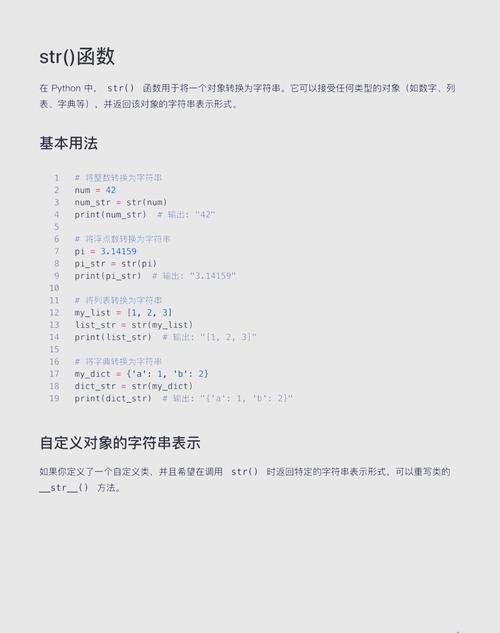
In short, str(count) is a function call that converts the value of the variable count into its string representation.
stris the built-in Python function for creating a string.countis a variable (or any other object) that you want to convert.- The parentheses are used to call the function and pass the
countvariable as an argument.
The Core Concept: Type Conversion
Python has several built-in functions for converting data from one type to another. The most common ones are:
str(): Converts a value to a string.int(): Converts a value to an integer.float(): Converts a value to a floating-point number.bool(): Converts a value to a boolean (TrueorFalse).
str(count) is the process of type casting or type conversion. It takes an object and returns a human-readable string version of it.
Why and When Do You Use str(count)?
You use str(count) whenever you need to treat a number as text. The most common reason is concatenation (joining strings together).

Example 1: Concatenation in a Sentence
You cannot directly add a number to a string in Python. This will cause a TypeError.
# This will cause an error!
count = 10
# message = "The total count is: " + count  # TypeError: can only concatenate str (not "int") to str
To fix this, you must convert the integer count to a string first.
count = 10
# Correct way: Convert count to a string before concatenating
message = "The total count is: " + str(count)
print(message)
# Output: The total count is: 10
Example 2: Using f-strings (The Modern, Recommended Way)
Python 3.6+ introduced f-strings, which are a more readable and efficient way to embed expressions inside string literals. You don't need str() for this!
count = 10
message = f"The total count is: {count}"
print(message)
# Output: The total count is: 10
The f-string automatically calls str() on the expression inside the curly braces for you.

Example 3: Using the format() Method
Before f-strings, the .format() method was the standard.
count = 10
message = "The total count is: {}".format(count)
print(message)
# Output: The total count is: 10
Like f-strings, .format() handles the conversion for you.
Example 4: Printing to a File or the Console
When you use print(), Python actually calls str() on the object you are printing before displaying it. So, these two lines are functionally identical:
count = 99
# Method 1: Letting print() handle it
print(count)
# Method 2: Explicitly converting to a string first
print(str(count))
# Output for both:
# 99
While they look the same, the first is more common and Pythonic. The explicit str() is only necessary when you need to use the string representation for something else, like concatenation.
What Can You Convert with str()?
str() is very versatile. It can convert almost any Python object into a string.
| Object Type | Example | str() Output |
|---|---|---|
| Integer | str(123) |
'123' |
| Float | str(99.9) |
'99.9' |
| Boolean | str(True) |
'True' |
| List | str([1, 2, 3]) |
'[1, 2, 3]' |
| Dictionary | str({'a': 1}) |
"{'a': 1}" |
| None | str(None) |
'None' |
| Custom Object | (See below) | '<__main__.MyObject object at 0x...>' |
Example: Converting a List
my_list = [1, 2, 3, 'apple']
list_as_string = str(my_list)
print(list_as_string)
# Output: [1, 2, 3, 'apple']
print(type(list_as_string))
# Output: <class 'str'>
Customizing String Representation (Advanced)
When you convert a custom object, the default str() output isn't very useful. You can define special methods in your class to control what str() returns.
__str__(self): Defines the "informal" or user-friendly string representation. Called byprint()andstr().__repr__(self): Defines the "official" or developer-friendly string representation. Meant to be unambiguous. Called byrepr()and in the interactive interpreter.
class Book:
    def __init__(self, title, author):
        self.title = title
        self.author = author
    # Define what str() returns for this object
    def __str__(self):
        return f"'{self.title}' by {self.author}"
    # Define what repr() returns for this object
    def __repr__(self):
        return f"Book(title='{self.title}', author='{self.author}')"
my_book = Book("The Hobbit", "J.R.R. Tolkien")
# When you use str(), it calls __str__()
print(str(my_book))
# Output: 'The Hobbit' by J.R.R. Tolkien
# When you use repr(), it calls __repr__()
print(repr(my_book))
# Output: Book(title='The Hobbit', author='J.R.R. Tolkien')
Summary
| Method | When to Use | Example |
|---|---|---|
str(count) |
When you need to explicitly convert a number or object to a string for concatenation or other string operations. | s = "Total: " + str(count) |
| f-strings | (Recommended) For embedding variables directly into strings. Modern, readable, and efficient. | s = f"Total: {count}" |
.format() |
(Legacy) A good alternative to f-strings for older Python versions or more complex formatting. | s = "Total: {}".format(count) |