Of course! Here is a comprehensive guide to using FFmpeg with Python, covering the different approaches, their pros and cons, and code examples.
The Short Answer: Which SDK to Use?
There isn't one single "official" FFmpeg Python SDK. Instead, you have several excellent options, each with its own strengths. The best choice depends on your needs:
| Method | Best For | Pros | Cons |
|---|---|---|---|
ffmpeg-python |
Most users. Scripting, automation, data pipelines. | High-level, clean Python API, uses subprocess safely, easy to install (pip install). |
Can be less performant for high-throughput tasks; relies on a system FFmpeg installation. |
| PyAV | Performance & low-level access. Video processing, computer vision, complex pipelines. | Direct bindings to the libav* C libraries, very fast, precise control over streams. |
Steeper learning curve, API is less "Pythonic," more complex installation. |
| Subprocess | Full control & simplicity. Quick scripts, one-off commands. | Total control, no extra Python packages needed, guaranteed compatibility. | Manual work (string building), error-prone, unsafe if input comes from users. |
ffpyplayer |
Embedding players. Applications that need to play audio/video. | Provides a player widget for GUI toolkits (like Tkinter, PyQt). | Focuses on playback, not transcoding/editing. |
ffmpeg-python (Recommended for Most Use Cases)
This is the most popular and user-friendly library. It acts as a Pythonic wrapper around FFmpeg's command-line interface. It builds command-line arguments for you and executes ffmpeg via subprocess safely.
Installation
# You MUST have FFmpeg installed on your system first!
# On macOS: brew install ffmpeg
# On Ubuntu/Debian: sudo apt update && sudo apt install ffmpeg
# On Windows: Download from https://ffmpeg.org/download.html and add to PATH
pip install ffmpeg-python
Core Concepts
The library is built around a ffmpeg object. You chain methods to build your command.
.input(): Defines an input file or stream..output(): Defines an output file or stream..run(): Executes the command.
Example 1: Basic Transcoding (Convert MP4 to MP3)
This is the "Hello, World!" of FFmpeg. It converts a video file to an audio-only MP3 file.

import ffmpeg
try:
    # Input file
    input_file = 'my_video.mp4'
    # Output file
    output_file = 'my_audio.mp3'
    # Build the command
    (
        ffmpeg
        .input(input_file)
        .output(output_file)
        .run(overwrite_output=True) # overwrite_output is useful for scripts
    )
    print(f"Successfully converted {input_file} to {output_file}")
except ffmpeg.Error as e:
    print(f"An error occurred: {e.stderr.decode('utf8')}")
Example 2: More Complex - Resize and Convert to WebM
Here we specify output options like video size (-s), codec (-c:v), and audio codec (-c:a).
import ffmpeg
input_file = 'input.mp4'
output_file = 'output_640x360.webm'
# Specify options using keyword arguments
# They map directly to ffmpeg command-line flags
(
    ffmpeg
    .input(input_file)
    .output(output_file,
            s='640x360',      # Video size
            vcodec='libvpx-vp9', # Video codec
            acodec='libopus',    # Audio codec
            **{'b:v': '1M', 'b:a': '128k'} # Bitrates as a dict for flags with ':'
           )
    .run(overwrite_output=True)
)
print(f"Successfully created {output_file}")
Example 3: Getting Video Metadata
You can run ffprobe commands to get information about a file without modifying it.
import ffmpeg
probe = ffmpeg.probe('my_video.mp4')
# Get video duration
duration = float(probe['streams'][0]['duration'])
print(f"Video duration: {duration:.2f} seconds")
# Get video resolution
width = probe['streams'][0]['width']
height = probe['streams'][0]['height']
print(f"Video resolution: {width}x{height}")
# Print all metadata
# import json
# print(json.dumps(probe, indent=2))
PyAV (For High Performance and Low-Level Control)
If ffmpeg-python is a convenient wrapper, PyAV is a direct bridge to the underlying C libraries (libavcodec, libavformat, etc.). This makes it incredibly fast and powerful but also more complex to use.
Installation
# This can be tricky. It's often easiest to use a package manager
# that handles the C library dependencies, like Conda.
# Using Conda (Recommended)
conda install -c conda-forge pyav
# Using pip (may require you to have FFmpeg development libraries installed)
# pip install av
Core Concepts
av.open(): Opens a file or stream.container.streams: Accesses the audio/video streams.container.decode(): Iterates over the packets in a stream and decodes them into frames.frame: An object representing a single video frame or audio sample.
Example: Read Frames and Save Them as Images
This example opens a video, reads each frame, and saves it as a JPEG image. This is much faster with PyAV than with ffmpeg-python.
import av
input_file = 'my_video.mp4'
output_dir = 'frames/'
# Create output directory if it doesn't exist
import os
os.makedirs(output_dir, exist_ok=True)
# Open the video file
container = av.open(input_file)
# Select the video stream
video_stream = container.streams.video[0]
# Iterate over the frames in the video stream
for i, frame in enumerate(container.decode(video_stream)):
    # A frame is an Image object from the 'Pillow' library (or similar)
    # You can save it directly
    frame.to_image().save(f'{output_dir}frame_{i:04d}.png')
print(f"Extracted {i+1} frames to {output_dir}")
# The container is closed automatically when the 'with' block exits
# or when the container object is garbage collected.
The Direct Subprocess Method (No SDK)
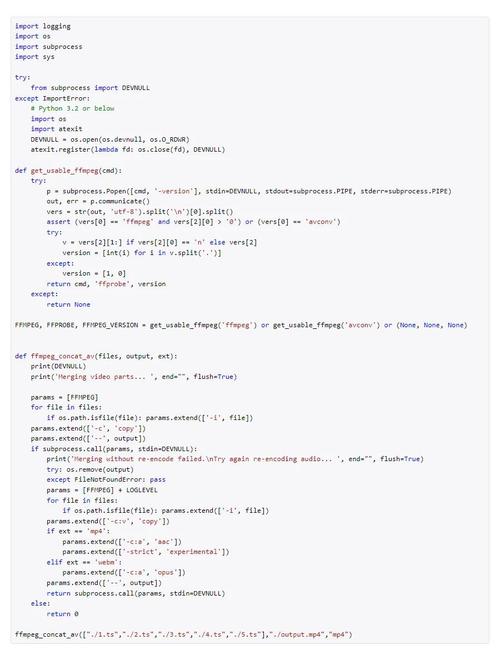
This is the most fundamental approach. You build the FFmpeg command as a string and execute it using Python's built-in subprocess module. It's great for simple, one-off tasks where you don't want to add a dependency.
import subprocess
input_file = 'input.mp4'
output_file = 'output.mp3'
# The FFmpeg command as a list of arguments
# Using a list is safer than a string to avoid shell injection
command = [
    'ffmpeg',
    '-i', input_file,
    '-vn',  # No video
    '-acodec', 'libmp3lame', # Audio codec
    '-ab', '192k',          # Audio bitrate
    output_file
]
try:
    # Execute the command
    # check=True will raise a CalledProcessError if the command fails
    # stdout and stderr are piped to prevent printing to the console
    subprocess.run(command, check=True, capture_output=True, text=True)
    print(f"Successfully converted {input_file} to {output_file}")
except subprocess.CalledProcessError as e:
    print(f"An error occurred:")
    print(f"Return code: {e.returncode}")
    print(f"Stderr: {e.stderr}")
Summary and Final Recommendation
| Use Case | Recommended Method |
|---|---|
| I'm a Python developer and just want to automate video tasks. | ffmpeg-python. It's the easiest to learn and use. |
| I'm building a high-performance video processing application. | PyAV. Its speed and low-level control are unmatched. |
| I just need to run a simple, one-time FFmpeg command. | subprocess. No dependencies, direct control. |
| I'm building a GUI application that needs to play video. | ffpyplayer. |
For most people starting out, ffmpeg-python is the perfect choice. It lowers the barrier to entry significantly while still being powerful enough for a vast array of tasks. Once you hit its performance limits or need finer-grained control, you can graduate to PyAV.