Of course! The phrase "Java MySQL text" typically refers to the process of handling text data between a Java application and a MySQL database. This involves several key concepts:
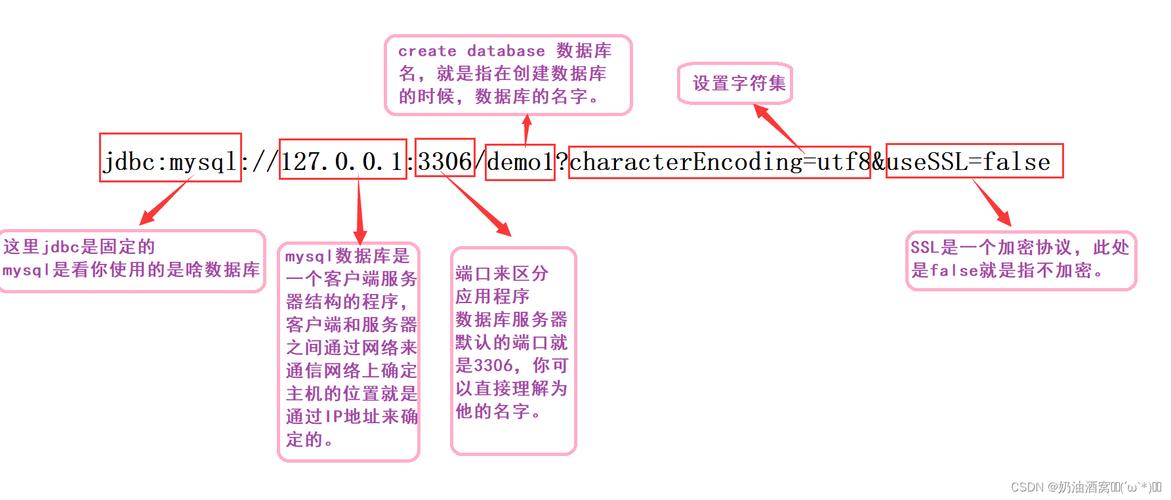
- Connecting Java to MySQL: Using JDBC (Java Database Connectivity).
- Storing Text: Using MySQL data types like
VARCHAR,TEXT,CHAR, etc. - Handling Text in Java: Using
Stringobjects and being aware of character encodings. - Security: Preventing SQL injection when handling user-provided text.
Let's break down each part with clear examples.
Connecting Java to MySQL (JDBC)
First, you need the MySQL JDBC driver. This is a JAR file that acts as a bridge between your Java code and the MySQL database.
Step 1: Add the MySQL Connector/J Dependency
You need to include the MySQL driver in your project. If you're using a build tool like Maven, add this to your pom.xml:
<dependency>
    <groupId>com.mysql</groupId>
    <artifactId>mysql-connector-j</artifactId>
    <version>8.0.33</version> <!-- Use the latest version -->
</dependency>
If you're not using a build tool, download the JAR file and add it to your project's classpath.
Step 2: Basic Connection Code
Here's a simple example of how to establish a connection.
import java.sql.Connection;
import java.sql.DriverManager;
import java.sql.SQLException;
public class MySqlConnectionExample {
    // Database connection details
    private static final String DB_URL = "jdbc:mysql://localhost:3306/your_database_name";
    private static final String USER = "your_username";
    private static final String PASS = "your_password";
    public static void main(String[] args) {
        // Use try-with-resources to ensure the connection is closed automatically
        try (Connection conn = DriverManager.getConnection(DB_URL, USER, PASS)) {
            if (conn != null) {
                System.out.println("Connected to the database successfully!");
            }
        } catch (SQLException e) {
            System.err.println("Database connection failed!");
            e.printStackTrace();
        }
    }
}
Storing and Retrieving Text in MySQL
MySQL has several text-based data types. Choosing the right one is important.
| Data Type | Max Size | Description |
|---|---|---|
CHAR(N) |
255 bytes | Fixed-length. Good for very short, predictable strings like country codes. |
VARCHAR(N) |
65,535 bytes | Variable-length. The most common choice for general text. N is the maximum number of characters. |
TEXT |
65,535 bytes | Variable-length. Designed for long text. VARCHAR is often preferred for shorter strings due to performance. |
MEDIUMTEXT |
16,777,215 bytes | For medium-length text. |
LONGTEXT |
4 GB | For very long text, like articles or log files. |
Example Table
Let's create a simple table in MySQL to store user comments.
CREATE TABLE comments (
    id INT AUTO_INCREMENT PRIMARY KEY,
    author_name VARCHAR(100) NOT NULL,
    comment_text TEXT NOT NULL,
    created_at TIMESTAMP DEFAULT CURRENT_TIMESTAMP
);
Java Code for Inserting and Selecting Text
Here is a complete, runnable example that inserts a text record into the comments table and then retrieves it.
import java.sql.Connection;
import java.sql.DriverManager;
import java.sql.PreparedStatement;
import java.sql.ResultSet;
import java.sql.SQLException;
import java.sql.Statement;
public class TextOperationsExample {
    private static final String DB_URL = "jdbc:mysql://localhost:3306/your_database_name";
    private static final String USER = "your_username";
    private static final String PASS = "your_password";
    public static void main(String[] args) {
        // 1. Insert a new comment
        insertComment("Alice", "This is my first comment using Java and MySQL!");
        // 2. Retrieve and display all comments
        getAllComments();
    }
    // Method to insert a new comment using PreparedStatement (safer)
    public static void insertComment(String author, String commentText) {
        String sql = "INSERT INTO comments (author_name, comment_text) VALUES (?, ?)";
        // Using try-with-resources for PreparedStatement
        try (Connection conn = DriverManager.getConnection(DB_URL, USER, PASS);
             PreparedStatement pstmt = conn.prepareStatement(sql)) {
            // Set the parameters for the query
            pstmt.setString(1, author);       // Binds the first '?' to the author string
            pstmt.setString(2, commentText);   // Binds the second '?' to the comment string
            int affectedRows = pstmt.executeUpdate();
            System.out.println(affectedRows + " row(s) inserted.");
        } catch (SQLException e) {
            System.err.println("Error inserting comment: " + e.getMessage());
        }
    }
    // Method to retrieve all comments
    public static void getAllComments() {
        String sql = "SELECT id, author_name, comment_text FROM comments";
        try (Connection conn = DriverManager.getConnection(DB_URL, USER, PASS);
             Statement stmt = conn.createStatement();
             ResultSet rs = stmt.executeQuery(sql)) {
            System.out.println("\n--- All Comments ---");
            while (rs.next()) {
                // Retrieve by column name for clarity and robustness
                int id = rs.getInt("id");
                String author = rs.getString("author_name");
                String comment = rs.getString("comment_text");
                System.out.println("ID: " + id);
                System.out.println("Author: " + author);
                System.out.println("Comment: " + comment);
                System.out.println("--------------------");
            }
        } catch (SQLException e) {
            System.err.println("Error retrieving comments: " + e.getMessage());
        }
    }
}
Critical Security: Preventing SQL Injection
Never build SQL queries by concatenating strings. This is a major security risk called SQL Injection.
❌ BAD (Vulnerable to SQL Injection)
// DANGEROUS CODE!
String userInput = "Robert'); DROP TABLE comments; --";
String sql = "SELECT * FROM comments WHERE author_name = '" + userInput + "'";
An attacker could input malicious code that deletes your table.
✅ GOOD (Using PreparedStatement)
The PreparedStatement shown in the example above is the correct way. It treats user input as data, not as part of the SQL command. The database driver safely escapes any special characters in the input string, neutralizing the threat.
Handling Character Encoding
This is a crucial step to avoid garbled text (e.g., "M�©xico" instead of "México").
Database Level
Ensure your MySQL database and tables are created with the correct character set. utf8mb4 is the modern standard that supports all Unicode characters, including emojis.
CREATE DATABASE your_database_name
CHARACTER SET utf8mb4
COLLATE utf8mb4_unicode_ci;
CREATE TABLE comments (
    -- ... your columns ...
)
CHARACTER SET utf8mb4
COLLATE utf8mb4_unicode_ci;
Java Connection Level
You must specify the character set in your JDBC connection URL. This tells the driver how to encode/decode data.
// Correct URL with character encoding
String DB_URL = "jdbc:mysql://localhost:3306/your_database_name?useSSL=false&serverTimezone=UTC&characterEncoding=UTF-8";
useSSL=false: For development. In production, use SSL.serverTimezone=UTC: Sets the time zone for the server.characterEncoding=UTF-8: This is the most important part for text handling.
Summary of Best Practices
- Use JDBC Driver: Always include the
mysql-connector-jJAR. - Use
try-with-resources: Ensures thatConnection,Statement, andResultSetobjects are always closed, preventing resource leaks. - Prefer
PreparedStatement: Use it for all queries that take user input to prevent SQL injection. - Specify Character Encoding: Add
characterEncoding=UTF-8to your JDBC URL to avoid garbled text. - Choose the Right MySQL Type: Use
VARCHARfor short to medium text andTEXTfor longer content. - Bind Variables: Use
pstmt.setString(1, value)instead of concatenating strings.