Of course. Let's dive deep into Java Applets, a technology that was once a cornerstone of interactive web content but is now obsolete.
Here's a comprehensive breakdown covering what they were, how they worked, why they failed, and what replaced them.
What Was a Java Applet?
A Java Applet was a small, compiled Java application that was designed to be run inside a web browser. It was one of the earliest technologies that allowed web pages to be more than just static text and images.
Think of it as a tiny, self-contained program that a web page would "host" and execute on the user's machine. The applet's code was typically embedded directly within an HTML page using the <applet> tag (later replaced by the standard <object> tag).
Key Characteristics:

- Client-Side: The code ran on the user's computer (the client), not the web server. This made it fast for interactive tasks.
- Sandboxed: By default, an applet ran in a secure "sandbox." It had restricted access to the user's file system, network connections (only to the server it came from), and system resources. This was a major security feature.
- Platform Independent: Like all Java code, applets were compiled into Java bytecode (
.classfiles). This bytecode could run on any operating system (Windows, macOS, Linux) that had a Java Virtual Machine (JVM) installed, making it truly "write once, run anywhere." - GUI-Focused: Applets were almost always used to create interactive graphical user interfaces (GUIs) within a web page, such as games, charts, simulations, or complex forms.
How Did They Work? (The Lifecycle)
An applet had a well-defined lifecycle managed by the browser's JVM. The key methods in an applet's class were:
init(): This method was called only once when the applet was first loaded. It was used for one-time setup, like creating the GUI components (buttons, text fields, etc.).start(): This method was called afterinit()and every time the user navigates back to the page containing the applet. It was used to start any threads or animations.stop(): This method was called when the user navigates away from the page. It was used to pause animations or stop threads to free up resources.destroy(): This method was called when the browser is shutting down or the page is being completely unloaded. It was used for any final cleanup.
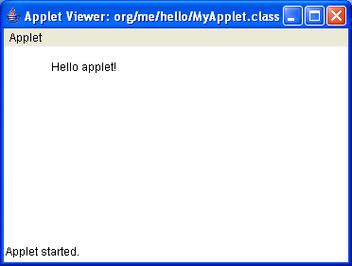
Simple Example Code:
import java.applet.Applet;
import java.awt.Graphics;
public class HelloWorldApplet extends Applet {
    // The init() method for one-time setup.
    public void init() {
        // You could initialize components here.
    }
    // The paint() method is called by the system to draw the applet.
    public void paint(Graphics g) {
        g.drawString("Hello, World from an Applet!", 50, 25);
    }
}
How to embed it in HTML:
<applet code="HelloWorldApplet.class" width="300" height="100">
    Your browser does not support Java applets.
</applet>
The "Golden Age" and Why Applets Were Popular
In the late 1990s and early 2000s, applets were revolutionary.

- Rich Interactivity: Before JavaScript was powerful, applets were the only way to put a complex, interactive application (like a game or a scientific graph) on a webpage.
- Cross-Platform Consistency: A developer could write one applet and be confident it would look and behave the same way on Windows, Mac, and Linux, as long as the user had the Java plugin.
- Performance: For CPU-intensive tasks like games or simulations, running compiled Java bytecode was much faster than interpreting JavaScript at the time.
- Mature GUI Framework: Applets had full access to the Abstract Window Toolkit (AWT) and later the Swing library, allowing for the creation of sophisticated desktop-like interfaces within a browser.
The Downfall and Obsolescence
Despite their initial success, a combination of factors led to the rapid decline and eventual death of Java Applets.
Security Vulnerabilities
The sandbox, while a good idea, had flaws. Over the years, numerous critical security vulnerabilities were discovered in the Java browser plugin. These vulnerabilities could allow a malicious applet to break out of the sandbox and gain control of the user's computer, leading to malware infections. This made Java a major target for hackers.
Performance and Startup Time
Java applications, especially the first time they were run on a system, had a noticeable startup time ("cold start"). The JVM had to load, which made the applet feel slow and clunky compared to native applications or even later, highly optimized JavaScript.
The Rise of JavaScript and AJAX
This is the single biggest reason for their demise. As JavaScript engines in browsers (like V8 in Chrome and SpiderMonkey in Firefox) became incredibly fast (a project known as the "JavaScript V8 Engine" race), the performance gap closed dramatically. Technologies like AJAX (Asynchronous JavaScript and XML) allowed web pages to communicate with the server in the background without reloading, creating a much smoother, more dynamic user experience. JavaScript, along with libraries like jQuery, Prototype, and later Angular and React, became the dominant force for web interactivity.
Plugin Fatigue and Installation Issues
Users had to manually download and install the Java plugin. This created friction. Over time, users became wary of installing browser plugins due to security concerns and the general trend away from them (e.g., the death of Flash, Silverlight, and ActiveX). Browsers like Chrome and Firefox began to actively deprecate and block NPAPI plugins, which the Java plugin was.
Oracle's Handling
After acquiring Sun Microsystems, Oracle's focus on Java for the web waned. They were slow to patch critical security vulnerabilities, which further eroded trust in the technology.
The Official End
- Java 9 (2025): Oracle officially deprecated the Java browser plugin and the
java.appletpackage. - Java 11 (2025): The Java browser plugin was completely removed from the standard JDK. It is no longer supported.
If you try to run an old applet today, modern browsers will simply not execute it.
What Replaced Applets?
The void left by applets was filled by a combination of modern web technologies:
| Technology | Description | Use Case |
|---|---|---|
| JavaScript | The core language of the web. With its modern engines, it's now incredibly fast and capable. | General-purpose interactivity, form validation, animations, DOM manipulation. |
| HTML5 Canvas & WebGL | <canvas> is a 2D drawing surface. WebGL is a 3D graphics library that uses the GPU. |
Games, data visualization, image editing, complex graphics. |
| WebAssembly (WASM) | A binary instruction format that allows code written in languages like C, C++, and Rust to run in the browser at near-native speed. | High-performance applications like games, video editors, and scientific simulations. This is the true spiritual successor to applets for performance-critical tasks. |
| Flash (Now Obsolete) | A proprietary plugin that was the main competitor to applets for years. It suffered from the same security and plugin issues and was officially killed by Adobe in 2025. | (Historically) Rich web animations, games, and video. |
| ActiveX (Now Obsolete) | Microsoft's proprietary technology for Windows only. It was notoriously insecure and is now deprecated. | (Historically) Windows-specific web components. |
Summary: Applets vs. Modern Web
| Feature | Java Applets | Modern Web (JS/HTML5) |
|---|---|---|
| Technology | Java bytecode in a browser plugin | JavaScript, HTML, CSS, WebAssembly |
| Security Model | Sandbox (often breached) | Sandboxed via browser security policies (CORS, Same-Origin) |
| Performance | Fast once JVM is loaded, but slow startup | Extremely fast JS engines; WASM for near-native speed |
| Installation | Required manual plugin install | Built into all modern browsers |
| Platform | Any OS with a JVM | Any OS with a modern browser |
| Status | Obsolete & Removed | The current standard |
Conclusion
Java Applets were a pioneering technology that brought interactivity to the web in an era when it was desperately needed. However, they were ultimately a victim of their own success and the rapid evolution of the web itself. Their legacy lives on in the form of the robust security models and rich interactive capabilities we now take for granted in modern web browsers, powered by JavaScript and WebAssembly.