Of course! Let's dive deep into Java Servlet Filters. This is a fundamental and powerful concept in Java web development.
What is a Servlet Filter?
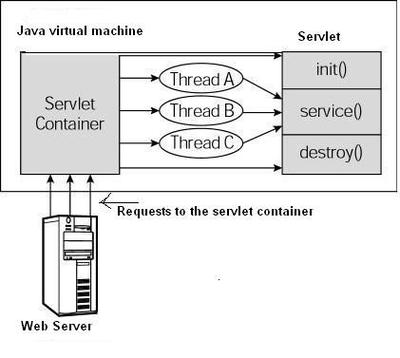
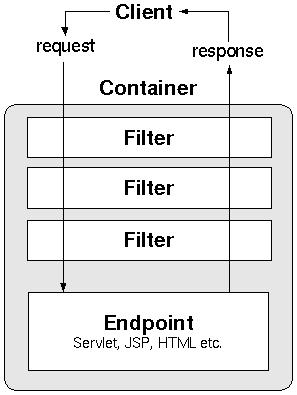
A Servlet Filter is a Java class that is used to intercept requests and responses from a client to a servlet. It acts as a "chain" or a "pre-processor/post-processor" for your web application.
Think of it like a security checkpoint at an airport. Before you can get to your gate (the servlet), you must pass through several checkpoints (filters):
- Show ID: Verifies your identity (Authentication Filter).
- Check-in Luggage: Processes your baggage (Logging/Encoding Filter).
- Security Screening: Scans for threats (Security Filter).
You can't get to the gate without passing through these filters. Similarly, a request can't reach a servlet without passing through any configured filters.
Key Characteristics of a Filter
- Interception: It sits between the client and the servlet, allowing it to inspect or modify the request and response objects.
- Reusable: A single filter can be mapped to multiple servlets or URL patterns.
- Configurable: You can define the order in which filters are executed and what they apply to.
- Pluggable: You can easily add or remove filters from your application's configuration without changing your servlet code.
The Core Interface: javax.servlet.Filter
To create a filter, you must implement the Filter interface, which has three mandatory methods:
init(FilterConfig config): This method is called by the servlet container only once when the filter is first initialized. It's used to perform any one-time setup, like reading configuration parameters fromweb.xmlor initializing resources.doFilter(ServletRequest request, ServletResponse response, FilterChain chain): This is the heart of the filter. It's called for every request that matches the filter's URL mapping.request: TheServletRequestobject (or its subclassHttpServletRequest) that contains the client's request.response: TheServletResponseobject (or its subclassHttpServletResponse) that will be sent back to the client.chain: TheFilterChainobject. This is the most important part. To pass the request to the next filter in the chain (or to the servlet itself), you must callchain.doFilter(request, response). If you don't, the request processing stops dead.
destroy(): This method is called by the servlet container only once when the web application is being shut down. It's used to clean up any resources the filter has acquired (e.g., closing database connections, releasing memory).
A Simple Practical Example: Character Encoding Filter
A very common use case for a filter is to ensure that all incoming requests use a specific character encoding (like UTF-8), preventing issues with special characters in form data.
The Filter Class (CharacterEncodingFilter.java)
import java.io.IOException;
import javax.servlet.*;
import javax.servlet.annotation.WebFilter; // Modern way to configure
import javax.servlet.http.HttpServletRequest;
import javax.servlet.http.HttpServletResponse;
// Using annotation to map this filter to all URLs
@WebFilter("/*")
public class CharacterEncodingFilter implements Filter {
    // The encoding we want to enforce
    private String encoding;
    @Override
    public void init(FilterConfig filterConfig) throws ServletException {
        // Read encoding from web.xml, or use a default
        encoding = filterConfig.getInitParameter("encoding");
        if (encoding == null) {
            encoding = "UTF-8"; // Default encoding
        }
        System.out.println("CharacterEncodingFilter initialized with encoding: " + encoding);
    }
    @Override
    public void doFilter(ServletRequest request, ServletResponse response, FilterChain chain)
            throws IOException, ServletException {
        // Cast to HttpServletRequest and HttpServletResponse for more features
        HttpServletRequest req = (HttpServletRequest) request;
        HttpServletResponse res = (HttpServletResponse) response;
        // 1. PRE-PROCESSING: Set the request encoding
        req.setCharacterEncoding(encoding);
        // 2. You can also modify the response here if needed
        // For example, setting the response content type
        // res.setContentType("text/html; charset=" + encoding);
        System.out.println("CharacterEncodingFilter: Processing request for " + req.getRequestURI());
        // 3. PASS THE REQUEST TO THE NEXT FILTER/SERVLET IN THE CHAIN
        // This is the crucial step!
        chain.doFilter(request, response);
        System.out.println("CharacterEncodingFilter: Response processed for " + req.getRequestURI());
    }
    @Override
    public void destroy() {
        // Clean up resources if any were created in init()
        System.out.println("CharacterEncodingFilter destroyed.");
    }
}
Configuration (Two Methods)
There are two primary ways to configure a filter:
Method A: Using Annotations (Modern & Recommended for Servlet 3.0+)
This is the simplest way. You just add the @WebFilter annotation to your filter class.
@WebFilter("/*") // Applies this filter to all URL patterns in the application
public class CharacterEncodingFilter implements Filter { /* ... code from above ... */ }
Method B: Using web.xml (Traditional)
This method gives you more control, especially for complex configurations or when you need to specify the filter order.
<!-- web.xml -->
<web-app xmlns="http://xmlns.jcp.org/xml/ns/javaee"
         xmlns:xsi="http://www.w3.org/2001/XMLSchema-instance"
         xsi:schemaLocation="http://xmlns.jcp.org/xml/ns/javaee http://xmlns.jcp.org/xml/ns/javaee/web-app_4_0.xsd"
         version="4.0">
    <!-- Define the filter -->
    <filter>
        <filter-name>CharacterEncodingFilter</filter-name>
        <filter-class>com.example.CharacterEncodingFilter</filter-class>
        <!-- You can pass initialization parameters here -->
        <init-param>
            <param-name>encoding</param-name>
            <param-value>UTF-8</param-value>
        </init-param>
    </filter>
    <!-- Map the filter to URL patterns -->
    <filter-mapping>
        <filter-name>CharacterEncodingFilter</filter-name>
        <!-- The url-pattern determines which requests this filter handles -->
        <url-pattern>/*</url-pattern>
    </filter-mapping>
</web-app>
The Filter Chain Concept
Filters are executed in a specific order. This order is determined by:
- The order of
<filter-mapping>declarations inweb.xml. - The alphabetical order of class names when using annotations (which is not ideal for control).
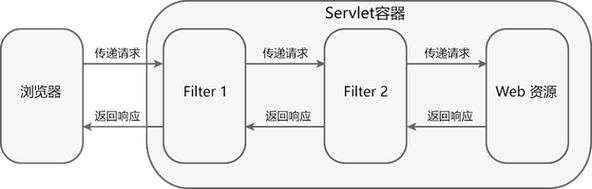
When you call chain.doFilter(), you are passing control to the next element in the chain.
Example Flow:
Imagine you have two filters: SecurityFilter and LoggingFilter, and a HomeServlet.
- A request comes in for
/home. - The container determines which filters match
/home. - Let's assume the order is
SecurityFilter->LoggingFilter->HomeServlet. SecurityFilter.doFilter()is called.- It performs security checks.
- It then calls
chain.doFilter().
LoggingFilter.doFilter()is now called.- It logs the request details.
- It then calls
chain.doFilter().
HomeServlet.doGet()is now called.It generates the HTML response.
- The response travels back up the chain:
LoggingFiltercan modify the response (e.g., add a footer timestamp).SecurityFiltercan modify the response (e.g., add security headers).- The final response is sent to the client.
// Inside SecurityFilter.doFilter()
// ... security checks ...
System.out.println("SecurityFilter: Request passed security check.");
chain.doFilter(request, response); // Passes to LoggingFilter
System.out.println("SecurityFilter: Response received from servlet.");
// Inside LoggingFilter.doFilter()
System.out.println("LoggingFilter: Logging request details.");
chain.doFilter(request, response); // Passes to HomeServlet
System.out.println("LoggingFilter: Logging response details.");
Common Use Cases for Filters
- Authentication & Authorization: Check if the user is logged in and has permission to access the resource.
- Logging & Auditing: Log all incoming requests and outgoing responses for debugging or monitoring.
- Data Compression: Compress the response data (e.g., using GZIP) before sending it to the client to reduce bandwidth.
- Input Validation: Sanitize or validate user input before it reaches the servlet.
- Image Processing: Dynamically resize or watermark images served by the application.
- Setting Character Encoding: As shown in our example.
- Caching: Control caching headers for responses.
Summary
| Feature | Description |
|---|---|
| Purpose | Intercept and modify requests/responses. |
| Interface | javax.servlet.Filter |
| Key Methods | init(), doFilter(), destroy() |
| Configuration | Annotations (` |