Of course! Returning JSON from a Python application is a fundamental task, especially when building web APIs. The process involves two main steps:
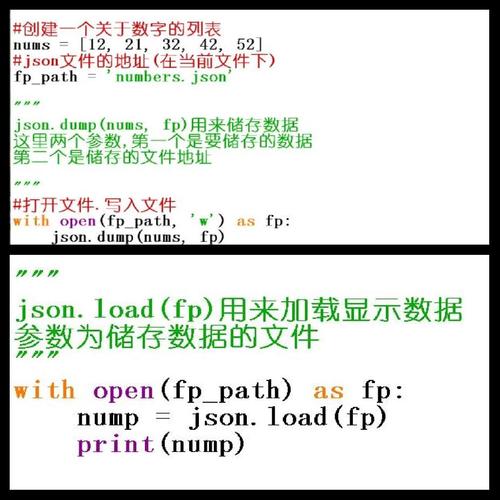
- Creating a Python object (like a dictionary or a list).
- Serializing that object into a JSON formatted string.
The most common and recommended way to do this is by using Python's built-in json library.
The Core Concept: json.dumps()
The key function is json.dumps(), which stands for "dump string". It takes a Python object and returns a JSON formatted string.
import json
# 1. Create a Python dictionary (our data structure)
data = {
    "name": "John Doe",
    "age": 30,
    "isStudent": False,
    "courses": [
        {"title": "History", "credits": 3},
        {"title": "Math", "credits": 4}
    ]
}
# 2. Serialize the Python object to a JSON string
json_string = json.dumps(data)
print(json_string)
Output:
{"name": "John Doe", "age": 30, "isStudent": false, "courses": [{"title": "History", "credits": 3}, {"title": "Math", "credits": 4}]}
Notice how Python's False was converted to JSON's false. The json library handles this type conversion automatically.
Common Use Case: Web Frameworks
In a real-world application, you'll almost always be returning JSON as an HTTP response from a web server. Here’s how to do it in popular Python web frameworks.
Flask (Lightweight Web Framework)
Flask makes this very straightforward using the jsonify helper function. It's important to use jsonify instead of json.dumps because it automatically sets the correct Content-Type header to application/json, which is crucial for browsers and API clients.
# app.py
from flask import Flask, jsonify
app = Flask(__name__)
@app.route('/api/user/1')
def get_user():
    # This is the Python dictionary you want to return
    user_data = {
        "id": 1,
        "name": "Alice",
        "email": "alice@example.com"
    }
    # jsonify converts the dict to a JSON response and sets the right headers
    return jsonify(user_data)
if __name__ == '__main__':
    app.run(debug=True)
How to run and test:
- Save the code as
app.py. - Install Flask:
pip install Flask - Run the app:
python app.py - Open your browser or use a tool like
curlto accesshttp://127.0.0.1:5000/api/user/1.
curl Output:
$ curl http://127.0.0.1:5000/api/user/1
{
  "email": "alice@example.com",
  "id": 1,
  "name": "Alice"
}
Django (Full-Stack Web Framework)
Django has a built-in JsonResponse class in its django.http module, which is the standard way to return JSON.
# views.py
from django.http import JsonResponse
def get_product(request, product_id):
    # In a real app, you'd fetch this from a database
    product_data = {
        "id": product_id,
        "name": "Laptop",
        "price": 1200.99,
        "in_stock": True
    }
    # JsonResponse automatically serializes the dict and sets the Content-Type
    return JsonResponse(product_data)
You would then map this view to a URL in your urls.py file.
FastAPI (Modern, High-Performance Framework)
FastAPI is designed with JSON in mind. You can simply return a Python dictionary, and FastAPI will automatically serialize it to JSON and generate an OpenAPI schema for you.
# main.py
from fastapi import FastAPI
app = FastAPI()
@app.get("/api/items/{item_id}")
def read_item(item_id: int, q: str | None = None):
    item = {
        "item_id": item_id,
        "q": q
    }
    # FastAPI automatically converts the dict to a JSON response
    return item
# To run this, you need uvicorn: pip install uvicorn fastapi
# Run with: uvicorn main:app --reload
Handling Custom Objects (Advanced)
What if you want to return a custom Python class instance as JSON? The default json.dumps() will fail with a TypeError because it doesn't know how to convert your object.
You have two main solutions:
The default Argument
You can provide a custom function to the default argument of json.dumps. This function will be called for any object that the standard JSON encoder doesn't know how to handle.
import json
class User:
    def __init__(self, name, email):
        self.name = name
        self.email = email
def serialize_user(obj):
    """JSON serializer for custom objects"""
    if isinstance(obj, User):
        return {
            'name': obj.name,
            'email': obj.email,
            '__class__': obj.__class__.__name__
        }
    raise TypeError(f"Object of type {type(obj)} is not JSON serializable")
# Create an instance of our custom class
user = User("Bob", "bob@example.com")
# Use the custom serializer
json_output = json.dumps(user, default=serialize_user)
print(json_output)
Output:
{"name": "Bob", "email": "bob@example.com", "__class__": "User"}
Subclassing json.JSONEncoder (More Robust)
For more complex applications, you can create a custom encoder class and subclass json.JSONEncoder.
import json
class User:
    def __init__(self, name, email):
        self.name = name
        self.email = email
class UserEncoder(json.JSONEncoder):
    def default(self, obj):
        if isinstance(obj, User):
            return {
                'name': obj.name,
                'email': obj.email,
                'type': 'user' # You can add custom keys
            }
        # Let the base class default method raise the TypeError
        return super().default(obj)
user = User("Charlie", "charlie@example.com")
# Use the custom encoder
json_output = json.dumps(user, cls=UserEncoder, indent=2)
print(json_output)
Output:
{
  "name": "Charlie",
  "email": "charlie@example.com",
  "type": "user"
}
Summary
| Scenario | Method | Why |
|---|---|---|
| Basic Python Script | json.dumps(your_dict) |
Converts a Python object to a JSON string. |
| Flask Web App | return jsonify(your_dict) |
Converts to JSON and sets the correct Content-Type header. |
| Django Web App | return JsonResponse(your_dict) |
Designed specifically for returning JSON HTTP responses. |
| FastAPI Web App | return your_dict |
Automatically serializes the dictionary to a JSON response. |
| Custom Python Objects | json.dumps(your_obj, default=custom_func) or cls=CustomEncoder |
Provides a way to tell the JSON encoder how to handle your custom classes. |