Of course! Working with date strings in Java is a common task, but it has evolved significantly over the years. The key is to use the modern, built-in java.time package, which has been the standard since Java 8.
Here’s a comprehensive guide covering the most common scenarios.
Parsing a String to a Date Object (The Modern Way: java.time)
This is the most common task: converting a string like "2025-10-27" or "10/27/2025 15:30" into a date/time object.
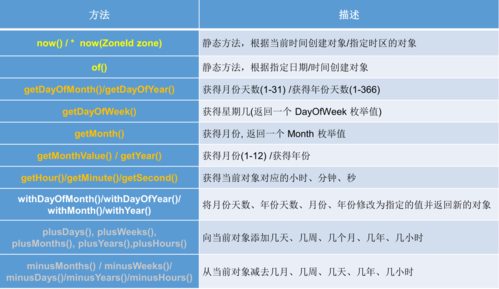
The core classes you'll use are:
LocalDate: For a date without a time (e.g.,2025-10-27).LocalTime: For a time without a date (e.g.,15:30:45).LocalDateTime: For a date and time without a time zone (e.g.,2025-10-27T15:30:45).ZonedDateTime: For a date and time with a time zone (e.g.,2025-10-27T15:30:45-04:00[America/New_York]).DateTimeFormatter: The class used to define the pattern of your date string.
Example: Parsing a String to LocalDate
You need to provide a pattern that matches the string exactly. yyyy is the 4-digit year, MM is the month, and dd is the day.
import java.time.LocalDate;
import java.time.format.DateTimeFormatter;
public class ParseDateExample {
    public static void main(String[] args) {
        // The date string you want to parse
        String dateString = "2025-10-27";
        // Define the pattern that matches the string
        DateTimeFormatter formatter = DateTimeFormatter.ofPattern("yyyy-MM-dd");
        try {
            // Parse the string into a LocalDate object
            LocalDate localDate = LocalDate.parse(dateString, formatter);
            System.out.println("Original String: " + dateString);
            System.out.println("Parsed LocalDate: " + localDate);
            System.out.println("Day of the week: " + localDate.getDayOfWeek()); // You can now use methods
        } catch (Exception e) {
            System.err.println("Failed to parse date. Error: " + e.getMessage());
        }
    }
}
Output:
Original String: 2025-10-27
Parsed LocalDate: 2025-10-27
Day of the week: FRIDAY
Example: Parsing a String to LocalDateTime
Let's parse a string that includes both date and time.
import java.time.LocalDateTime;
import java.time.format.DateTimeFormatter;
public class ParseDateTimeExample {
    public static void main(String[] args) {
        String dateTimeString = "10/27/2025 03:30 PM";
        // The pattern: MM/dd/yyyy hh:mm a
        // 'a' is for AM/PM period
        DateTimeFormatter formatter = DateTimeFormatter.ofPattern("MM/dd/yyyy hh:mm a");
        try {
            LocalDateTime localDateTime = LocalDateTime.parse(dateTimeString, formatter);
            System.out.println("Original String: " + dateTimeString);
            System.out.println("Parsed LocalDateTime: " + localDateTime);
        } catch (Exception e) {
            System.err.println("Failed to parse date. Error: " + e.getMessage());
        }
    }
}
Output:
Original String: 10/27/2025 03:30 PM
Parsed LocalDateTime: 2025-10-27T15:30
(Note: LocalDateTime stores the time in 24-hour format internally).
Formatting a Date Object to a String
This is the reverse operation. You have a LocalDate object and want to display it as a specific string.
The process is very similar: you use the same DateTimeFormatter.
Example: Formatting LocalDate to a String
import java.time.LocalDate;
import java.time.format.DateTimeFormatter;
public class FormatDateExample {
    public static void main(String[] args) {
        // Get the current date
        LocalDate today = LocalDate.now();
        // Define a desired output format
        DateTimeFormatter formatter = DateTimeFormatter.ofPattern("MMMM dd, yyyy");
        // Format the date object into a string
        String formattedDate = today.format(formatter);
        System.out.println("Current LocalDate: " + today);
        System.out.println("Formatted String: " + formattedDate);
        // Another example format
        DateTimeFormatter shortFormatter = DateTimeFormatter.ofPattern("MM/dd/yy");
        String shortDate = today.format(shortFormatter);
        System.out.println("Short Formatted String: " + shortDate);
    }
}
Output (will vary depending on the current date):
Current LocalDate: 2025-10-27
Formatted String: October 27, 2025
Short Formatted String: 10/27/23
Handling Time Zones (Crucial for Applications)
For applications that span different regions, you must use time zones.
Example: Parsing a String with a Time Zone
import java.time.ZonedDateTime;
import java.time.ZoneId;
import java.time.format.DateTimeFormatter;
public class ZonedDateExample {
    public static void main(String[] args) {
        // A string that includes a time zone offset
        String zonedDateString = "2025-10-27T10:00:00-05:00[America/New_York]";
        // ZonedDateTime can parse this string directly as it's an ISO format
        ZonedDateTime zonedDateTime = ZonedDateTime.parse(zonedDateString);
        System.out.println("Original String: " + zonedDateString);
        System.out.println("Parsed ZonedDateTime: " + zonedDateTime);
        // Convert it to the time zone of Tokyo
        ZoneId tokyoZone = ZoneId.of("Asia/Tokyo");
        ZonedDateTime tokyoTime = zonedDateTime.withZoneSameInstant(tokyoZone);
        System.out.println("Time in Tokyo: " + tokyoTime);
        // Format it nicely for a user
        DateTimeFormatter formatter = DateTimeFormatter.ofPattern("EEEE, MMMM d, yyyy h:mm a z");
        System.out.println("Formatted Tokyo Time: " + tokyoTime.format(formatter));
    }
}
Output:
Original String: 2025-10-27T10:00:00-05:00[America/New_York]
Parsed ZonedDateTime: 2025-10-27T10:00-05:00[America/New_York]
Time in Tokyo: 2025-10-27T23:00+09:00[Asia/Tokyo]
Formatted Tokyo Time: Friday, October 27, 2025 11:00 PM JST
Legacy java.util.Date (For Older Codebases)
If you are working with legacy code that uses the old java.util.Date class, you'll need to convert to and from java.time.
Warning: java.util.Date is poorly designed and mutable. Avoid it in new code.
Converting java.util.Date to java.time (Instant)
import java.util.Date;
import java.time.Instant;
import java.time.ZoneId;
import java.time.LocalDateTime;
import java.time.LocalDate;
public class LegacyConversion {
    public static void main(String[] args) {
        // Get an old java.util.Date object
        Date utilDate = new Date();
        // Convert to Instant (an instantaneous point on the timeline)
        Instant instant = utilDate.toInstant();
        // Convert Instant to ZonedDateTime (in the system default time zone)
        ZonedDateTime zonedDateTime = instant.atZone(ZoneId.systemDefault());
        // Get LocalDateTime and LocalDate from there
        LocalDateTime localDateTime = zonedDateTime.toLocalDateTime();
        LocalDate localDate = zonedDateTime.toLocalDate();
        System.out.println("Legacy java.util.Date: " + utilDate);
        System.out.println("Converted to Instant: " + instant);
        System.out.println("Converted to ZonedDateTime: " + zonedDateTime);
        System.out.println("Converted to LocalDateTime: " + localDateTime);
        System.out.println("Converted to LocalDate: " + localDate);
    }
}
Converting java.time to java.util.Date
import java.time.Instant;
import java.time.ZonedDateTime;
import java.util.Date;
public class ToLegacyConversion {
    public static void main(String[] args) {
        // Create a modern ZonedDateTime object
        ZonedDateTime zonedDateTime = ZonedDateTime.now(ZoneId.of("America/Los_Angeles"));
        // Convert to Instant
        Instant instant = zonedDateTime.toInstant();
        // Convert Instant to legacy java.util.Date
        Date legacyDate = Date.from(instant);
        System.out.println("Modern ZonedDateTime: " + zonedDateTime);
        System.out.println("Converted to legacy java.util.Date: " + legacyDate);
    }
}
Common Date/Time Patterns
| Symbol | Meaning | Example |
|---|---|---|
yyyy |
Year | 2025 |
yy |
Year (2-digit) | 23 |
MM |
Month in year | 10 (October) |
M |
Month in year (1-12) | 10 |
dd |
Day in month | 27 |
d |
Day in month | 27 |
HH |
Hour in day (0-23) | 15 |
hh |
Hour in am/pm (1-12) | 03 |
mm |
Minute in hour | 30 |
ss |
Second in minute | 45 |
a |
AM/PM marker | PM |
z |
Time zone name | PST, EST, GMT |
Z |
Time zone offset | -0800, +0530 |
XXX |
Time zone offset (ISO-8601) | -08:00, +05:30 |
EEEE |
Day name in week | Friday |
MMMM |
Month name in year | October |
Summary: Best Practices
- Always use
java.timefor new code. It's immutable, thread-safe, and much easier to use. - Be explicit with your
DateTimeFormatter. Don't rely on default patterns, as they can be locale-dependent and lead to bugs. - Use
LocalDatefor dates,LocalTimefor times, andLocalDateTimefor combined date-times without time zones. - Use
ZonedDateTimefor any application logic, user input, or storage that involves different time zones. This prevents subtle and hard-to-find bugs. - Only use
java.util.Datewhen you absolutely must interact with legacy APIs.