Of course. This is an excellent question that gets to the heart of how different programming languages and runtime environments handle fundamental data types.
Here’s a detailed comparison of Java's byte and .NET's byte.
Quick Summary (TL;DR)
| Feature | Java byte |
.NET byte |
|---|---|---|
| Size | 8 bits (1 byte) | 8 bits (1 byte) |
| Signed/Unsigned | Signed (-128 to 127) | Unsigned (0 to 255) |
| Default Value | 0 |
0 |
| Wrapper Class | java.lang.Byte |
System.Byte |
| C# Keyword | N/A (direct equivalent is sbyte) |
byte |
| Common Use Case | Efficient storage of raw binary data, file I/O, network packets. | Efficient storage of raw binary data, file I/O, network packets. |
Detailed Breakdown
Size and Memory Representation
- Java
byte: Occupies 8 bits (1 byte) of memory. - .NET
byte: Occupies 8 bits (1 byte) of memory.
Conclusion: In terms of raw size, they are identical. Both are the smallest standard integer type in their respective platforms.
Signed vs. Unsigned (The Critical Difference)
This is the most important distinction and the source of many subtle bugs when moving code between the two ecosystems.
-
Java
byte: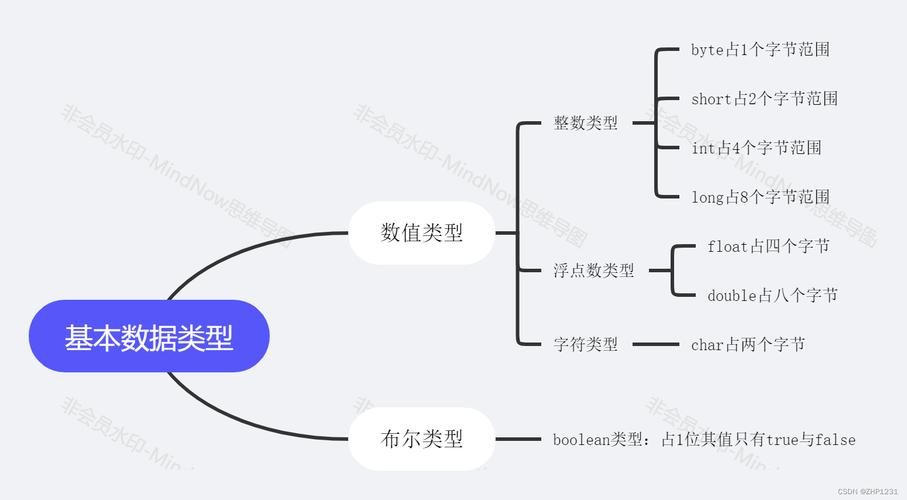 (图片来源网络,侵删)
- It is a signed data type.
- It uses two's complement representation.
- Its value range is -128 to 127 (inclusive).
-
.NET
byte:- It is an unsigned data type.
- Its value range is 0 to 255 (inclusive).
Why does this matter?
Consider the number 255 (binary 11111111).
- In .NET,
byte b = 255;is perfectly valid. The bit pattern11111111represents the unsigned value 255. - In Java,
byte b = 255;will cause a compile-time error because 255 is outside the valid range for a signedbyte(-128 to 127).
If you have an 8-bit value of 255 that you need to store in Java, you have to cast it, explicitly telling the compiler you are aware of the potential data loss:
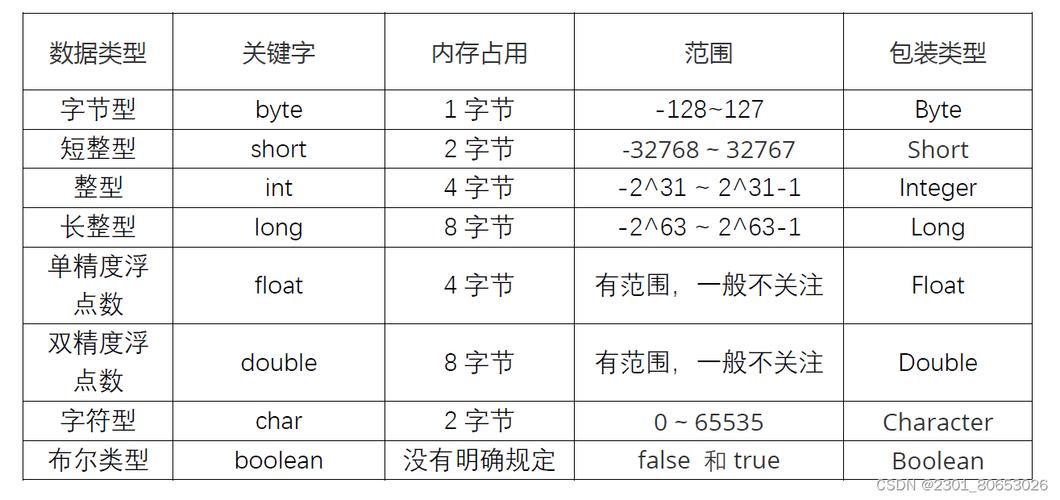
// The (byte) cast truncates the higher bits, leaving only the 8 least-significant bits.
// 255 in binary is ...0000000011111111. Casting to byte leaves 11111111.
// In Java's signed two's complement system, 11111111 is -128.
byte javaByte = (byte) 255;
System.out.println(javaByte); // Output: -128
C# Nuance: C# has both a byte (unsigned) and an sbyte (signed) to match Java's byte.
// .NET's unsigned byte
byte netByte = 255; // This is valid
// C#'s signed byte, the direct equivalent of Java's byte
sbyte csharpSignedByte = -128; // This is valid
Default Value
- Java
byte: The default value for abytefield in a class or an array is0. - .NET
byte: The default value for abytefield in a class or a struct is also0.
This behavior is identical and intuitive.
Wrapper Classes and Operations
Both platforms provide a wrapper class to allow byte to be used as an object and to perform utility operations.
-
Java:
- Wrapper Class:
java.lang.Byte - It's a
finalclass, immutable. - Provides static methods like
Byte.parseByte(String s).
- Wrapper Class:
-
.NET:
- Wrapper Class:
System.Byte - It's a
struct(a value type), not a class. This has performance implications (no heap allocation). - Provides static methods in the
System.Byteclass and also as extension methods inSystem.Convert.
- Wrapper Class:
Example: Parsing a String
// Java
byte value = Byte.parseByte("123");
// C#
byte value = byte.Parse("123");
// or
byte value = System.Byte.Parse("123");
Common Use Cases
Despite the signed/unsigned difference, the primary use cases for byte are the same in both environments:
- Memory Efficiency: When you need to store a large amount of numerical data where the range is known to be small (e.g., pixel values in a grayscale image, sensor readings), using
byteinstead ofint(which is 32 bits) saves significant memory. - Binary I/O: Reading from or writing to files, network sockets, or any binary stream.
byteis the fundamental unit for this. For example,InputStream.read()in Java returns anint(0-255) but is conceptually reading one byte of data. In .NET,Stream.ReadByte()returns anintwhere -1 indicates the end of the stream, but the actual byte value is in the 0-255 range. - Low-Level Data Representation: Working with binary file formats, network protocols (like TCP/IP packets), or cryptography where data is handled at the bit/byte level.
Practical Example: Handling Network Data
Imagine you receive a 2-byte value from a network that represents a 16-bit unsigned integer (a UInt16 in .NET, which is 0 to 65535).
In .NET (C#):
// Assume 'data' is a byte array received from the network
byte[] data = { 0xFF, 0x0F }; // Represents 15 * 256 + 255 = 4095
// You can combine the bytes directly
ushort value = (ushort)((data[0] << 8) | data[1]);
Console.WriteLine(value); // Output: 4095
In Java:
// Assume 'data' is a byte array received from the network
byte[] data = { (byte) 0xFF, (byte) 0x0F }; // Note the cast!
// The signed nature of Java's byte causes a problem with bit shifting.
// If you do (data[0] << 8), Java first promotes data[0] to an int.
// Since data[0] is -128 (0xFF in two's complement), the result is a negative int.
// The correct way is to "promote" the byte to an unsigned int first.
int value = ((data[0] & 0xFF) << 8) | (data[1] & 0xFF);
System.out.println(value); // Output: 4095
The & 0xFF mask is a common and crucial idiom in Java to treat a byte as its unsigned 8-bit equivalent before performing operations that assume a larger bit width.
Summary Table
| Feature | Java byte |
.NET byte |
|---|---|---|
| Size | 8 bits (1 byte) | 8 bits (1 byte) |
| Signed/Unsigned | Signed (-128 to 127) | Unsigned (0 to 255) |
| Default Value | 0 |
0 |
| Wrapper Class | java.lang.Byte |
System.Byte |
| C# Keyword | N/A (use sbyte) |
byte |
| Common Use Case | Efficient storage of raw binary data, file I/O, network packets. | Efficient storage of raw binary data, file I/O, network packets. |
| Bitwise Operations | Requires masking (& 0xFF) to treat as unsigned. |
Can be used directly in bitwise operations. |