
Of course! This is a classic and important topic in Python. Let's break down shelve and pickle, explain what they are, how they work, and when to use each.
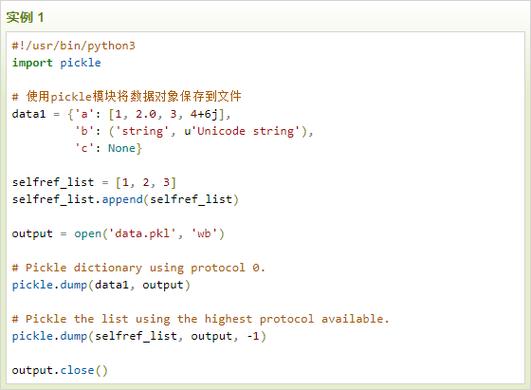
The Core Idea: Saving Python Objects
Both pickle and shelve are part of Python's standard library and are used for serialization—the process of converting a Python object into a byte stream so that it can be saved to a file or sent over a network. The reverse process, turning the byte stream back into a Python object, is called deserialization.
pickle - The Foundation
pickle is the fundamental serialization module in Python. It's like a "can" for your Python objects.
What it does:
pickle takes almost any Python object (lists, dictionaries, class instances, etc.) and converts it into a special byte format. You can then save this byte format to a file. Later, you can read the file and reconstruct the exact same object in memory.
Key Characteristics:
- Format: The format is specific to Python. You can only unpickle a file with a Python interpreter (e.g., you can't read a pickled object with Java or C++ directly).
- Security Warning: NEVER unpickle data from an untrusted source. Pickling can execute arbitrary code during unpickling, making it a potential security risk.
- Protocol: It uses different protocols (versions) for compatibility. The latest (protocol 5) is the most efficient.
How to Use pickle:
You use it with binary file mode ('wb' for write, 'rb' for read).
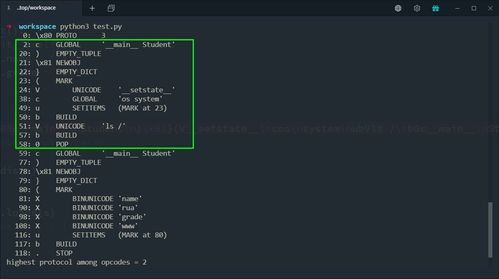
Example: Pickling a dictionary
import pickle
# 1. The data we want to save
my_data = {
    'name': 'Alice',
    'age': 30,
    'scores': [88, 92, 95],
    'is_student': False
}
# 2. Pickle the object and save it to a file
# We use 'wb' (write binary) mode
with open('data.pkl', 'wb') as f:
    pickle.dump(my_data, f)
print("Data has been pickled and saved to data.pkl")
# 3. Unpickle the object and load it from the file
# We use 'rb' (read binary) mode
with open('data.pkl', 'rb') as f:
    loaded_data = pickle.load(f)
print("\nLoaded data from pickle file:")
print(loaded_data)
print(f"Type: {type(loaded_data)}")
# 4. Verify that the data is the same
print("\nIs the loaded data identical to the original?", my_data == loaded_data)
Use Cases for pickle:
- Saving the state of a complex program (e.g., a machine learning model, a game's progress).
- Caching the results of a long computation.
- Sending Python objects between different processes on the same machine.
shelve - The Organized Pantry
shelve is built on top of pickle. It uses pickle behind the scenes to serialize objects, but it adds a crucial layer: a dictionary-like interface.
Think of shelve as a persistent dictionary that is stored on your disk. You access values using string keys, just like a regular Python dictionary.

What it does:
shelve provides a simple key-value store. It automatically handles opening, closing, and managing the underlying database file(s).
Key Characteristics:
- Dictionary-like: You access items with
shelf[key] = valueandvalue = shelf[key]. - Keys must be strings: This is a key limitation. The keys in a
shelvedatabase must always be strings. - Values can be any picklable object: This is its power. You can store lists, dictionaries, custom class instances, etc., as values.
- File Management: It's much simpler than
picklefor multi-object storage. You don't have to manage lists or append to a file. Each key points to its own pickled object.
How to Use shelve:
You open a "shelf" which acts like a dictionary.
Example: Using shelve to store multiple objects
import shelve
# --- Writing to the shelf ---
# 'c' flag means create if it doesn't exist, otherwise open for read/write
with shelve.open('my_shelf.db') as shelf:
    print("Writing data to the shelf...")
    shelf['name'] = 'Bob'
    shelf['age'] = 25
    shelf['hobbies'] = ['reading', 'hiking', 'coding']
    shelf['address'] = {'city': 'New York', 'zip': '10001'}
# The shelf is automatically closed when the 'with' block ends
# --- Reading from the shelf ---
with shelve.open('my_shelf.db', 'r') as shelf: # 'r' for read-only
    print("\nReading data from the shelf...")
    print(f"Name: {shelf['name']}")
    print(f"Age: {shelf['age']}")
    print(f"Hobbies: {shelf['hobbies']}")
    print(f"Address: {shelf['address']}")
    # Check if a key exists before accessing it
    if 'email' in shelf:
        print(f"Email: {shelf['email']}")
    else:
        print("Email key not found.")
# --- Updating a value ---
with shelve.open('my_shelf.db', 'c') as shelf:
    print("\nUpdating age...")
    shelf['age'] = 26 # The old value is replaced
    print(f"New age: {shelf['age']}")
# --- Important: Handling writeback ---
# By default, changes to mutable objects are not saved back to the shelf.
# For example, this will NOT work:
with shelve.open('my_shelf.db', 'c') as shelf:
    shelf['hobbies'].append('gaming') # This modifies the list in memory
    # But the change is NOT saved to the shelf file!
# To fix this, use the 'writeback=True' option. This caches all accessed
# objects and writes them back to the file when the shelf is closed.
# WARNING: This uses more memory!
with shelve.open('my_shelf.db', 'c', writeback=True) as shelf:
    print("\nUsing writeback=True to modify hobbies...")
    shelf['hobbies'].append('gaming')
    # Now the change is saved when the shelf closes.
with shelve.open('my_shelf.db', 'r') as shelf:
    print(f"\nHobbies after writeback: {shelf['hobbies']}")
Use Cases for shelve:
- Simple databases (e.g., a user profile system, a product catalog).
- Caching system where you want to retrieve items by a unique string key.
- Storing configuration settings where you need to access settings by name.
shelve vs. pickle: Head-to-Head Comparison
| Feature | pickle |
shelve |
|---|---|---|
| Core Purpose | Serialize any single Python object to a byte stream. | Create a persistent, dictionary-like key-value store on disk. |
| Interface | Imperative: dump() to write, load() to read. |
Dictionary-like: shelf[key] = value. |
| Object Storage | Stores one object per file (or a list of objects). | Stores multiple objects, each associated with a unique string key. |
| Keys | Not applicable. It's a stream of bytes. | Must be strings. |
| Values | Any picklable object. | Any picklable object. |
| File Handling | You must manually open/close files in binary mode ('wb', 'rb'). |
Automatically handled by the shelve.open() context manager. |
| Best For | Saving the state of one complex object (e.g., a model, a game). | Storing and retrieving many different objects using descriptive keys. |
Which One Should You Choose?
Here's a simple decision guide:
Use shelve if:
✅ You need to store multiple, different Python objects.
✅ You want to access them using meaningful, string-based keys (like a database).
✅ You want a simple, dictionary-like API that is easy to use.
✅ You don't need to store complex, non-string keys.
Example: You're building an app and need to save user data. You can use
shelvewith keys like'user_123','settings', and'cache_data'.
Use pickle if:
✅ You only need to save one (or a few related) Python object(s).
✅ You need full control over the serialization process.
✅ You are sending the object over a network or saving it as part of a larger, single file format.
Example: You've trained a machine learning model with
scikit-learn. You want to save the trained model object to a file so you can load it later without retraining. You would usepickle.dump().
Alternatives to Consider
For more robust and











