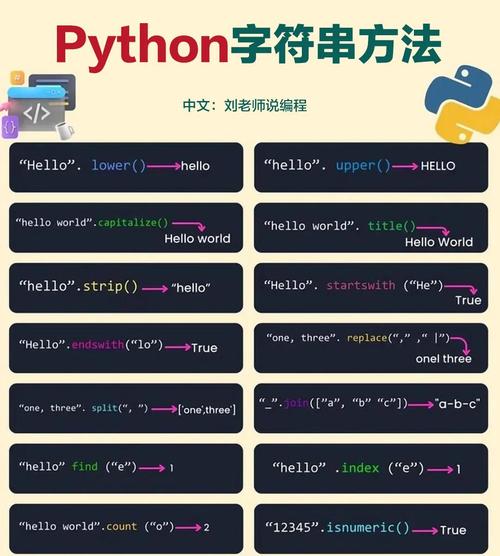
Of course! In Python, the method you're looking for is capitalize(). It's a built-in string method that returns a copy of the string with its first character capitalized and the rest of the characters converted to lowercase.
Let's break it down with examples and common use cases.
The capitalize() Method
Syntax
string.capitalize()
What It Does
- Capitalizes the first character: If the first character of the string is a letter, it converts it to uppercase.
- Lowercases the rest: It converts all other characters in the string to lowercase.
- Non-letters: If the first character is not a letter (e.g., a number, symbol, or space), it leaves it as is and still lowercases the rest of the string.
- Empty strings: If the string is empty, it returns an empty string.
Basic Examples
Here are some straightforward examples to see how it works:
# Example 1: Standard sentence
text1 = "hello world"
print(f"'{text1}' -> '{text1.capitalize()}'")
# Output: 'hello world' -> 'Hello world'
# Example 2: Already capitalized
text2 = "Python is fun"
print(f"'{text2}' -> '{text2.capitalize()}'")
# Output: 'Python is fun' -> 'Python is fun' (the 'P' stays, the rest is lowercased)
# Example 3: All lowercase
text3 = "everything is lowercase"
print(f"'{text3}' -> '{text3.capitalize()}'")
# Output: 'everything is lowercase' -> 'Everything is lowercase'
# Example 4: All uppercase
text4 = "THIS IS A LOUD SENTENCE"
print(f"'{text4}' -> '{text4.capitalize()}'")
# Output: 'THIS IS A LOUD SENTENCE' -> 'This is a loud sentence'
# Example 5: Starting with a number
text5 = "123abc"
print(f"'{text5}' -> '{text5.capitalize()}'")
# Output: '123abc' -> '123abc' (first character is not a letter, so it's not capitalized, but the rest is lowercased)
# Example 6: Starting with a space
text6 = "  leading space"
print(f"'{text6}' -> '{text6.capitalize()}'")
# Output: '  leading space' -> '  leading space' (the first character is a space, so it's not changed)
# Example 7: Empty string
text7 = ""
print(f"'{text7}' -> '{text7.capitalize()}'")
# Output: '' -> ''
Important Distinction: capitalize() vs. title() vs. upper()
It's easy to confuse capitalize() with other string methods. Here’s a quick comparison.
| Method | Description | Example Input ("heLLo wORld") |
Output |
|---|---|---|---|
capitalize() |
Capitalizes the very first character and lowercases all others. | "heLLo wORld" |
"Hello world" |
upper() |
Converts all characters to uppercase. | "heLLo wORld" |
"HELLO WORLD" |
my_string = "heLLo wORld"
print(f"capitalize():  '{my_string.capitalize()}'")
print(f"title():       '{my_string.title()}'")
print(f"upper():       '{my_string.upper()}'")
# Output:
# capitalize():  'Hello world'):       'Hello World'
# upper():       'HELLO WORLD'
Common Use Case: Normalizing User Input
A very common use for capitalize() is when you are collecting user input, like a name or a city, and you want to store it in a consistent format.
# Imagine a user is entering their city
user_city = "new york"  # or "NEW YORK", or "nEw yOrK"
# Normalize the input to have only the first letter of the entire string capitalized
normalized_city = user_city.capitalize()
print(f"User entered: '{user_city}'")
print(f"Normalized to: '{normalized_city}'")
# Database or list would store: 'New york'
A Note on str.title()
While capitalize() is great for titles of documents or single phrases, it's often not what you want for titles of people or books because it lowercases everything after the first word.
For example:
print(book_title.capitalize())
# Output: 'The lord of the rings' (This looks incorrect)
# For titles, a custom function or the .title() method is often better, though .title() has its own issues (e.g., "they're" -> "They'Re").
# A more robust approach for titles is often needed.
Summary
| Method | Best For |
|---|---|
capitalize() |
Standardizing the first letter of a single string or sentence. Ensuring the rest is lowercase. |
upper() |
When you need the entire string to be in uppercase, like for acronyms or shouting. |
For your request "python captitalize", the answer is the capitalize() method.