Of course! This is a fundamental topic in Java. Here’s a comprehensive breakdown of Vector and List, covering their differences, similarities, usage, and best practices.
The Short Answer (TL;DR)
| Feature | java.util.Vector |
java.util.List (Interface) |
|---|---|---|
| Type | A concrete, legacy class | An interface, a blueprint for lists |
| Thread Safety | Synchronized (thread-safe) by default | Not synchronized by default. You can make them thread-safe. |
| Performance | Slower due to synchronization overhead | Faster, as it doesn't have the synchronization overhead. |
| Modern Use | Avoid in new code. Use Collections.synchronizedList() or CopyOnWriteArrayList instead. |
Use this. It's the standard interface for all ordered collections. |
| Legacy Feature | Has legacy methods like addElement(), elementAt() |
Uses the standard Collection API: add(), get(), etc. |
java.util.List (The Interface)
List is one of the core interfaces in the Java Collections Framework. It represents an ordered collection (also known as a sequence) that can contain duplicate elements.
Key Characteristics of a List:
- Ordered: Elements are stored in the order they are inserted. You can access them by their position (index).
- Allows Duplicates: You can add the same object multiple times.
- Allows Null Elements: Most
Listimplementations allow you to storenullvalues. - Interface, Not a Class: You cannot instantiate a
Listdirectly. You must use one of its concrete implementations.
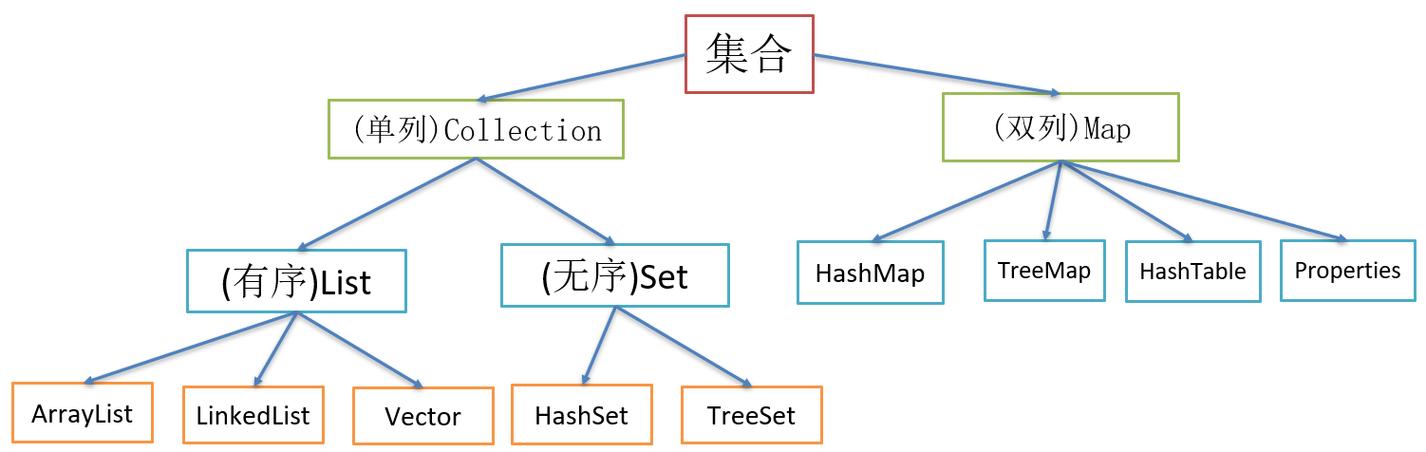
Common Implementations of List:
ArrayList: The most common implementation. It's resizable and internally uses a dynamic array. It's fast for random access (getting an element by its index) but can be slow for inserting/deleting elements in the middle of the list.LinkedList: Implemented as a doubly-linked list. It's fast for inserting and deleting elements anywhere in the list but slower for random access.Vector: A legacy implementation (we'll cover this next).CopyOnWriteArrayList: A modern, thread-safeList. It's used in highly concurrent scenarios where iterations far outnumber modifications.
Example: Using List (with ArrayList)
import java.util.ArrayList;
import java.util.List;
public class ListExample {
    public static void main(String[] args) {
        // You always declare the variable with the interface type (List)
        // and instantiate with a concrete class (ArrayList).
        List<String> fruits = new ArrayList<>();
        // Add elements
        fruits.add("Apple");
        fruits.add("Banana");
        fruits.add("Orange");
        fruits.add("Apple"); // Duplicate is allowed
        System.out.println("Initial List: " + fruits);
        // Access an element by index (0-based)
        String firstFruit = fruits.get(0);
        System.out.println("First Fruit: " + firstFruit);
        // Remove an element
        fruits.remove("Banana");
        System.out.println("List after removing 'Banana': " + fruits);
        // Check if an element exists
        boolean hasOrange = fruits.contains("Orange");
        System.out.println("Does the list contain 'Orange'? " + hasOrange);
        // Get the size of the list
        System.out.println("Size of the list: " + fruits.size());
    }
}
java.util.Vector (The Legacy Class)
Vector is a legacy class that was part of Java's original collections (before Java 1.2). It was retrofitted to implement the List interface.
Key Characteristics of Vector:
- Thread-Safe: This is its most defining feature. Every public method in
Vectorissynchronized. This means that only one thread can execute a method on aVectorobject at a time, preventing concurrent modification issues. - Slower Performance: Because of the synchronization,
Vectoroperations are slower than their unsynchronized counterparts inArrayList. If you are not working in a multi-threaded environment, this overhead is unnecessary and degrades performance. - Legacy Methods:
Vectorhas some old methods that are not part of the standardListinterface, such asaddElement(E obj)andelementAt(int index). While they still work, it's better to use the standardadd()andget()methods for consistency.
Example: Using Vector
import java.util.Vector;
public class VectorExample {
    public static void main(String[] args) {
        // Vector is a concrete class, so you can instantiate it directly.
        // It's generic, so you specify the type of elements it will hold.
        Vector<String> vehicles = new Vector<>();
        // Add elements (can use legacy or modern methods)
        vehicles.addElement("Car");    // Legacy method
        vehicles.add("Bicycle");       // Modern method from List interface
        vehicles.add("Motorcycle");
        vehicles.add("Car");           // Duplicates are allowed
        System.out.println("Initial Vector: " + vehicles);
        // Access an element
        String firstVehicle = vehicles.get(0); // Using the modern List method
        // String firstVehicle = vehicles.elementAt(0); // Using the legacy method
        System.out.println("First Vehicle: " + firstVehicle);
        // Remove an element
        vehicles.remove("Bicycle");
        System.out.println("Vector after removing 'Bicycle': " + vehicles);
    }
}
Vector vs. ArrayList: The Crucial Comparison
This is the most important comparison for any Java developer.
| Feature | Vector |
ArrayList |
|---|---|---|
| Synchronization | Synchronized. Thread-safe. | Not Synchronized. Not thread-safe by default. |
| Performance | Slower due to locking overhead. | Faster, as there's no synchronization cost. |
| Growth Mechanism | When it needs to grow, it increases its capacity by 100% (doubles its size). | When it needs to grow, it increases its capacity by 50% (1.5 times its size). This is often more memory-efficient. |
| Legacy vs. Modern | Legacy class. Avoid in new code. | Modern standard. The default choice for a non-thread-safe list. |
| API | Has legacy methods like addElement(), elementAt(). |
Adheres strictly to the List interface. |
When to use Vector?
Almost never in new, modern Java code. The main reason people used Vector was for thread safety. Today, there are much better, more efficient alternatives.
When to use ArrayList?
Almost always, when you need a dynamic array and do not require thread safety. It's the go-to implementation for 95% of use cases involving a List.
Modern Thread-Safe Alternatives to Vector
If you need a thread-safe list, don't use Vector. Use these modern alternatives instead.
Alternative 1: Collections.synchronizedList()
This is a wrapper that takes any List (like an ArrayList) and makes it thread-safe. It synchronizes on every public method, similar to Vector.
import java.util.ArrayList;
import java.util.Collections;
import java.util.List;
public class SynchronizedListExample {
    public static void main(String[] args) {
        // Create a regular, fast ArrayList
        List<String> list = new ArrayList<>();
        // "Wrap" it to make it thread-safe
        List<String> synchronizedList = Collections.synchronizedList(list);
        // Now you can use synchronizedList in a multi-threaded environment.
        // You must manually synchronize on the list when iterating over it!
        synchronizedList.add("One");
        synchronizedList.add("Two");
        // Iterating over a synchronized collection requires manual synchronization
        synchronized (synchronizedList) {
            for (String item : synchronizedList) {
                System.out.println(item);
            }
        }
    }
}
Alternative 2: CopyOnWriteArrayList
This is a superior choice for scenarios where you have many more reads than writes.
- How it works: When you modify the list (add, remove, etc.), it creates a brand new copy of the underlying array in the background. The read operations always happen on the unmodified, stable array.
- Benefit: Read operations are extremely fast because they never need to be locked. There is no performance impact on reads.
- Drawback: Write operations are expensive because they involve copying the entire array.
- Best for: Event listeners, observer lists, or any collection where iteration is frequent and modification is rare.
import java.util.concurrent.CopyOnWriteArrayList;
public class CopyOnWriteArrayListExample {
    public static void main(String[] args) {
        // This list is inherently thread-safe
        CopyOnWriteArrayList<String> list = new CopyOnWriteArrayList<>();
        list.add("Alpha");
        list.add("Beta");
        // Iterating is safe and fast, even if other threads modify the list
        for (String s : list) {
            System.out.println(s);
            // Note: This iteration will not see any modifications made by other
            // threads *after* this iteration started.
        }
    }
}
Summary and Best Practices
-
Use
Listas your type declaration. It's good practice to program to the interface.// Good List<String> myList = new ArrayList<>(); // Avoid ArrayList<String> myList = new ArrayList<>();
-
Use
ArrayListfor general-purpose, non-thread-safe lists. It's fast, efficient, and the standard choice. -
Avoid
Vectorin new code. It's a legacy class with poor performance characteristics compared to modern alternatives. -
For thread-safe lists:
- Use
CopyOnWriteArrayListif you have far more reads than writes. - Use
Collections.synchronizedList()if you have a mix of reads and writes and need a simple solution. Remember to manually synchronize on the list during iteration.
- Use