Of course! Here is a comprehensive guide to using the jQuery EasyUI Tree component in a Java web application. This guide is structured for beginners and covers everything from basic setup to server-side integration.
What is EasyUI Tree?
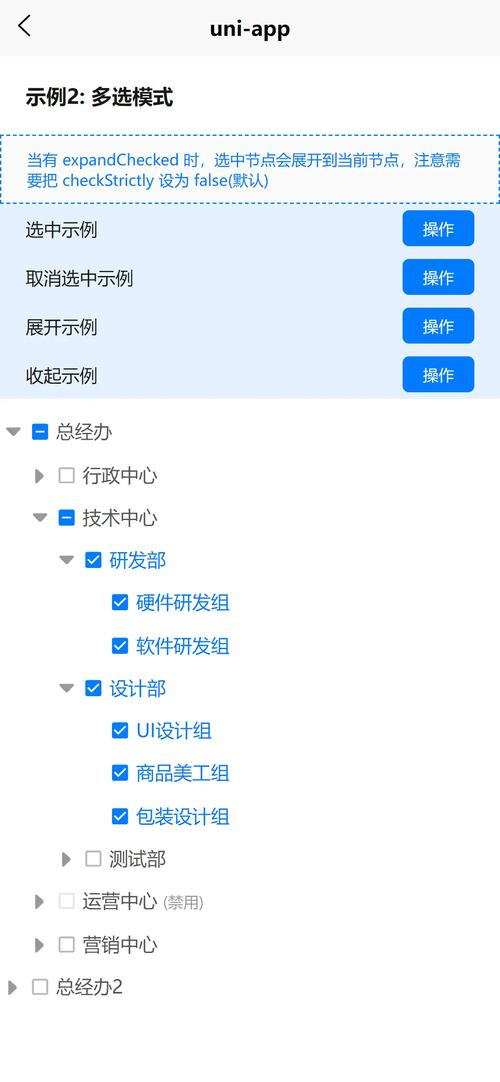
The EasyUI Tree is a flexible and feature-rich component for displaying hierarchical data. It's built on top of jQuery and is very popular for building admin backends because it's easy to use and has a clean, professional look out of the box.
Key features:
- Hierarchical Data Display: Shows data in a tree structure with parent-child relationships.
- Load on Demand: Child nodes can be loaded from the server only when the parent node is expanded. This is crucial for performance with large datasets.
- CRUD Operations: Easily add, edit, and delete nodes.
- State Management: Supports checkboxes, radio buttons, and node selection.
- Customizable: Themable and customizable through CSS and configuration options.
Step 1: Project Setup (Maven)
First, you need to add the necessary EasyUI libraries to your project. The easiest way is with Maven.
Add these dependencies to your pom.xml:
<dependencies>
    <!-- JSP API -->
    <dependency>
        <groupId>javax.servlet</groupId>
        <artifactId>javax.servlet-api</artifactId>
        <version>4.0.1</version>
        <scope>provided</scope>
    </dependency>
    <!-- JSTL for JSP -->
    <dependency>
        <groupId>javax.servlet</groupId>
        <artifactId>jstl</artifactId>
        <version>1.2</version>
    </dependency>
    <!-- EasyUI (jQuery and EasyUI files) -->
    <!-- You can host these yourself or use a CDN -->
    <!-- For simplicity, we'll assume you've placed them in webapp/resources/easyui -->
    <!-- This dependency is just for the POM to resolve versions, the actual JS/CSS files are static -->
    <dependency>
        <groupId>org.webjars</groupId>
        <artifactId>jquery-easyui</artifactId>
        <version>1.9.21</version>
    </dependency>
</dependencies>
File Structure:
Place the EasyUI CSS and JS files in your webapp directory.
your-project/
├── src/
│   └── main/
│       ├── java/
│       ├── resources/
│       └── webapp/
│           ├── resources/
│           │   └── easyui/  <-- Place easyui.css, jquery.min.js, jquery.easyui.min.js etc. here
│           ├── WEB-INF/
│           │   └── views/
│           │       └── tree.jsp  <-- Our JSP page
│           └── index.jsp       <-- Entry point
You can download the EasyUI files from the official site or use a CDN link in your JSP.
Step 2: The JSP Page (tree.jsp)
This is where the Tree component will be rendered. We'll create a simple JSP that includes the necessary CSS and JS files and initializes the tree.
<%@ page language="java" contentType="text/html; charset=UTF-8" pageEncoding="UTF-8"%>
<%@ taglib prefix="c" uri="http://java.sun.com/jsp/jstl/core" %>
<!DOCTYPE html>
<html>
<head>
<meta charset="UTF-8">EasyUI Tree Demo</title>
<!-- Use CDN or local files -->
<link rel="stylesheet" type="text/css" href="https://www.jeasyui.com/easyui/themes/default/easyui.css">
<link rel="stylesheet" type="text/css" href="https://www.jeasyui.com/easyui/themes/icon.css">
<script type="text/javascript" src="https://code.jquery.com/jquery-1.12.4.min.js"></script>
<script type="text/javascript" src="https://www.jeasyui.com/easyui/jquery.easyui.min.js"></script>
<script type="text/javascript" src="https://www.jeasyui.com/easyui/locale/easyui-lang-zh_CN.js"></script> <!-- For Chinese localization -->
<style>
    body {
        font-family: Arial, sans-serif;
        padding: 20px;
    }
    #tree-container {
        width: 300px;
        border: 1px solid #ccc;
        padding: 10px;
    }
</style>
</head>
<body>
    <h2>Basic EasyUI Tree</h2>
    <p>This tree loads all data at once.</p>
    <div id="tree-container"></div>
    <hr>
    <h2>Tree with Load on Demand</h2>
    <p>This tree loads child nodes from the server when a parent is expanded.</p>
    <div id="tree-container-dynamic"></div>
<script type="text/javascript">
    $(document).ready(function(){
        // --- Example 1: Basic Tree (Static Data) ---
        $('#tree-container').tree({
            data: [
                {
                    id: 1,
                    text: 'Folder 1',
                    iconCls: 'icon-folder',
                    state: 'closed', // Start closed
                    children: [
                        { id: 11, text: 'File 1-1', iconCls: 'icon-file' },
                        { id: 12, text: 'File 1-2', iconCls: 'icon-file' }
                    ]
                },
                {
                    id: 2,
                    text: 'Folder 2',
                    iconCls: 'icon-folder',
                    children: [
                        { id: 21, text: 'File 2-1', iconCls: 'icon-file' }
                    ]
                }
            ]
        });
        // --- Example 2: Dynamic Tree (Load on Demand) ---
        $('#tree-container-dynamic').tree({
            url: '/tree/getNodes', // The URL to fetch data from
            method: 'get',
            animate: true,
            lines: true,
            loadFilter: function(data) {
                // The server returns { total: 2, rows: [...] }
                // EasyUI expects just the array of nodes
                return data.rows;
            },
            onBeforeExpand: function(node) {
                // This is a key event for load-on-demand
                // It tells the tree where to get the children for the expanded node
                $(this).tree('options').url = '/tree/getNodes?parentId=' + node.id;
            }
        });
    });
</script>
</body>
</html>
Step 3: The Java Backend (Servlet)
Now, let's create the Java code to serve the tree data. We'll use a simple Servlet. The data format is critical: EasyUI expects a JSON array of nodes.
Each node in the array is a JSON object with properties like id, text, and children.
The Node Structure:
{
    "id": 1,              // Unique identifier
    "text": "Node Text", // Display text
    "state": "open",      // 'open' or 'closed'. 'closed' indicates children can be loaded.
    "iconCls": "icon-folder", // CSS class for the icon
    "attributes": {       // Custom data
        "someProperty": "someValue"
    }
}
The Servlet (TreeController.java)
This servlet will handle the request from the dynamic tree.
package com.example.controller;
import com.example.model.TreeNode;
import com.fasterxml.jackson.databind.ObjectMapper;
import javax.servlet.annotation.WebServlet;
import javax.servlet.http.HttpServlet;
import javax.servlet.http.HttpServletRequest;
import javax.servlet.http.HttpServletResponse;
import java.io.IOException;
import java.util.ArrayList;
import java.util.List;
@WebServlet("/tree/getNodes")
public class TreeController extends HttpServlet {
    // In a real app, you would fetch this from a database or service layer
    private static final List<TreeNode> allNodes = new ArrayList<>();
    static {
        // Root nodes
        allNodes.add(new TreeNode(1, "Animals", "icon-folder", "closed"));
        allNodes.add(new TreeNode(2, "Fruits", "icon-folder", "closed"));
        allNodes.add(new TreeNode(3, "Vegetables", "icon-folder", "closed"));
        // Children of Animals (id=1)
        allNodes.add(new TreeNode(11, "Mammals", "icon-file", 1));
        allNodes.add(new TreeNode(12, "Birds", "icon-file", 1));
        allNodes.add(new TreeNode(13, "Reptiles", "icon-file", 1));
        // Children of Mammals (id=11)
        allNodes.add(new TreeNode(111, "Lion", "icon-file", 11));
        allNodes.add(new TreeNode(112, "Elephant", "icon-file", 11));
        // Children of Fruits (id=2)
        allNodes.add(new TreeNode(21, "Apple", "icon-file", 2));
        allNodes.add(new TreeNode(22, "Banana", "icon-file", 2));
    }
    @Override
    protected void doGet(HttpServletRequest req, HttpServletResponse resp) throws IOException {
        String parentIdParam = req.getParameter("parentId");
        List<TreeNode> childrenNodes = new ArrayList<>();
        if (parentIdParam == null || parentIdParam.isEmpty()) {
            // If no parentId is provided, return the root nodes
            for (TreeNode node : allNodes) {
                if (node.getParentId() == 0) {
                    childrenNodes.add(node);
                }
            }
        } else {
            // If parentId is provided, return its children
            long parentId = Long.parseLong(parentIdParam);
            for (TreeNode node : allNodes) {
                if (node.getParentId() == parentId) {
                    childrenNodes.add(node);
                }
            }
        }
        // Use Jackson to convert the list of objects to JSON
        ObjectMapper mapper = new ObjectMapper();
        // EasyUI tree expects a JSON array directly.
        // The loadFilter in JSP can handle more complex structures if needed.
        resp.setContentType("application/json");
        resp.setCharacterEncoding("UTF-8");
        mapper.writeValue(resp.getWriter(), childrenNodes);
    }
}
// A simple POJO to represent a tree node
class TreeNode {
    private long id;
    private String text;
    private String iconCls;
    private long parentId; // Helper property, not part of the JSON output
    public TreeNode(long id, String text, String iconCls, long parentId) {
        this.id = id;
        this.text = text;
        this.iconCls = iconCls;
        this.parentId = parentId;
    }
    public TreeNode(long id, String text, String iconCls, String state) {
        this.id = id;
        this.text = text;
        this.iconCls = iconCls;
        // For root nodes, we set state directly
        // This constructor is a bit simplified for the example
        this.parentId = 0;
    }
    // Getters and Setters (Required for Jackson)
    public long getId() { return id; }
    public void setId(long id) { this.id = id; }
    public String getText() { return text; }
    public void setText(String text) { this.text = text; }
    public String getIconCls() { return iconCls; }
    public void setIconCls(String iconCls) { this.iconCls = iconCls; }
    public long getParentId() { return parentId; }
    public void setParentId(long parentId) { this.parentId = parentId; }
}
How It Works Together
- User opens
tree.jsp: The page loads, and the$(document).ready()function executes. - Dynamic Tree Initialization:
$('#tree-container-dynamic').tree({...})is called.- The
url: '/tree/getNodes'tells the tree to fetch its initial data from this URL. - The
onBeforeExpandhandler is set. This function runs before a node is expanded.
- The
- Initial Load: The tree makes a GET request to
/tree/getNodes. Since there's noparentIdparameter, the servlet returns all root nodes (Animals, Fruits, Vegetables). - Tree Renders: The tree displays these three root nodes.
- User Expands "Animals": The
onBeforeExpandfunction fires. It updates the tree'surlto/tree/getNodes?parentId=1. - Child Node Load: The tree now makes a GET request to the new URL. The servlet sees
parentId=1and returns the children of "Animals" (Mammals, Birds, Reptiles). - Tree Appends Children: The tree takes the new JSON data and appends the new nodes under the "Animals" node.
Advanced: Adding Checkboxes
To add checkboxes, you just need one line in your JSP configuration.
// In your tree() configuration
$('#tree-container').tree({
    checkbox: true, // <-- Add this line
    url: '/tree/getNodes',
    // ... other options
});
The server doesn't need to change. EasyUI will automatically render checkboxes. You can then get the checked nodes using JavaScript:
var checkedNodes = $('#tree-container').tree('getChecked');
// checkedNodes will be an array of node objects that are checked.
console.log(checkedNodes);
To get the ids of the checked nodes, you can map the array:
var checkedIds = $.map(checkedNodes, function(node){
    return node.id;
});
console.log(checkedIds); // e.g., [1, 11, 112]
Summary
| Concept | JSide | Java Side |
|---|---|---|
| Data Format | JSON Array of objects. Each object has id, text, etc. |
Create POJOs with matching fields (id, text). Use Jackson to convert to JSON. |
| Load on Demand | Set url in config. Use onBeforeExpand to modify the URL with the parent's id. |
Read parentId from the request parameter. Return only the children for that id. |
| Initial Load | Set url or provide data for static trees. |
Handle the request with no parentId to return root nodes. |
| CRUD | Use tree('append'), tree('remove'), tree('update') methods. |
Add new Servlets for POST/PUT/DELETE to handle create/update/delete operations. |