Of course! Let's dive deep into ServletRequest, a fundamental interface in Java web development.
What is ServletRequest?
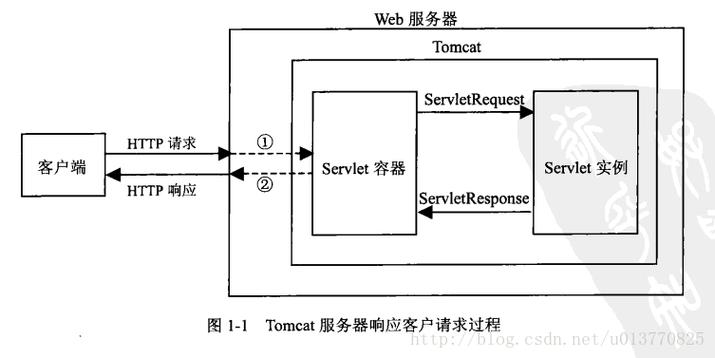
ServletRequest is an interface in the javax.servlet package that represents a request from a client to a servlet. When a user (a client) makes an request to a web server (e.g., by typing a URL in a browser), the servlet container (like Tomcat or Jetty) creates an ServletRequest object. This object contains all the information about the client's request.
Your servlet's service() method (or doGet(), doPost(), etc.) receives this ServletRequest object as its first parameter, allowing your code to inspect and react to the incoming request.
Key Characteristics
- Interface, Not a Class: You work with an instance of a class that implements the
ServletRequestinterface. You don't instantiate it yourself; the servlet container does. - Request-Scoped: It exists only for the duration of a single request. After the server sends a response, the
ServletRequestobject is discarded. - Information-Rich: It provides access to all parts of an HTTP request, including headers, parameters, attributes, and the input stream.
How to Get an ServletRequest Object?
You don't create it. The servlet container passes it to your servlet's service method.
Here's a standard example in a HttpServlet:
import javax.servlet.http.HttpServlet;
import javax.servlet.http.HttpServletRequest;
import javax.servlet.http.HttpServletResponse;
import java.io.IOException;
public class MyExampleServlet extends HttpServlet {
    @Override
    protected void doGet(HttpServletRequest request, HttpServletResponse response) throws IOException {
        // The container passes an HttpServletRequest (which extends ServletRequest)
        // and an HttpServletResponse to this method.
        // You can now use the 'request' object to get information
        String userAgent = request.getHeader("User-Agent");
        System.out.println("Request came from: " + userAgent);
        // ... process the request and generate a response ...
    }
}
Note:
HttpServletRequestis an extension ofServletRequestthat is specific to HTTP requests. It adds HTTP-specific methods likegetSession(),getCookies(), andgetPathInfo(). In modern web development, you will almost always work withHttpServletRequest.
Commonly Used Methods of ServletRequest
The interface provides a wide range of methods. Here are the most important ones, categorized by their function.
Information about the Request Line and URI
These methods help you identify the resource the client is requesting.
| Method | Description | Example |
|---|---|---|
String getMethod() |
Returns the HTTP method (GET, POST, PUT, etc.). | request.getMethod() -> "GET" |
String getRequestURI() |
Returns the part of the URL from the protocol name up to the query string. | request.getRequestURI() -> /myApp/user/profile |
String getRequestURL() |
Reconstructs the URL the client used to make the request. | request.getRequestURL() -> http://localhost:8080/myApp/user/profile |
String getQueryString() |
Returns the query string (the part after the ). | request.getQueryString() -> id=123&name=John |
String getContextPath() |
Returns the context path of the web application. | request.getContextPath() -> /myApp |
String getServletPath() |
Returns the path section that directly calls the servlet. | request.getServletPath() -> /user/profile |
Accessing Request Parameters
These methods are used to read data sent by the client, typically from an HTML form.
| Method | Description |
|---|---|
String getParameter(String name) |
Returns the value of a request parameter as a String. Returns null if the parameter doesn't exist. |
Map<String, String[]> getParameterMap() |
Returns a java.util.Map containing all parameters and their values. This is very useful when you have multiple values for a single parameter name (e.g., checkboxes). |
Enumeration<String> getParameterNames() |
Returns an Enumeration of all parameter names. |
String[] getParameterValues(String name) |
Returns an array of Strings containing all values for the given parameter name. Useful for multi-select lists or checkboxes. |
Example (HTML Form):
<form action="/search" method="get">
  <input type="text" name="q" value="java servlet">
  <input type="checkbox" name="category" value="books">
  <input type="checkbox" name="category" value="articles">
  <button type="submit">Search</button>
</form>
Example (Servlet Code):
// In the doGet method of a servlet mapped to "/search"
String searchQuery = request.getParameter("q"); // "java servlet"
String[] categories = request.getParameterValues("category"); // ["books", "articles"]
Reading Request Headers
HTTP headers provide metadata about the request or the client itself.
| Method | Description |
|---|---|
String getHeader(String name) |
Returns the value of a specified header. |
Enumeration<String> getHeaderNames() |
Returns an Enumeration of all header names. |
Enumeration<String> getHeaders(String name) |
Returns all values for a header that can have multiple values (e.g., Accept-Language). |
int getIntHeader(String name) |
Returns a header value as an int. |
String getContentType() |
Returns the Content-Type header of the request. |
String getCharacterEncoding() |
Returns the character encoding (e.g., UTF-8) used for the request body. |
String getRemoteAddr() |
Returns the IP address of the client. |
Example:
String userAgent = request.getHeader("User-Agent");
String acceptLanguage = request.getHeader("Accept-Language");
String ipAddress = request.getRemoteAddr();
Reading the Request Body
If the client sends data in the body of a request (e.g., with a POST request), you can read it as an input stream.
| Method | Description |
|---|---|
ServletInputStream getInputStream() |
Returns an InputStream for reading binary data from the body. |
BufferedReader getReader() |
Returns a BufferedReader for reading character data from the body. The character encoding is determined by getCharacterEncoding(). |
Example (Reading a JSON payload):
// In a doPost method
try (BufferedReader reader = request.getReader()) {
    StringBuilder sb = new StringBuilder();
    String line;
    while ((line = reader.readLine()) != null) {
        sb.append(line);
    }
    String requestBody = sb.toString();
    // Now parse 'requestBody' as JSON
    System.out.println("Request Body: " + requestBody);
} catch (IOException e) {
    // handle exception
}
Request Attributes
Attributes are objects you can attach to the request object and forward it to another resource (like another servlet or a JSP). They are not sent by the client; they are set by your server-side code.
| Method | Description |
|---|---|
void setAttribute(String name, Object o) |
Stores an attribute in the request. |
Object getAttribute(String name) |
Retrieves an attribute by name. |
Enumeration<String> getAttributeNames() |
Returns an Enumeration of all attribute names. |
void removeAttribute(String name) |
Removes an attribute. |
Example (Forwarding to a JSP):
// In a servlet
User user = new User("Alice", "admin");
request.setAttribute("user", user); // Storing an object in the request
// Forward the request to a JSP page
RequestDispatcher dispatcher = request.getRequestDispatcher("/userProfile.jsp");
dispatcher.forward(request, response);
In userProfile.jsp, you can access the user object like this:
${user.name}
A Complete Practical Example
Let's create a simple form that sends data to a servlet, which then processes it and prints the information to the console.
HTML Form (index.html)
<!DOCTYPE html>
<html>
<head>Form Example</title>
</head>
<body>
    <h1>User Registration</h1>
    <form action="register" method="post">
        Name: <input type="text" name="username"><br>
        Email: <input type="email" name="email"><br>
        Interests:
        <input type="checkbox" name="interests" value="coding"> Coding
        <input type="checkbox" name="interests" value="music"> Music
        <input type="checkbox" name="interests" value="sports"> Sports<br>
        <input type="submit" value="Register">
    </form>
</body>
</html>
The Servlet (RegistrationServlet.java)
import javax.servlet.ServletException;
import javax.servlet.annotation.WebServlet;
import javax.servlet.http.HttpServlet;
import javax.servlet.http.HttpServletRequest;
import javax.servlet.http.HttpServletResponse;
import java.io.IOException;
import java.util.Arrays;
@WebServlet("/register") // Maps this servlet to the /register URL
public class