Of course! Let's dive deep into Java .properties files. They are a fundamental part of Java development for managing configuration external to your code.
What is a .properties file?
A .properties file is a simple, plain-text file used in Java to store configuration data, such as database credentials, application settings, API keys, and other parameters. The key advantage is that you can change these values without recompiling your Java code.
Key Characteristics:
- Format: It's a simple key-value pair format.
- Encoding: Traditionally, it uses ISO-8859-1 (Latin-1) encoding. For modern applications, especially with non-ASCII characters, UTF-8 is highly recommended and supported by Java 9+.
- Structure:
- Lines are either comments or key-value pairs.
- Comments start with or .
- A key-value pair is separated by an equals sign () or a colon ().
- Keys and values are strings. Values can be escaped with a backslash (
\).
Example (config.properties):
# Database Configuration
db.url=jdbc:mysql://localhost:3306/my_app_db
db.username=admin
db.password=secret!@#123
# Application Settings
app.name=My Awesome App
app.version=1.2.5
app.debug.mode=true
# Feature Toggles
feature.new_ui.enabled=false
How to Read a .properties File in Java
There are two primary ways to load properties in Java: the classic java.util.Properties class and the more modern java.util.ResourceBundle.
Method 1: Using java.util.Properties (Most Common)
This is the most flexible method, as it allows you to load properties from any InputStream, such as a file, a network resource, or even a classpath resource.
Steps:
- Create an instance of
Properties. - Load the content from the file using
load(InputStream)orload(Reader). It's crucial to use aReader(likeInputStreamReader) with UTF-8 encoding to correctly handle special characters. - Retrieve values using
getProperty(String key).
Example Code:
Let's assume your config.properties file is located in the resources directory of your Maven/Gradle project.
import java.io.InputStream;
import java.io.InputStreamReader;
import java.nio.charset.StandardCharsets;
import java.util.Properties;
public class PropertiesExample {
    public static void main(String[] args) {
        // The file is located in the classpath (e.g., src/main/resources)
        String fileName = "config.properties";
        // Use try-with-resources to ensure the stream is closed automatically
        try (InputStream inputStream = PropertiesExample.class.getClassLoader().getResourceAsStream(fileName);
             InputStreamReader reader = new InputStreamReader(inputStream, StandardCharsets.UTF_8)) {
            if (inputStream == null) {
                System.err.println("Sorry, unable to find " + fileName);
                return;
            }
            Properties prop = new Properties();
            // Load the properties file
            prop.load(reader);
            // Read values from the properties file
            String dbUrl = prop.getProperty("db.url");
            String dbUser = prop.getProperty("db.username");
            String dbPassword = prop.getProperty("db.password");
            String appName = prop.getProperty("app.name");
            boolean isDebugMode = Boolean.parseBoolean(prop.getProperty("app.debug.mode"));
            // Print the values
            System.out.println("Application Name: " + appName);
            System.out.println("Database URL: " + dbUrl);
            System.out.println("Database User: " + dbUser);
            System.out.println("Debug Mode: " + isDebugMode);
            // Handling a property that might not exist
            String newUiFeature = prop.getProperty("feature.new_ui.enabled", "false"); // Default value is "false"
            System.out.println("New UI Feature Enabled: " + newUiFeature);
        } catch (Exception ex) {
            ex.printStackTrace();
        }
    }
}
Explanation:
getClassLoader().getResourceAsStream(fileName): This is the standard way to load a file from the application's classpath. It works in both standalone applications and web containers (like Tomcat).InputStreamReader(inputStream, StandardCharsets.UTF_8): This is the best practice for correctly reading the file, ensuring that characters like , , or are read properly.prop.getProperty("key"): Retrieves the value for the given key. If the key is not found, it returnsnull.prop.getProperty("key", "default_value"): Retrieves the value, or returns the specified default value if the key is not found. This is very useful for avoidingNullPointerException.
Method 2: Using java.util.ResourceBundle (Good for Internationalization)
ResourceBundle is designed for localization (i18n) but is also excellent for simple configuration. It automatically looks for files with a specific naming convention.
Naming Convention:
- Base name:
messages(for example) - Locale-specific suffix:
_en,_fr,_de, etc. - File extension:
.properties
So, you would have:
messages.properties(default/fallback)messages_fr.properties(French)messages_de.properties(German)
Example Code:
Let's use a file named messages.properties in the resources directory.
# messages.properties
welcome.message=Hello, World!
goodbye.message=Goodbye!
import java.util.Locale;
import java.util.ResourceBundle;
public class ResourceBundleExample {
    public static void main(String[] args) {
        // Load the default bundle (messages.properties)
        ResourceBundle bundle = ResourceBundle.getBundle("messages");
        // Read values
        String welcome = bundle.getString("welcome.message");
        String goodbye = bundle.getString("goodbye.message");
        System.out.println(welcome); // Output: Hello, World!
        System.out.println(goodbye); // Output: Goodbye!
        // --- Example with a specific Locale ---
        // Let's assume we have a messages_fr.properties with:
        // welcome.message=Bonjour le monde!
        // goodbye.message=Au revoir!
        Locale frenchLocale = new Locale("fr");
        ResourceBundle frenchBundle = ResourceBundle.getBundle("messages", frenchLocale);
        System.out.println(frenchBundle.getString("welcome.message")); // Output: Bonjour le monde!
    }
}
When to use ResourceBundle:
- When your application needs to support multiple languages.
- For simple, string-based configurations where you don't need complex loading logic.
When to use Properties:
- For general-purpose configuration.
- When you need to load from a dynamic file path (not just the classpath).
- When you need to handle non-string data types (like
int,boolean) easily. - When you need to write back to the properties file.
Advanced: Writing to a .properties File
You can also modify and save properties back to a file using the store() method.
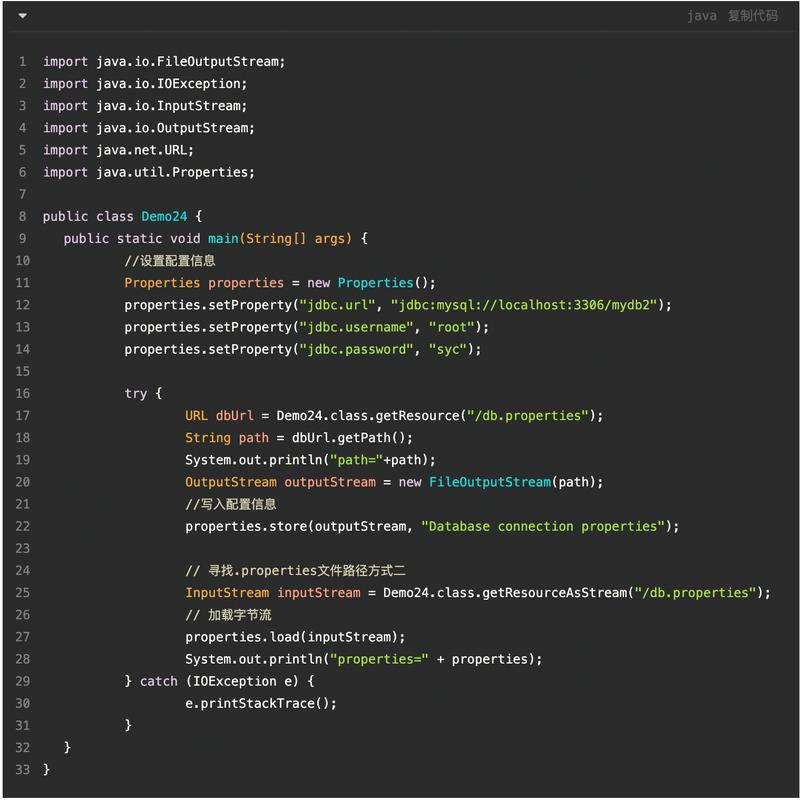
import java.io.FileOutputStream;
import java.io.OutputStream;
import java.nio.charset.StandardCharsets;
import java.util.Properties;
public class WritePropertiesExample {
    public static void main(String[] args) {
        Properties prop = new Properties();
        prop.setProperty("server.port", "8080");
        prop.setProperty("logging.level", "INFO");
        prop.setProperty("new.setting", "value");
        String fileName = "config_new.properties";
        try (OutputStream output = new FileOutputStream(fileName)) {
            // Save the properties to a file
            // The second argument is a comment for the top of the file
            prop.store(output, "Application Configuration File - Updated");
            System.out.println("Properties file saved successfully!");
        } catch (Exception io) {
            io.printStackTrace();
        }
    }
}
Important Note on store():
The store() method does not preserve comments or the order of properties. It will overwrite the file with a new one containing only the key-value pairs from the Properties object. This is a major limitation if you want to maintain comments or structure.
Best Practices
- Store in
src/main/resources: For Maven/Gradle projects, place your properties files here. They will be automatically included in the final artifact (JAR/WAR) and accessible from the classpath. - Use UTF-8 Encoding: Always use
InputStreamReaderwithStandardCharsets.UTF_8when reading to avoid character encoding issues. - Provide Default Values: Use
getProperty(key, defaultValue)to make your application more robust. - Don't Store Secrets: Never commit passwords, API keys, or other sensitive data to version control. Use environment variables, a secrets management tool (like HashiCorp Vault), or a configuration server for secrets.
- Structure with Hierarchical Keys: Use dots () in your keys to create a logical hierarchy, which can be useful for organizing settings (e.g.,
database.connection.url). - Use
.propertiesfor Simple Data: They are great for strings, booleans, and numbers. For more complex, structured data (like JSON, XML, YAML), consider using other formats and libraries (e.g., Jackson for JSON).