
Of course! Let's break down the powerful combination of Python, Linux, and NumPy. These three technologies form the bedrock of modern scientific computing, data science, and machine learning, especially in professional and research environments.

Here's a comprehensive guide covering what they are, why they work so well together, and how to get started.
The "What": A Quick Overview
Python
- What it is: A high-level, interpreted, general-purpose programming language.
- Why it's used here:
- Readable & Simple: Its syntax is clean and easy to learn, allowing you to focus on solving problems rather than complex code.
- Vast Ecosystem: This is Python's superpower. Through its package manager,
pip, you can access millions of packages for almost any task imaginable. - Data Science Stack: It's the de facto language for data science thanks to libraries like NumPy, Pandas, Matplotlib, Scikit-learn, and TensorFlow/PyTorch.
Linux
- What it is: A family of open-source, Unix-like operating systems (e.g., Ubuntu, CentOS, Debian, Fedora).
- Why it's used here:
- The Developer's OS: It's the native environment for most servers, cloud platforms (AWS, GCP, Azure), and high-performance computing (HPC) clusters.
- Powerful Command Line: The Linux terminal (or shell) is incredibly efficient for file management, running scripts, automating tasks, and installing software.
- Free & Open Source: No licensing costs, and you have full control over your environment.
- Stability & Performance: Linux is renowned for its stability, making it ideal for running long-running computations and server applications.
NumPy (Numerical Python)
- What it is: A fundamental package for scientific computing in Python. It's not a standalone program but a library that you import into your Python scripts.
- Why it's the cornerstone:
- N-Dimensional Arrays (
ndarray): At its core, NumPy provides a powerful, high-performance object for storing and manipulating large grids of numbers (like vectors, matrices, and tensors). - Vectorization: This is the key to its speed. Instead of writing slow, explicit Python loops, you perform operations on entire arrays at once. NumPy's underlying code is written in C, so these vectorized operations are incredibly fast.
- Mathematical Functions: It provides a huge library of mathematical, logical, shape manipulation, sorting, selecting, and statistical functions to operate on these arrays.
- The Foundation: NumPy is the foundation upon which nearly all other data science libraries in Python are built (Pandas uses NumPy arrays, Scikit-learn uses NumPy for its models, etc.).
- N-Dimensional Arrays (
The "Why": Why They Work So Well Together
Think of it like building a high-performance car:
- Linux is the engine and chassis. It provides the raw power, stability, and the platform on which everything runs.
- Python is the driver's cockpit and control system. It provides a user-friendly interface to give commands and steer the car.
- NumPy is the turbocharger and fuel injection system. It's a specialized, high-performance component that makes the core engine (Python) incredibly fast and efficient for specific, demanding tasks (numerical computation).
The synergy: You use the Linux terminal to set up your Python environment. You write your data analysis or machine learning script in Python. When your script needs to perform heavy mathematical calculations on large datasets, you leverage the speed and power of the NumPy library to get the job done orders of magnitude faster than pure Python ever could.
The "How": A Practical Workflow Guide
Here’s a step-by-step guide to setting up and using this stack on a typical Linux system (like Ubuntu).
Step 1: Update Your System
It's always good practice to start with an up-to-date system.
sudo apt update
sudo apt upgrade -y
Step 2: Install Python and Pip
Most modern Linux distributions come with Python pre-installed. You'll also need pip, Python's package installer.
# Check if python3 is installed
python3 --version
# Install python3 and pip if they are not
sudo apt install python3 python3-pip -y
Step 3: Install NumPy
Now you can use pip to install NumPy. It's best practice to use pip3 to ensure you're installing it for Python 3.
# Install NumPy
pip3 install numpy
Step 4: Verify the Installation
You can quickly check if NumPy was installed correctly by opening a Python interpreter and importing it.

python3
>>> import numpy as np
>>> print(np.__version__)
# You should see a version number, e.g., '1.23.5'
>>> exit()
Step 5: Your First NumPy Script
Let's create a simple Python script to see the power of NumPy in action. Create a file named numpy_demo.py.
# numpy_demo.py
import numpy as np
import time
# --- Create some large data ---
# A list of one million numbers
size = 1_000_000
python_list = list(range(size))
# A NumPy array of one million numbers
numpy_array = np.arange(size)
# --- Perform a calculation and time it ---
# 1. Using a standard Python loop
start_time = time.time()
squared_list = [x * x for x in python_list]
end_time = time.time()
python_time = end_time - start_time
print(f"Python list comprehension took: {python_time:.6f} seconds")
# 2. Using NumPy's vectorized operation
start_time = time.time()
squared_array = numpy_array ** 2
end_time = time.time()
numpy_time = end_time - start_time
print(f"NumPy vectorized operation took:  {numpy_time:.6f} seconds")
# --- Show the speedup ---
print(f"\nNumPy was {python_time / numpy_time:.2f} times faster!")
Step 6: Run the Script
Save the file and run it from your Linux terminal.
python3 numpy_demo.py
Typical Output:
Python list comprehension took: 0.048912 seconds
NumPy vectorized operation took:  0.002104 seconds
NumPy was 23.25 times faster!
(Your exact speedup will vary depending on your computer's hardware, but you will almost always see a massive improvement.)
Essential NumPy Concepts & Operations
Here are some of the most common things you'll do with NumPy.
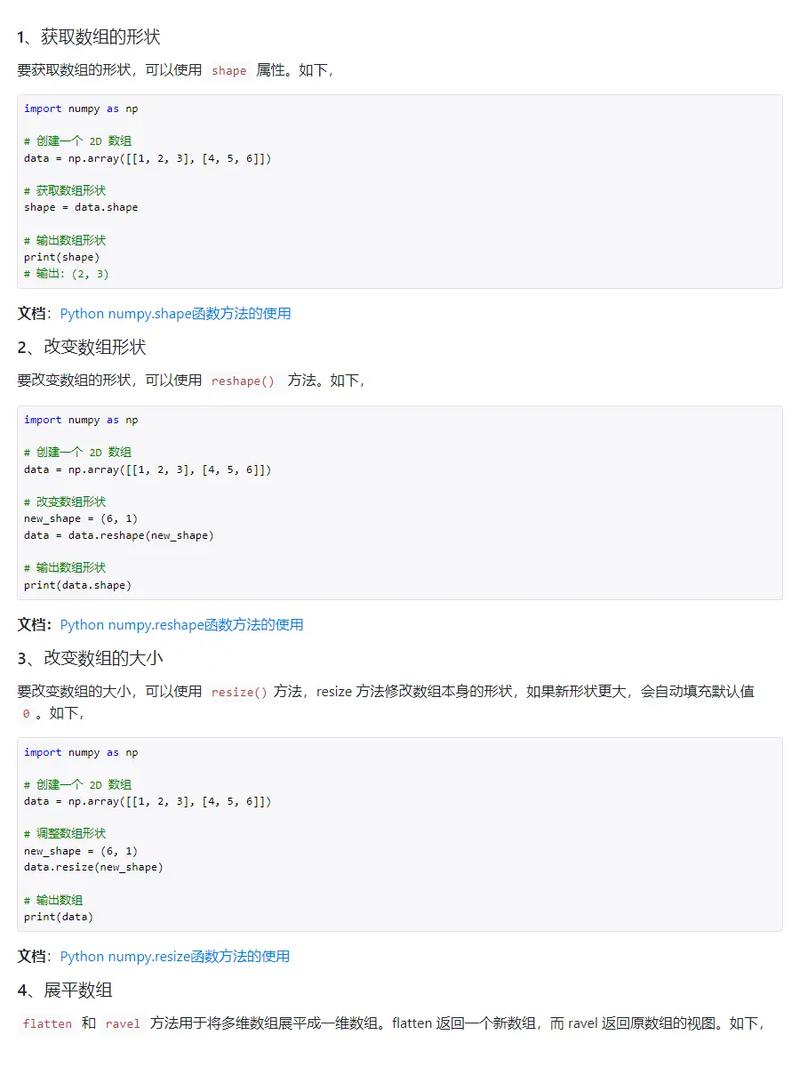
Creating Arrays
import numpy as np
# From a list
a = np.array([1, 2, 3, 4])
print(a)
# Create an array of zeros
b = np.zeros(5)
print(b)
# Create a 2x3 array of ones
c = np.ones((2, 3))
print(c)
# Create a range of numbers
d = np.arange(0, 10, 2) # Start, stop, step
print(d)
# Create evenly spaced numbers (useful for plots)
e = np.linspace(0, 1, 5) # 5 numbers from 0 to 1
print(e)
Array Attributes
Understanding the shape and size of your arrays is crucial.
arr = np.array([[1, 2, 3], [4, 5, 6]])
print(f"Shape: {arr.shape}")       # (2, 3) -> 2 rows, 3 columns
print(f"Number of dimensions: {arr.ndim}") # 2
print(f"Size (total elements): {arr.size}") # 6
print(f"Data type: {arr.dtype}")   # int64 (or similar)
Indexing and Slicing
Works just like Python lists, but with more dimensions.
arr = np.array([0, 10, 20, 30, 40, 50])
# Get a single element
print(arr[2])      # 20
# Get a slice
print(arr[1:4])    # [10, 20, 30]
# For 2D arrays
arr_2d = np.array([[1, 2, 3], [4, 5, 6], [7, 8, 9]])
print(arr_2d[1, 2])    # Get element at row 1, column 2 -> 6
print(arr_2d[0:2, 1:]) # Get rows 0-1 and columns 1 onwards -> [[2, 3], [5, 6]]
Basic Mathematics
This is where NumPy shines. Operations are applied element-wise.
a = np.array([1, 2, 3, 4])
b = np.array([10, 20, 30, 40])
print(a + b)      # [11 22 33 44]
print(a * 2)      # [ 2  4  6  8]
print(a ** 2)     # [ 1  4  9 16]
print(np.sin(a))  # [ 0.841471  0.909297  0.14112  -0.756802]
Useful Aggregations
arr = np.array([[1, 2, 3], [4, 5, 6]])
print(f"Sum of all elements: {np.sum(arr)}")        # 21
print(f"Mean of all elements: {np.mean(arr)}")      # 3.5
print(f"Max value in each column: {np.max(arr, axis=0)}") # [4 5 6]
print(f"Min value in each row: {np.min(arr, axis=1)}")    # [1 4]
Next Steps: The Broader Ecosystem
Once you're comfortable with NumPy, you'll naturally want to explore other libraries that build upon it.
- Pandas: Provides
DataFrameobjects, which are like powerful spreadsheets in Python, perfect for handling and analyzing tabular data. - Matplotlib & Seaborn: For creating static, interactive, and publication-quality visualizations.
- Scikit-learn: The go-to library for classical machine learning (e.g., regression, classification, clustering).
- Jupyter Notebook/Lab: An interactive web-based environment that allows you to mix code, text, and visualizations in a single document. It's the standard for data exploration and analysis.
Summary
| Technology | Role in the Stack | Key Benefit |
|---|---|---|
| Linux | Operating System / Platform | Stability, powerful command line, industry standard for servers and HPC. |
| Python | Programming Language | Readability, vast ecosystem of libraries for data science. |
| NumPy | Core Numerical Library | Provides fast, efficient N-dimensional arrays and vectorized mathematical operations. |
Mastering this combination will give you a formidable skill set for any role involving data, analysis, or scientific computing.


