Of course! This is a fundamental concept in Python that often confuses beginners. Let's break it down clearly.
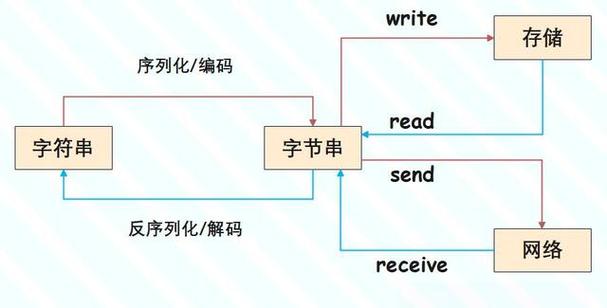
The Core Idea: bytes vs. str
Think of it like this:
str(String): A sequence of Unicode characters. It's an abstract representation of text. For example, the letter'A'is the characterU+0041in Unicode. It doesn't care how that character is stored in a computer's memory; it just knows what it is.bytes(Bytes): A sequence of raw 8-bit values (integers from 0 to 255). It's a concrete, physical representation of data. It's how data is actually stored on your disk, sent over a network, or handled by low-level system functions.
| Feature | str (String) |
bytes (Bytes) |
|---|---|---|
| Purpose | Abstract text representation | Raw binary data |
| Content | Unicode characters (e.g., 'A', , '你') |
Raw bytes (integers 0-255) |
| Literal Syntax | 'hello', "world" |
b'hello', b"world" |
| Mutable? | Immutable | Immutable |
| Use Cases | Text processing, user input, display | File I/O, network communication, cryptography |
Creating bytes Objects
You can create a bytes object in a few ways.
a) From a Literal (for ASCII data)
The easiest way is to prefix a string literal with a b. This only works for characters that can be represented in a single byte (like ASCII).
# A bytes literal
data = b'hello world'
# Check the type
print(type(data))  # <class 'bytes'>
# You cannot mix non-ASCII characters
# b'café'  # This will raise a SyntaxError!
b) From a List of Integers
Each integer must be in the range 0 to 255.
# Create bytes from a list of integers
data_from_list = bytes([72, 101, 108, 108, 111]) # H, e, l, l, o in ASCII
print(data_from_list)  # b'Hello'
c) From a str Object (The Most Common Way)
This is where encoding comes in. To turn a str into bytes, you must encode it using a specific character encoding. The most common encoding is UTF-8.
# A regular Python string
my_string = "Hello, world! 🌍"
# Encode the string into bytes using UTF-8
my_bytes = my_string.encode('utf-8')
print(f"Original string: {my_string}")
print(f"Type: {type(my_string)}")
print("-" * 20)
print(f"Encoded bytes: {my_bytes}")
print(f"Type: {type(my_bytes)}")
Output:
Original string: Hello, world! 🌍
Type: <class 'str'>
--------------------
Encoded bytes: b'Hello, world! \xf0\x9f\x8c\x8d'
Type: <class 'bytes'>
Notice how the emoji is no longer a single character but is represented by four bytes: \xf0\x9f\x8c\x8d. This is because UTF-8 uses a variable number of bytes to represent characters outside the ASCII range.
Converting Back: bytes to str
To get a str back from a bytes object, you must decode it. It's crucial to use the same encoding that was used for encoding.
# We have our bytes from the previous step
my_bytes = b'Hello, world! \xf0\x9f\x8c\x8d'
# Decode the bytes back into a string using UTF-8
my_string_again = my_bytes.decode('utf-8')
print(f"Decoded string: {my_string_again}")
print(f"Type: {type(my_string_again)}")
Output:
Decoded string: Hello, world! 🌍
Type: <class 'str'>
What happens if you use the wrong encoding?
# Let's try to decode UTF-8 bytes using a different encoding, like ASCII
try:
    my_bytes.decode('ascii')
except UnicodeDecodeError as e:
    print(f"Error: {e}")
Output:
Error: 'ascii' codec can't decode byte 0xf0 in position 13: ordinal not in range(128)This error happens because the ASCII encoding can only handle values from 0 to 127. The byte 0xf0 (240 in decimal) is outside that range, so it fails.
Working with bytes Objects
bytes objects are sequences, just like str, so you can index, slice, and loop over them.
data = b'hello world'
# Indexing
print(data[0])       # Prints the integer value: 104 (which is 'h' in ASCII)
# Slicing
print(data[0:5])     # Prints b'hello'
# Length
print(len(data))     # Prints 11
# Looping
for byte in data:
    print(byte, end=' ') # Prints the integer values
print()
# Output: 104 101 108 108 111 32 119 111 114 108 100
# Checking for a byte (using a literal)
if b'world' in data:
    print("Found 'world' in the bytes!")
When to Use Which? (Practical Examples)
Use str for:
- Text Processing: Reading and writing text files, parsing user input, displaying messages to the user.
- Web Content: Handling HTML, JSON, or XML that you're sending to or receiving from a web server (though you'll encode/decode at the boundaries).
# Reading a text file
with open('my_text_file.txt', 'r', encoding='utf-8') as f:
    content = f.read() # content is a str
    print(content)
Use bytes for:
- Reading/Writing Binary Files: Images, videos, executables, compressed files (
.zip,.gz).
# Reading an image file (binary mode)
with open('my_image.png', 'rb') as f: # 'rb' = read bytes
    image_data = f.read() # image_data is a bytes object
    print(f"Read {len(image_data)} bytes of image data.")
- Network Communication: Sockets, HTTP requests/responses at a low level. Data is always transmitted as bytes.
# Sending data over a network socket
import socket
# Data to send (must be bytes)
message_to_send = "GET /index.html HTTP/1.1".encode('utf-8')
# Connect and send (simplified example)
# s = socket.socket()
# s.connect(('example.com', 80))
# s.sendall(message_to_send) # sendall expects bytes
- Cryptography: Hashing, encryption, and decryption algorithms operate on raw bytes, not text.
import hashlib
data_to_hash = "my secret message".encode('utf-8')
sha256_hash = hashlib.sha256(data_to_hash).hexdigest()
print(f"SHA256 Hash: {sha256_hash}")
Summary: The Golden Rule
When dealing with text, use str.
When dealing with files, networks, or raw binary data, use bytes.
The bridge between them is the .encode() and .decode() methods, and the key to using them correctly is always specifying the encoding (UTF-8 is the standard choice).