Of course! Let's dive deep into urllib2 for HTTP requests in Python.
Important: urllib2 vs. urllib (Python 2) vs. urllib (Python 3)
This is a common point of confusion. You mentioned urllib2, which is the standard library name in Python 2.
-
Python 2: The library was split into two modules:
urllib2andurllib.urllib2: For opening URLs (HTTP, HTTPS, FTP). This is what you're asking about.urllib: For URL encoding/decoding (urllib.quote,urllib.unquote).
-
Python 3: The modules were merged and reorganized into
urllib.requestandurllib.parse.urllib.request: The direct successor tourllib2. It handles opening URLs.urllib.parse: The successor to the oldurllib. It handles URL parsing and encoding.
Recommendation: For any new project, you should use the requests library. It's far more intuitive, powerful, and easier to use than the built-in urllib. However, understanding urllib2 is essential for reading legacy Python 2 code.
urllib2 in Python 2: Core Concepts
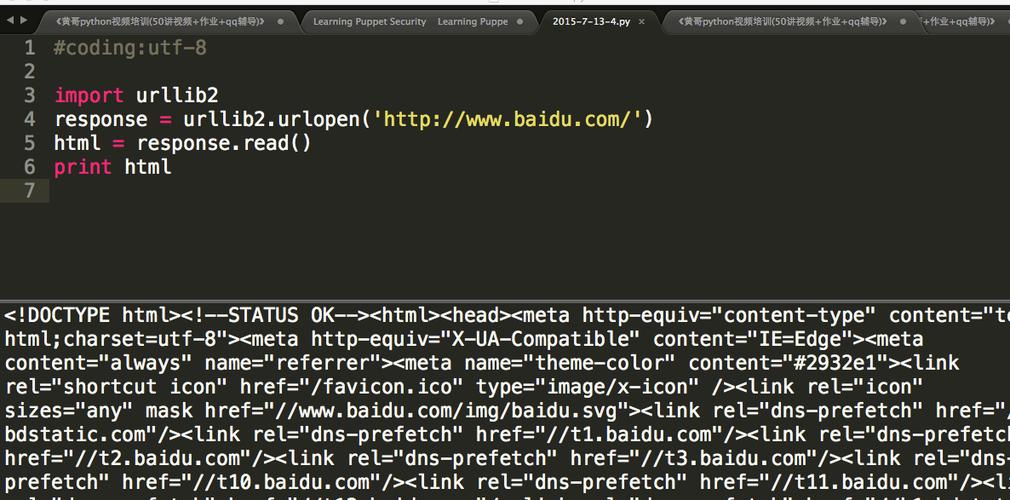
The main entry point for urllib2 is the urlopen() function. It can handle both simple requests and more complex ones that require custom headers, authentication, or cookies.
Making a Simple GET Request
This is the most basic use case: fetching the content of a webpage.
import urllib2
# The URL we want to fetch
url = "http://httpbin.org/get"
try:
    # urlopen opens the URL and returns a file-like object
    response = urllib2.urlopen(url)
    # We can read the content of the response
    html = response.read()
    # The response object also has useful headers
    print "Response Code:", response.getcode()
    print "Headers:"
    print response.info()
    print "\n--- Content ---"
    print html
except urllib2.URLError as e:
    print "Failed to open URL:", e.reason
Explanation:
urllib2.urlopen(url): Opens the URL and returns aaddinfourlobject (a file-like object).response.read(): Reads the entire content of the response as a string.response.getcode(): Returns the HTTP status code (e.g., 200 for OK, 404 for Not Found).response.info(): Returns anemail.message.Messageobject containing the response headers.
Adding Custom Headers (e.g., User-Agent)
Many websites block default Python user-agents. To avoid this, you can add a User-Agent header. For this, you need to create a Request object.
import urllib2
url = "http://httpbin.org/user-agent"
# Create a dictionary of headers
headers = {
    'User-Agent': 'Mozilla/5.0 (Windows NT 10.0; Win64; x64)',
    'Accept': 'application/json'
}
# Create a Request object with the URL and headers
request = urllib2.Request(url, headers=headers)
try:
    # Pass the Request object to urlopen
    response = urllib2.urlopen(request)
    response_data = response.read()
    print response_data
except urllib2.URLError as e:
    print "Failed to open URL:", e.reason
Explanation:
urllib2.Request(url, headers=...): Instead of passing a string directly, we create aRequestobject. This allows us to specify headers, data (for POST), and other request-level parameters.urllib2.urlopen(request): We pass theRequestobject tourlopen.
Making a POST Request
To send data to a server, you use a POST request. You pass the data as the second argument to the Request object.
import urllib2
import urllib # Note: We need the old urllib for urlencode
url = "http://httpbin.org/post"
# The data to send. This must be in a specific format.
# We use urllib.urlencode to convert a dictionary to a query string.
post_data = urllib.urlencode({
    'username': 'test_user',
    'password': 'secure_password123'
})
# The data must be passed as bytes in Python 2
post_data_bytes = post_data.encode('utf-8')
# Create a Request object, passing the URL and the data
request = urllib2.Request(url, data=post_data_bytes)
try:
    response = urllib2.urlopen(request)
    response_data = response.read()
    print "Response from POST request:"
    print response_data
except urllib2.URLError as e:
    print "Failed to open URL:", e.reason
Explanation:
urllib.urlencode(): This function (from the oldurllibmodule) is crucial. It takes a dictionary and converts it into a format suitable for an HTTP request body (key1=value1&key2=value2).Request(url, data=post_data_bytes): By providing thedataargument,urllib2automatically changes the request method from GET to POST.
Handling HTTP Errors (e.g., 404 Not Found)
If a URL returns an error status code (4xx or 5xx), urlopen raises an HTTPError.
import urllib2
url = "http://httpbin.org/status/404"
try:
    response = urllib2.urlopen(url)
    print "Success! Code:", response.getcode()
except urllib2.HTTPError as e:
    # This block catches HTTP errors like 404, 500, etc.
    print "HTTP Error occurred!"
    print "Error Code:", e.code
    print "Error Reason:", e.reason
    print "Error Headers:", e.headers
except urllib2.URLError as e:
    # This block catches other URL-related errors (e.g., no network)
    print "URL Error occurred:", e.reason
Handling Cookies
urllib2 has a built-in HTTPCookieProcessor to handle cookies automatically. You need to build an "opener" to use it.
import urllib2
import cookielib # The old cookie library
# Create a cookie jar to store cookies
cookie_jar = cookielib.CookieJar()
# Create an opener that will handle cookies
opener = urllib2.build_opener(urllib2.HTTPCookieProcessor(cookie_jar))
# A URL that sets a cookie
url_set_cookie = "http://httpbin.org/cookies/set?test_cookie=12345"
# A URL that expects the cookie to be sent back
url_check_cookie = "http://httpbin.org/cookies"
# Install the opener. Now all calls to urlopen will use it.
urllib2.install_opener(opener)
print "--- Visiting URL to set cookie ---"
response = urllib2.urlopen(url_set_cookie)
print response.read()
print "\n--- Visiting URL to check cookie ---"
response = urllib2.urlopen(url_check_cookie)
print response.read()
# You can inspect the cookies in the jar
print "\n--- Cookies in the jar ---"
for cookie in cookie_jar:
    print cookie
The Modern Alternative: The requests Library
As promised, here's how you'd do the same tasks with the requests library in Python 3 (or 2 with pip install requests). The syntax is much cleaner.
Installation
pip install requests
requests Examples
import requests
# 1. Simple GET Request
response = requests.get('http://httpbin.org/get')
print("Status Code:", response.status_code)
print("JSON Response:", response.json()) # .json() parses the JSON response
# 2. Adding Headers
headers = {'User-Agent': 'MyCoolAgent/1.0'}
response = requests.get('http://httpbin.org/user-agent', headers=headers)
print(response.json())
# 3. Making a POST Request
payload = {'username': 'test_user', 'password': 'secure_password123'}
response = requests.post('http://httpbin.org/post', data=payload)
print("POST Response JSON:", response.json())
# 4. Handling Errors (Requests does this for you)
try:
    response = requests.get('http://httpbin.org/status/404', timeout=5)
    response.raise_for_status() # Raises an HTTPError for bad responses (4xx or 5xx)
except requests.exceptions.HTTPError as err:
    print("HTTP Error:", err)
except requests.exceptions.RequestException as err:
    print("Other Error:", err)
# 5. Handling Cookies (Automatically!)
# Session objects persist cookies across requests
with requests.Session() as session:
    # Get a cookie
    session.get('http://httpbin.org/cookies/set/test_cookie/12345')
    # The cookie is now attached to the session
    response = session.get('http://httpbin.org/cookies')
    print("Cookies from session:", response.json())
Summary: urllib2 vs. requests
| Feature | urllib2 (Python 2) |
requests (Modern Python) |
|---|---|---|
| Ease of Use | Verbose, requires manual handling of many cases. | Simple, intuitive, "Pythonic" API. |
| JSON Handling | Manual: json.loads(response.read()) |
Automatic: response.json() |
| POST Data | Requires urllib.urlencode(). |
Pass a dictionary directly. |
| Sessions/Cookies | Requires building an opener with HTTPCookieProcessor. |
Built-in Session object handles cookies automatically. |
| Error Handling | Requires catching URLError and HTTPError separately. |
raise_for_status() and a single requests.exceptions.RequestException base class. |
| Recommendation | Only for maintaining legacy Python 2 code. | The standard for all new Python projects. |