什么是 Properties 文件?
Properties 文件是 Java 中一种常用的配置文件格式,它主要用于存储应用程序的配置信息,例如数据库连接 URL、用户名、密码、服务器地址等。
它的主要特点:
- 键值对存储由一系列的“键=值”对组成。
- 简单的文本格式:文件是纯文本的,可以用任何文本编辑器打开和修改。
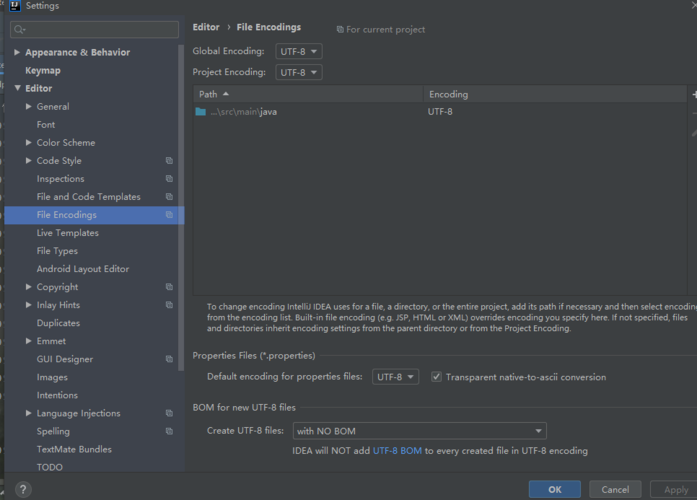
- 编码:传统上,Properties 文件使用 ISO-8859-1 (Latin-1) 编码,这意味着如果存储非英文字符(如中文),需要进行转义,从 Java 9 开始,支持 UTF-8 编码,这是目前推荐的方式。
- 注释:使用 或 开头的行为注释,这些行会被忽略。
- 层级结构:从 Java 9 开始,支持使用点 () 来组织键,形成类似包的层级结构,便于管理。
文件示例
一个典型的 config.properties 文件内容如下:
# Database Configuration
db.url=jdbc:mysql://localhost:3306/mydb
db.username=root
db.password=secret
# Server Configuration
server.port=8080
server.host=localhost
# Application Settings
app.name=My Awesome App
app.version=1.0.0
如何在 Java 中读取 Properties 文件
主要有两种方法:使用 java.util.Properties 类(传统方式)和使用 java.lang.System 类(适用于环境变量)。
使用 java.util.Properties 类(最常用)
这是最标准、最灵活的方法,可以从文件、类路径、网络等多种来源加载属性。
核心步骤:
- 创建
Properties对象实例。 - 使用
InputStream读取.properties文件。- 从类路径加载:推荐使用
ClassLoader.getResourceAsStream(),这种方式将.properties文件放在src/main/resources目录下(Maven/Gradle项目),打包后它会在类根路径下。 - 从文件系统加载:使用
FileInputStream,需要提供文件的完整或相对路径。
- 从类路径加载:推荐使用
- 调用
properties.load(InputStream)方法将输入流中的内容加载到Properties对象中。 - 使用
properties.getProperty("key")或properties.getProperty("key", "defaultValue")来获取值。
示例代码:
假设你的项目结构如下:
src
└── main
    ├── java
    │   └── com
    │       └── example
    │           └── Main.java
    └── resources
        └── config.properties
config.properties
app.name=Hello World
app.version=1.0
Main.java 代码:
package com.example;
import java.io.InputStream;
import java.util.Properties;
public class Main {
    public static void main(String[] args) {
        // 1. 创建 Properties 对象
        Properties props = new Properties();
        // try-with-resources 语句,可以自动关闭流
        try (InputStream input = Main.class.getClassLoader().getResourceAsStream("config.properties")) {
            // 2. 检查流是否成功加载
            if (input == null) {
                System.out.println("Sorry, unable to find config.properties");
                return;
            }
            // 3. 加载属性文件
            props.load(input);
            // 4. 获取属性值
            String appName = props.getProperty("app.name");
            String appVersion = props.getProperty("app.version");
            // 如果键不存在,可以提供一个默认值
            String author = props.getProperty("author", "Unknown Author");
            System.out.println("Application Name: " + appName);
            System.out.println("Application Version: " + appVersion);
            System.out.println("Author: " + author);
        } catch (Exception ex) {
            ex.printStackTrace();
        }
    }
}
从文件系统加载的示例:
如果你的 config.properties 文件在项目根目录下:
try (FileInputStream input = new FileInputStream("config.properties")) {
    props.load(input);
    // ... 后续操作
} catch (IOException e) {
    e.printStackTrace();
}
使用 java.lang.System 类
这种方法适用于将配置信息作为环境变量或 JVM 启动参数传递给应用程序。
作为环境变量设置
在操作系统级别设置环境变量(在 Linux/macOS 中:export APP_NAME=MyApp),然后在 Java 代码中通过 System.getenv() 获取。
String appName = System.getenv("APP_NAME"); // 获取环境变量
System.out.println("App Name from Env: " + appName);
作为 JVM 启动参数设置
在运行 Java 程序时,使用 -D 参数来设置属性。
java -Dapp.name="MyApp" -Dapp.version="2.0" -jar myapp.jar
在 Java 代码中通过 System.getProperty() 获取:
String appName = System.getProperty("app.name"); // 获取JVM属性
String appVersion = System.getProperty("app.version", "1.0"); // 提供默认值
System.out.println("App Name from System Property: " + appName);
System.out.println("App Version from System Property: " + appVersion);
高级用法和最佳实践
处理中文等特殊字符(编码问题)
问题:Properties 文件默认是 ISO-8859-1 编码,直接写入中文会乱码。
解决方案:
-
推荐(Java 9+):在文件第一行指定编码为
UTF-8。# -*- coding: UTF-8 -*- app.message=你好,世界!
这样
Properties.load()方法会自动使用正确的编码。 -
传统(Java 8及以下):如果无法修改文件,可以在 Java 代码中进行手动转义。
- 写入时:将字符串转换为 Unicode 转义序列。
String chinese = "你好"; String unicodeEscape = NativeToAsciiUtils.nativeToAscii(chinese); // 需要工具类 props.setProperty("app.message", unicodeEscape); - 读取时:
Properties类会自动将\uXXXX转换回字符。
- 写入时:将字符串转换为 Unicode 转义序列。
写入 Properties 文件
除了读取,你还可以修改 Properties 对象并将其写回文件。
import java.io.FileOutputStream;
import java.io.IOException;
import java.util.Properties;
public class WritePropertiesExample {
    public static void main(String[] args) {
        Properties props = new Properties();
        // 设置一些属性
        props.setProperty("database.url", "jdbc:mysql://newhost:3306/newdb");
        props.setProperty("user", "admin");
        props.setProperty("password", "newpassword123");
        // 写入文件
        try (FileOutputStream output = new FileOutputStream("config.properties")) {
            // 可以添加一个注释头
            props.store(output, "This is an updated configuration file");
            System.out.println("Properties file updated successfully!");
        } catch (IOException io) {
            io.printStackTrace();
        }
    }
}
store 方法的第二个参数是注释,它会作为文件的第一行(以 开头)。
资源管理
最佳实践:始终使用 try-with-resources。
InputStream 和 OutputStream 都是需要手动关闭的资源,使用 try-with-resources 语句可以确保它们在使用后被自动关闭,即使发生异常也不会导致资源泄漏。
// 推荐
try (InputStream input = ...) {
    // ...
} // input 自动关闭
// 不推荐(旧式)
InputStream input = null;
try {
    input = ...
    // ...
} finally {
    if (input != null) {
        try {
            input.close();
        } catch (IOException e) {
            // ...
        }
    }
}
| 特性/方法 | 描述 | 优点 | 缺点/注意事项 |
|---|---|---|---|
| 文件格式 | 键=值,或注释,纯文本 | 简单、易读、易修改 | 默认编码ISO-8859-1,处理中文需注意 |
java.util.Properties |
标准API,可从类路径、文件系统等加载 | 灵活、功能强大、可读写 | 需要手动管理流资源 |
System.getProperty() |
读取JVM启动参数 (-Dkey=value) |
无需文件,适合部署时配置 | 配置与代码打包在一起,不够灵活 |
System.getenv() |
读取操作系统环境变量 | 跨平台,适合系统级配置 | 依赖于外部环境设置 |
核心建议:
- 将配置与代码分离:将
properties文件放在resources目录下,而不是硬编码在 Java 文件中。 - 优先从类路径加载:使用
ClassLoader.getResourceAsStream(),这能保证你的应用在打包成 JAR 或 WAR 后仍然能正常读取配置。 - 使用
try-with-resources:确保所有InputStream和OutputStream都被正确关闭。 - 处理编码:如果是 Java 9+,在文件开头声明
UTF-8编码,如果是旧版本,考虑使用工具类或确保编辑器以 ISO-8859-1 格式保存。 - 提供默认值:使用
getProperty(key, defaultValue)方法,增强程序的健壮性,避免因某个配置项缺失而崩溃。