
Of course. Let's break down the line # coding=utf-8 in Python.
The Short Answer
# coding=utf-8 is a coding declaration. It's a special comment at the very beginning of a Python file that tells the Python interpreter which character encoding (like UTF-8) is used to write the code in that file.
This is essential for correctly interpreting non-ASCII characters (like letters with accents, Chinese characters, emojis, etc.) that are part of your source code itself.
The Detailed Explanation
What is Character Encoding?
Computers don't store characters like A, , or 你. They store numbers. An encoding is a set of rules that maps characters to numbers.
- ASCII: An old encoding that only handles 128 English characters (A-Z, a-z, 0-9, and symbols). It cannot represent characters like or .
- UTF-8: A modern, universal encoding that can represent every character in every language. It's backward-compatible with ASCII and has become the standard for the web and most software development.
Why Do You Need This Declaration in Python?
By default, Python 3 assumes that your source code is encoded in UTF-8. So, for many simple cases, you don't need to write this line.
However, you must use this declaration if your Python file contains non-ASCII characters in the source code itself. This includes:
-
String literals containing non-ASCII characters:
# This line is fine in UTF-8 without a declaration, but it's good practice.
greeting = "Hello, world! 你好, 世界!"
-
Variable, function, or class names with non-ASCII characters:
# This REQUIRES a coding declaration to work. def hänsel_und_gretel(): print("Looking for a breadcrumb...") -
Comments containing non-ASCII characters:
 (图片来源网络,侵删)
# coding=utf-8 # 这个文件处理中文数据 (This file handles Chinese data) data = "一些文本"
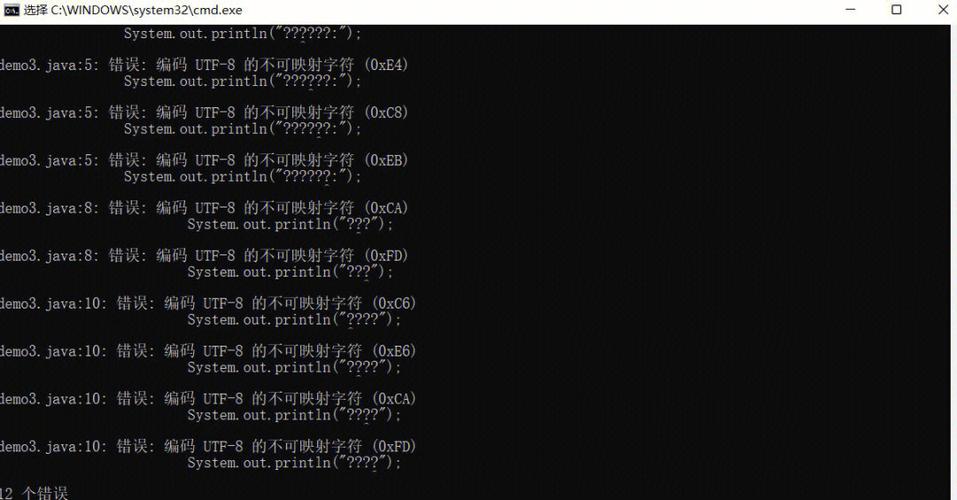
If you try to run a Python 3 file that contains these characters without the proper encoding declaration, Python will raise a SyntaxError because it doesn't know how to read the file correctly.
How to Use It
The declaration must be placed at the top of the file. It can be on the first or second line.
Correct Placement:
# On the very first line
# coding=utf-8
print("This file uses UTF-8.")
# On the second line (if the first line is a shebang for Unix systems)
#!/usr/bin/env python3
# coding=utf-8
print("This also works.")
Incorrect Placement:
print("This will fail if the next line has a non-ASCII character.")
# coding=utf-8  # Placing it here is too late!
def my_function():
    # ...
The Modern, Preferred Alternative: UTF-8 as Default
Since Python 3.3, the UTF-8 encoding has been the default. This means that for most modern Python development, you don't need to write # coding=utf-8.
If your editor saves your files in UTF-8 (which almost all modern editors do, like VS Code, PyCharm, Sublime Text, etc.), Python 3 will read them correctly without any declaration.
When you still might want to use it:
- For Maximum Compatibility: It makes your code's encoding explicit, leaving no room for ambiguity. Anyone reading your file immediately knows it's UTF-8.
- For Code Editors: Some editors use this declaration to decide how to display and save the file, ensuring they don't accidentally save it in a different encoding like Windows-1252.
- When Working with Legacy Systems: If your code might be run on very old or non-standard systems where the default encoding might not be UTF-8, an explicit declaration is a safety net.
Key Takeaways
| Feature | Description |
|---|---|
| What it is | A special comment (# coding=utf-8) that declares the file's character encoding. |
| Purpose | To allow Python to correctly read non-ASCII characters (like , , 你, ) within your source code. |
| Placement | Must be at the very top of the file (line 1 or 2). |
| Is it always needed? | No. In Python 3, UTF-8 is the default. You only need it if your code contains non-ASCII characters and you want to be absolutely explicit. |
| Best Practice | Rely on your editor's default UTF-8 save. If your code is pure ASCII or standard English, you don't need the declaration. If it contains other characters, a modern Python 3 environment will handle it automatically, but adding the declaration is harmless and can be good for clarity. |











