
Of course! Let's dive deep into Python's str.split() method. It's one of the most frequently used string methods for breaking strings into smaller parts.
Quick Summary
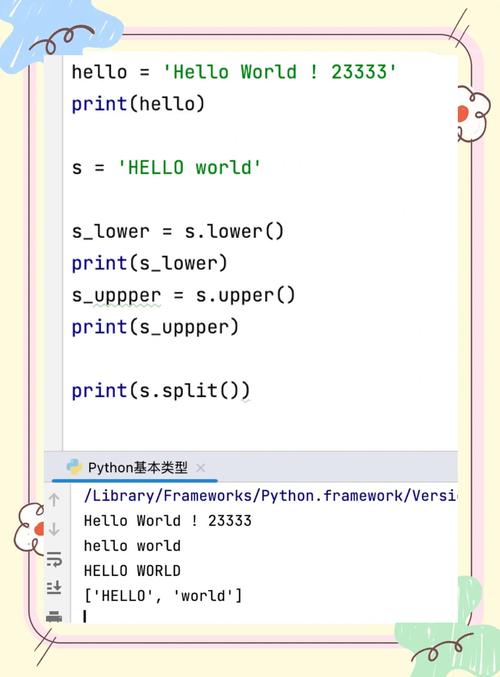
str.split() is a built-in string method that splits a string into a list of substrings based on a specified separator (or whitespace by default).
Basic Syntax
string.split(separator, maxsplit)
separator(optional): The delimiter string that separates the parts. If not provided, the method splits on any whitespace (spaces, tabs, newlines).maxsplit(optional): The maximum number of splits to perform. If not provided, all possible splits are made.
The Most Common Use Case: Splitting by Whitespace (No Separator)
When you call split() without any arguments, it's incredibly smart. It splits the string at any sequence of whitespace characters and automatically removes any leading or trailing whitespace.
Example:
sentence = "  Hello   world, this is a test.  "
# No separator provided, splits on any whitespace
words = sentence.split()
print(words)
Output:

['Hello', 'world,', 'this', 'is', 'a', 'test.']Key Takeaway: This is the easiest way to get a list of words from a sentence. Notice how the multiple spaces between "Hello" and "world," are treated as a single separator, and the leading/trailing spaces are ignored.
Splitting by a Specific Separator
You can pass a string as the separator argument. The string will be split at every occurrence of this specific string.
Example 1: Splitting by a comma
This is very common for parsing CSV-like data.
data = "apple,banana,cherry,date"
fruits = data.split(',')
print(fruits)
Output:
['apple', 'banana', 'cherry', 'date']Example 2: Splitting by a hyphen
date_string = "2025-10-27"
year_month_day = date_string.split('-')
print(year_month_day)
Output:
['2025', '10', '27']Example 3: Splitting by a colon
path = "/home/user/documents/report.txt"
# Split the path into directories and filename
parts = path.split('/')
print(parts)
Output:
['', 'home', 'user', 'documents', 'report.txt']Notice the empty string at the beginning. This appears because the string starts with the separator .
The maxsplit Argument
The maxsplit argument limits the number of splits. The result will contain a maximum of maxsplit + 1 elements.
Example:
sentence = "one two three four five"
# Split only once
first_split = sentence.split(maxsplit=1)
print(f"Splitting once: {first_split}")
# Split only twice
second_split = sentence.split(maxsplit=2)
print(f"Splitting twice: {second_split}")
Output:
Splitting once: ['one', 'two three four five']
Splitting twice: ['one', 'two', 'three four five']
This is useful when you only care about the first few parts of a string and want to keep the rest intact.
Important Variations and Related Methods
str.rsplit()
This method is identical to split() but splits the string from the right. It's most useful when you want to limit the number of splits (maxsplit) from the end.
Example:
Imagine a file path where you want to separate the directory from the filename.
path = "/home/user/documents/report.txt"
# Using split with maxsplit=1
# This splits from the left, so we get ['', '/home/user/documents', 'report.txt']
# Not what we want.
# Using rsplit with maxsplit=1
# This splits from the right, which is perfect for file paths.
directory, filename = path.rsplit('/', maxsplit=1)
print(f"Directory: {directory}")
print(f"Filename: {filename}")
Output:
Directory: /home/user/documents
Filename: report.txt
str.splitlines()
This is a specialized method for splitting a string into a list of lines. It understands different line boundaries (\n, \r\n, \r, etc.) and is generally more robust than split('\n').
Example:
multiline_text = "First line\nSecond line\r\nThird line\nFourth line"
lines = multiline_text.splitlines()
print(lines)
Output:
['First line', 'Second line', 'Third line', 'Fourth line']Unlike split('\n'), splitlines() does not include the line break characters (\n) in the resulting list.
Common Pitfalls and Best Practices
Pitfall 1: "ValueError: not enough values to unpack"
This happens when you try to assign the result of a split to a fixed number of variables, but the split produces a list with a different number of elements.
data = "apple,banana,cherry"
# This will FAIL because there are 3 items, not 2
try:
    fruit1, fruit2 = data.split(',')
except ValueError as e:
    print(f"Error: {e}")
Solution: Use a more robust unpacking method if the number of items might vary.
data = "apple,banana,cherry"
# Get the first two items, ignore the rest
fruit1, fruit2, *_ = data.split(',')
print(fruit1) # apple
print(fruit2) # banana
print(_)     # ['cherry']
# Or, get the last item
*_, last_fruit = data.split(',')
print(last_fruit) # cherry
Pitfall 2: Forgetting Whitespace Around Separators
When you split on a separator like , the resulting list items might have leading or trailing whitespace.
data = "apple, banana ,cherry , date "
fruits = data.split(',')
print(fruits)
Output:
['apple', ' banana ', 'cherry ', ' date ']Notice the spaces in ' banana ' and ' date '.
Solution: Use a list comprehension to strip whitespace from each item.
data = "apple, banana ,cherry , date "
fruits = [fruit.strip() for fruit in data.split(',')]
print(fruits)
Output:
['apple', 'banana', 'cherry', 'date']Summary Table
| Method | Description | Example |
|---|---|---|
str.split() |
Splits on any whitespace (default). Returns a list of words. | "a b c".split() -> ['a', 'b', 'c'] |
str.split(sep) |
Splits on a specific string sep. |
"a,b,c".split(',') -> ['a', 'b', 'c'] |
str.split(sep, maxsplit) |
Splits on sep a maximum of maxsplit times. |
"a b c d".split(maxsplit=1) -> ['a', 'b c d'] |
str.rsplit(sep, maxsplit) |
Splits from the right. Useful for maxsplit. |
"/a/b/c".rsplit('/', 1) -> ['/a/b', 'c'] |
str.splitlines() |
Splits on line boundaries (\n, \r\n). Returns lines without the breaks. |
"a\nb".splitlines() -> ['a', 'b'] |











