Of course! This is a fundamental concept in Java. Let's break down Map, List, and Set in detail, comparing them and showing how to use them.
The Big Picture: The java.util.Collection Framework
These three are all part of the Java Collections Framework. They are data structures used to store groups of objects.
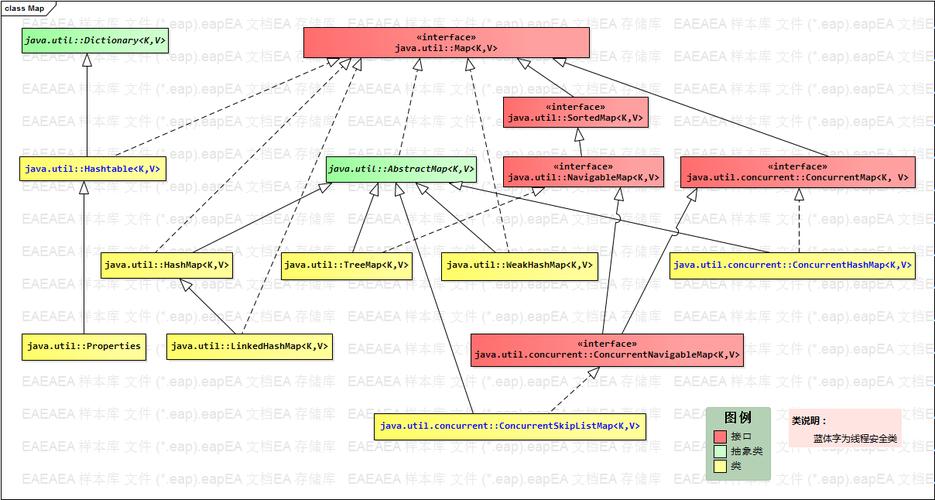
ListandSetboth extend theCollectioninterface. This means they share common behaviors likesize(),isEmpty(),add(),remove(), anditerator().Mapis a separate interface that does not extendCollection. It's designed to store key-value pairs, not just a collection of individual elements.
List - An Ordered Collection (A "Bag" of Elements)
A List is an ordered collection (also known as a sequence). It allows duplicate elements. The most important feature is that you can access elements by their integer index (position), just like an array.
Key Characteristics:
- Ordered: Elements are stored in the order they are added.
- Allows Duplicates: You can have multiple identical objects in the list.
- Indexed: You can access elements by their position (e.g.,
list.get(0)for the first element).
Common Implementations:
ArrayList: The most common implementation. It's like a resizable array. Very fast for getting elements by index (get(index)), but can be slower for adding or removing elements in the middle of the list.LinkedList: Implemented as a doubly-linked list. Fast for adding or removing elements from the beginning or middle of the list, but slower for random access (get(index)).
Code Example:
import java.util.ArrayList;
import java.util.Arrays;
import java.util.List;
public class ListExample {
    public static void main(String[] args) {
        // Create an ArrayList
        List<String> fruits = new ArrayList<>();
        // Add elements (duplicates are allowed)
        fruits.add("Apple");
        fruits.add("Banana");
        fruits.add("Orange");
        fruits.add("Apple"); // Duplicate is fine
        System.out.println("Initial List: " + fruits);
        // Add an element at a specific position
        fruits.add(1, "Mango");
        System.out.println("After adding at index 1: " + fruits);
        // Access an element by index
        String secondFruit = fruits.get(1);
        System.out.println("Fruit at index 1: " + secondFruit);
        // Remove an element
        fruits.remove("Orange");
        System.out.println("After removing 'Orange': " + fruits);
        // Check if an element exists
        boolean hasApple = fruits.contains("Apple");
        System.out.println("Does the list contain 'Apple'? " + hasApple);
        // Get the size of the list
        System.out.println("Size of the list: " + fruits.size());
        // Iterate over the list
        System.out.println("--- Iterating with a for-each loop ---");
        for (String fruit : fruits) {
            System.out.println(fruit);
        }
    }
}
Set - A Collection of Unique Elements
A Set is a collection that cannot contain duplicate elements. It models the mathematical set abstraction.
Key Characteristics:
- No Duplicates: If you try to add an element that is already in the set, the add operation is ignored.
- Unordered (in most cases): The elements are not stored in the order you add them. (See
LinkedHashSetfor an exception). - No Indices: You cannot access elements by their position. You must iterate through the set to get its elements.
Common Implementations:
HashSet: The most common implementation. It provides constant-time performance (O(1)) for basic operations likeadd(),remove(), andcontains(). It does not maintain any order.LinkedHashSet: Similar toHashSet, but it maintains the insertion order of elements. It's slightly slower thanHashSet.TreeSet: Stores elements in a sorted order (natural order or a customComparator). It provides log(n) time cost for basic operations.
Code Example:
import java.util.HashSet;
import java.util.LinkedHashSet;
import java.util.Set;
import java.util.TreeSet;
public class SetExample {
    public static void main(String[] args) {
        // Create a HashSet (most common)
        Set<String> fruits = new HashSet<>();
        // Add elements (duplicates are ignored)
        fruits.add("Apple");
        fruits.add("Banana");
        fruits.add("Orange");
        fruits.add("Apple"); // This will be ignored
        System.out.println("HashSet (no order guaranteed): " + fruits);
        // Create a LinkedHashSet (maintains insertion order)
        Set<String> orderedFruits = new LinkedHashSet<>();
        orderedFruits.add("Apple");
        orderedFruits.add("Banana");
        orderedFruits.add("Orange");
        System.out.println("LinkedHashSet (insertion order): " + orderedFruits);
        // Create a TreeSet (stores elements in sorted order)
        Set<String> sortedFruits = new TreeSet<>();
        sortedFruits.add("Orange");
        sortedFruits.add("Apple");
        sortedFruits.add("Banana");
        System.out.println("TreeSet (natural sorted order): " + sortedFruits);
        // Check if an element exists
        boolean hasApple = fruits.contains("Apple");
        System.out.println("Does the set contain 'Apple'? " + hasApple);
        // Remove an element
        fruits.remove("Banana");
        System.out.println("After removing 'Banana': " + fruits);
        // Iterate over the set
        System.out.println("--- Iterating over the set ---");
        for (String fruit : fruits) {
            System.out.println(fruit);
        }
    }
}
Map - A Key-Value Pair Collection
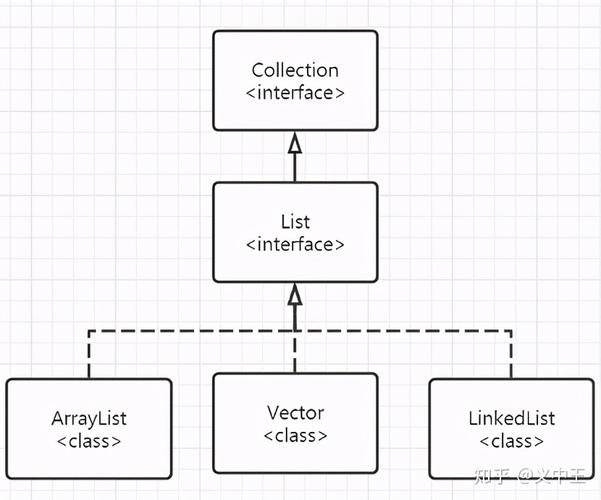
A Map is an object that maps keys to values. A key must be unique. You use the key to retrieve the associated value. It's like a dictionary.
Key Characteristics:
- Key-Value Pairs: Stores data as pairs.
- Unique Keys: Each key in a
Mapmust be unique. If you put a value with an existing key, the old value is replaced. - Values Can Be Duplicated: The values themselves do not have to be unique.
- No Duplicates: A
Mapcannot have two keys that are equal.
Common Implementations:
HashMap: The most common implementation. It provides constant-time performance (O(1)) for basic operations. It does not maintain any order.LinkedHashMap: Similar toHashMap, but it maintains insertion order of the key-value pairs.TreeMap: Stores the keys in a sorted order (natural order or a customComparator). It provides log(n) time cost for basic operations.
Code Example:
import java.util.HashMap;
import java.util.LinkedHashMap;
import java.util.Map;
import java.util.TreeMap;
public class MapExample {
    public static void main(String[] args) {
        // Create a HashMap (most common)
        Map<Integer, String> studentMap = new HashMap<>();
        // Add key-value pairs using put()
        studentMap.put(101, "Alice");
        studentMap.put(102, "Bob");
        studentMap.put(103, "Charlie");
        System.out.println("HashMap (no order guaranteed): " + studentMap);
        // If you add a value with an existing key, the old value is replaced
        studentMap.put(101, "Alex"); // Replaces "Alice" with "Alex"
        System.out.println("After updating key 101: " + studentMap);
        // Get a value by its key
        String studentName = studentMap.get(102);
        System.out.println("Student with ID 102 is: " + studentName);
        // Check if a key exists
        boolean hasId101 = studentMap.containsKey(101);
        System.out.println("Does the map contain key 101? " + hasId101);
        // Check if a value exists
        boolean hasBob = studentMap.containsValue("Bob");
        System.out.println("Does the map contain value 'Bob'? " + hasBob);
        // Remove a key-value pair
        studentMap.remove(103);
        System.out.println("After removing key 103: " + studentMap);
        // Iterate over the map
        System.out.println("--- Iterating over the map ---");
        // You can iterate over keys, values, or key-value pairs
        for (Map.Entry<Integer, String> entry : studentMap.entrySet()) {
            System.out.println("ID: " + entry.getKey() + ", Name: " + entry.getValue());
        }
    }
}
Summary Table: List vs. Set vs. Map
| Feature | List |
Set |
Map |
|---|---|---|---|
| Purpose | An ordered collection of elements. | A collection of unique elements. | A collection of key-value pairs. |
| Duplicates | Allowed | Not Allowed | Keys must be unique. Values can be duplicated. |
| Order | Ordered (by insertion index). | Generally unordered (except LinkedHashSet). |
Generally unordered (except LinkedHashMap). |
| Access Elements | By integer index (get(index)). |
By iteration (no direct access). | By key (get(key)). |
| Main Use Case | When you need to preserve order and allow duplicates (e.g., a list of tasks, a history). | When you need to store a unique set of items and check for existence quickly (e.g., unique usernames). | When you need to associate a value with a unique identifier (e.g., user ID to user object, word to definition). |
| Common Impl. | ArrayList, LinkedList |
HashSet, LinkedHashSet, TreeSet |
HashMap, LinkedHashMap, TreeMap |
How to Choose?
-
Use a
Listwhen:- You need to maintain the order of elements.
- You need to allow duplicate elements.
- You need to access elements by their position (index).
-
Use a
Setwhen:- You only care about the presence or absence of an element.
- You must have only unique elements.
- You don't care about the order (or can use
LinkedHashSetif you do).
-
Use a
Mapwhen:- You need to store data in key-value pairs.
- You need to quickly look up a value using a unique key.
- You need to associate a value with an identifier (like an ID or a name).