Of course! Let's break down java.util.Date.getTime() in detail, including its modern alternatives.
The Short Answer
java.utilDate.getTime() returns the number of milliseconds that have elapsed since January 1, 1970, 00:00:00 GMT (this is known as the "Unix epoch" or "epoch time").
It's a long value representing this duration.
Detailed Explanation
The Method Signature
public long getTime()
- Return Type:
long. This is important because the number of milliseconds can be a very large number, larger than what anintcan hold. - What it Represents: It's a standard way to represent a specific point in time as a single number. This makes it easy to store in databases, compare dates, and perform arithmetic.
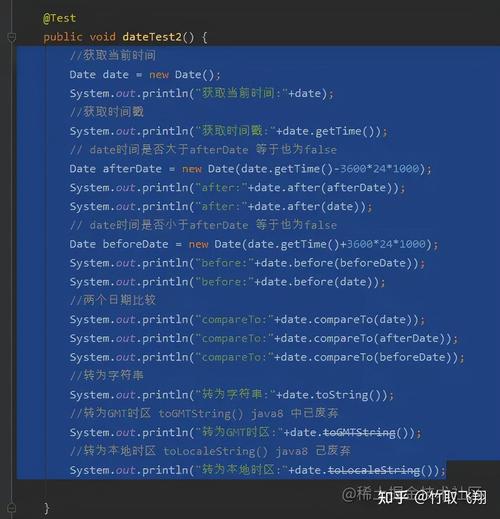
Code Example
Here is a simple example demonstrating how to use getTime().
import java.util.Date;
public class DateGetTimeExample {
    public static void main(String[] args) {
        // 1. Create a Date object, which represents the current moment.
        Date now = new Date();
        // 2. Get the number of milliseconds since the epoch.
        long millisecondsSinceEpoch = now.getTime();
        // 3. Print the results
        System.out.println("Current Date: " + now);
        System.out.println("Milliseconds since epoch (getTime()): " + millisecondsSinceEpoch);
        // 4. Example: Comparing two dates using getTime()
        Date earlierDate = new Date(millisecondsSinceEpoch - 5000); // 5 seconds ago
        Date laterDate = new Date(millisecondsSinceEpoch + 5000);   // 5 seconds in the future
        System.out.println("\nEarlier Date: " + earlierDate);
        System.out.println("Later Date: " + laterDate);
        // You can compare the long values directly
        if (earlierDate.getTime() < laterDate.getTime()) {
            System.out.println("\n'earlierDate' is indeed before 'laterDate'.");
        }
    }
}
Sample Output:
Current Date: Wed Oct 26 10:30:55 EDT 2025
Milliseconds since epoch (getTime()): 1698313855321
Earlier Date: Wed Oct 26 10:30:50 EDT 2025
Later Date: Wed Oct 26 10:31:00 EDT 2025
'earlierDate' is indeed before 'laterDate'.
Common Use Cases for getTime()
-
Date Comparison: The most common use. Since
getTime()returns along, you can compare dates using simple arithmetic operators (<,>, ), which is very efficient.if (date1.getTime() > date2.getTime()) { // date1 is after date2 } -
Time Difference Calculation: You can find the difference between two dates by subtracting their
getTime()values.Date start = new Date(); // ... some code that takes time to execute ... Date end = new Date(); long durationInMillis = end.getTime() - start.getTime(); System.out.println("Process took: " + durationInMillis + " ms"); -
Storing Dates in Databases: Many databases (like MySQL with a
TIMESTAMPorBIGINTcolumn) store dates as a numeric timestamp (milliseconds or seconds since epoch).getTime()provides this value directly. -
Creating a Date from a Timestamp: If you have a timestamp (e.g., from a database or an API), you can create a
Dateobject from it. (图片来源网络,侵删)
long timestampFromDb = 1698313855321L; Date dateFromDb = new Date(timestampFromDb);
The Modern Java 8+ Alternative: Instant
The java.util.Date class is part of the old, legacy date-time API introduced in Java 1.0. It has many design flaws and is largely considered obsolete.
Since Java 8, we have a much better, modern date-time API in the java.time package. The equivalent of Date.getTime() is the java.time.Instant class.
Key Differences:
| Feature | java.util.Date.getTime() |
java.time.Instant.getEpochSecond() |
|---|---|---|
| Class | java.util.Date (Legacy) |
java.time.Instant (Modern) |
| Precision | Milliseconds (1/1000 of a second) | Nanoseconds (1/1,000,000,000 of a second) |
| Time Zone | Mutable, confusingly tied to system default timezone. | Immutable, represents a point in time on the timeline in UTC. |
| API | Clunky, lots of deprecated methods. | Fluent, clear, and thread-safe. |
Example using java.time.Instant
import java.time.Instant;
public class InstantExample {
    public static void main(String[] args) {
        // 1. Get the current moment as an Instant (UTC-based)
        Instant now = Instant.now();
        // 2. Get the epoch seconds (equivalent to getTime() / 1000)
        long epochSeconds = now.getEpochSecond();
        // 3. Get the nanoseconds of the second (0 to 999,999,999)
        int nanoOfSecond = now.getNano();
        // 4. Get the total milliseconds since epoch (the direct equivalent)
        long millisSinceEpoch = now.toEpochMilli();
        System.out.println("Current Instant: " + now);
        System.out.println("Epoch Seconds: " + epochSeconds);
        System.out.println("Nanos of Second: " + nanoOfSecond);
        System.out.println("Milliseconds since epoch (toEpochMilli()): " + millisSinceEpoch);
        // Example: Comparing two Instants
        Instant earlier = Instant.now().minusSeconds(10);
        Instant later = Instant.now().plusSeconds(10);
        if (earlier.isBefore(later)) {
            System.out.println("\n'earlier' Instant is before 'later' Instant.");
        }
    }
}
Summary
| Method | Class | What it Returns | Recommendation |
|---|---|---|---|
getTime() |
java.util.Date |
Milliseconds since epoch (as a long) |
Avoid in new code. It's legacy. |
toEpochMilli() |
java.time.Instant |
Milliseconds since epoch (as a long) |
Use this in modern Java (8+). It's clearer, immutable, and more precise. |
If you are working on an existing project with java.util.Date, you'll need to use getTime(). However, for any new development, you should strongly prefer the modern java.time API and use Instant for representing points in time.