
Of course! Let's break down the relationship between Thread and Runnable in Java. This is a fundamental concept in concurrent programming.

The Core Idea: Separation of Concerns
The key to understanding Thread and Runnable is to see them as two separate parts of a single task:
-
The Task (
Runnable): This is the "what-to-do." It's a blueprint for a unit of work. It contains the code that you want to execute in a separate thread. ARunnableobject is not a thread itself; it's just a task. -
The Worker (
Thread): This is the "who-does-it." AThreadobject is an independent path of execution. It's a worker that can be given a task to perform. When you start a thread, it looks for aRunnabletask and executes itsrun()method.
The Runnable Interface
Runnable is a functional interface in Java, defined in the java.lang package.
@FunctionalInterface
public interface Runnable {
    public abstract void run();
}
What this means:
- Any class that implements
Runnablemust provide an implementation for therun()method. - The code you place inside the
run()method is the code that will be executed in a new thread. - Crucially, the
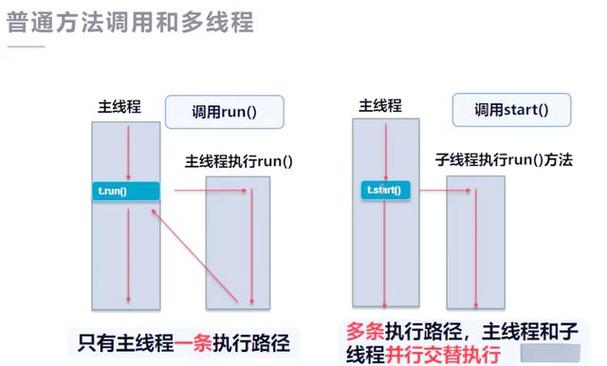
run()method does not start a new thread. It's just a regular method call if you invoke it directly (e.g.,myRunnable.run()). To run it in a new thread, you need aThreadobject.
The Thread Class
The Thread class, also in java.lang, represents a thread of execution. It has several constructors, but the most important one for this discussion is:
public Thread(Runnable target)
This constructor takes a Runnable object as its "target." This Runnable is the task that the new Thread will execute.
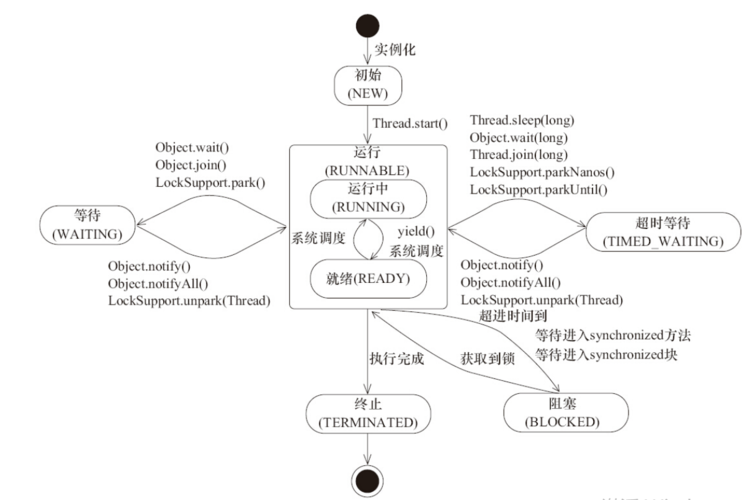
The Lifecycle of a Thread:
new(New): You create aThreadobject, but it has not started executing yet.Runnable myTask = new MyTask(); Thread myThread = new Thread(myTask); // Thread is in the NEW state
runnable(Runnable): You call thestart()method. This tells the Java Virtual Machine (JVM) that this thread is ready to run. The JVM's thread scheduler will then give it CPU time to execute itsrun()method.myThread.start(); // Thread moves to the RUNNABLE state
running(Running): The thread is actively executing code (specifically, therun()method of itsRunnable).blocked/waiting(Blocked/Waiting): The thread is temporarily inactive because it's waiting for a resource (like I/O) or for another thread to finish.terminated(Terminated): Therun()method has finished executing, and the thread has exited.
How They Work Together: A Practical Example
Let's create a simple program that prints a message from a separate thread.
Step 1: Create a Task that Implements Runnable
We'll create a class PrintTask that implements Runnable. The task is to print a message multiple times.
// This is the TASK (the "what-to-do")
class PrintTask implements Runnable {
    private String message;
    private int delay;
    public PrintTask(String message, int delay) {
        this.message = message;
        this.delay = delay;
    }
    @Override
    public void run() {
        try {
            for (int i = 1; i <= 5; i++) {
                System.out.println(Thread.currentThread().getName() + ": " + message + " - " + i);
                Thread.sleep(delay); // Pause for a bit
            }
        } catch (InterruptedException e) {
            System.out.println("Task was interrupted.");
            // Restore the interrupted status
            Thread.currentThread().interrupt();
        }
    }
}
Step 2: Create a Thread and Assign the Task
Now, in our main program, we'll create a Thread object, give it our PrintTask, and start it.
// This is the MAIN PROGRAM
public class RunnableExample {
    public static void main(String[] args) {
        System.out.println("Main thread started.");
        // 1. Create an instance of our task (the Runnable)
        Runnable printTask = new PrintTask("Hello from a thread", 500);
        // 2. Create a Thread and pass the Runnable to its constructor
        Thread workerThread = new Thread(printTask, "Worker-1");
        // 3. Start the thread. This moves it to the RUNNABLE state.
        // The JVM will now call the run() method of our PrintTask.
        workerThread.start();
        // The main thread continues its own execution
        try {
            for (int i = 1; i <= 3; i++) {
                System.out.println(Thread.currentThread().getName() + ": Main thread working... " + i);
                Thread.sleep(300);
            }
        } catch (InterruptedException e) {
            e.printStackTrace();
        }
        // Wait for the worker thread to finish before the main program exits
        try {
            workerThread.join();
        } catch (InterruptedException e) {
            e.printStackTrace();
        }
        System.out.println("Main thread finished.");
    }
}
Output (will vary slightly due to timing):
Main thread started.
main: Main thread working... 1
Worker-1: Hello from a thread - 1
main: Main thread working... 2
Worker-1: Hello from a thread - 2
main: Main thread working... 3
Worker-1: Hello from a thread - 3
Worker-1: Hello from a thread - 4
Worker-1: Hello from a thread - 5
Main thread finished.
Notice how the "Worker-1" thread and the "main" thread run concurrently, interleaving their output.
Why Use Runnable Instead of Extending Thread?
You might see another way to create a thread: by creating a new class that extends Thread and overriding its run() method.
// Alternative: Extending the Thread class
class MyThread extends Thread {
    @Override
    public void run() {
        System.out.println("Running from a thread that extends Thread.");
    }
}
// In main:
MyThread t = new MyThread();
t.start();
While this works, using Runnable is almost always the better and more flexible approach.
Advantages of Runnable:
-
Avoids Limiting Single Inheritance: In Java, a class can only extend one parent class. If your class already extends another class (e.g.,
class MySpecialTask extends SomeOtherClass), you cannot also extendThread. However, you can always implementRunnable. -
Promotes Loose Coupling: Your task logic (
PrintTask) is completely separate from the thread mechanism (Thread). This is a core principle of good design. You can create different types of executors or run the same task in the current thread without any changes to the task class itself.// You can run the task in the current thread... Runnable myTask = new PrintTask("Hello", 100); myTask.run(); // Just a method call, no new thread // ...or give it to a thread pool executor ExecutorService executor = Executors.newFixedThreadPool(2); executor.execute(myTask); // The executor manages the thread -
Better for Sharing Resources: If you have multiple threads that need to perform the same task on different data, you can create multiple
Threadobjects, all sharing the sameRunnableinstance (if designed to be thread-safe) or different instances of the same task class.
Modern Approach: The Future and Executor Framework
While Thread and Runnable are the foundation, modern Java development favors the Executor Framework (from java.util.concurrent). It provides a higher-level abstraction for managing a pool of threads.
Instead of manually creating and managing Thread objects, you submit Runnable (or Callable) tasks to an ExecutorService.
import java.util.concurrent.ExecutorService;
import java.util.concurrent.Executors;
import java.util.concurrent.TimeUnit;
public class ExecutorExample {
    public static void main(String[] args) {
        // Create a thread pool with 2 threads
        ExecutorService executor = Executors.newFixedThreadPool(2);
        // Submit multiple Runnable tasks to the executor
        executor.execute(new PrintTask("Task Alpha", 300));
        executor.execute(new PrintTask("Task Beta", 400));
        // Shutdown the executor. It will finish executing all submitted tasks.
        executor.shutdown();
        try {
            // Wait for a maximum of 1 second for all tasks to complete
            if (!executor.awaitTermination(1, TimeUnit.SECONDS)) {
                System.out.println("Forcing shutdown of tasks that haven't completed.");
            }
        } catch (InterruptedException e) {
executor 










