Java List 导出 Excel 的几种常用方法
在 Java 中将 List 数据导出到 Excel 是常见的需求,以下是几种常用的实现方法:

(图片来源网络,侵删)
使用 Apache POI
Apache POI 是最流行的 Java 操作 Excel 的库。
Maven 依赖
<dependency>
    <groupId>org.apache.poi</groupId>
    <artifactId>poi</artifactId>
    <version>5.2.3</version>
</dependency>
<dependency>
    <groupId>org.apache.poi</groupId>
    <artifactId>poi-ooxml</artifactId>
    <version>5.2.3</version>
</dependency>
示例代码
import org.apache.poi.ss.usermodel.*;
import org.apache.poi.xssf.usermodel.XSSFWorkbook;
import java.io.FileOutputStream;
import java.io.IOException;
import java.util.List;
public class ExcelExportUtil {
    public static void exportToExcel(List<User> userList, String filePath) throws IOException {
        // 创建工作簿
        Workbook workbook = new XSSFWorkbook();
        // 创建工作表
        Sheet sheet = workbook.createSheet("用户数据");
        // 创建表头
        Row headerRow = sheet.createRow(0);
        headerRow.createCell(0).setCellValue("ID");
        headerRow.createCell(1).setCellValue("姓名");
        headerRow.createCell(2).setCellValue("年龄");
        headerRow.createCell(3).setCellValue("邮箱");
        // 填充数据
        int rowNum = 1;
        for (User user : userList) {
            Row row = sheet.createRow(rowNum++);
            row.createCell(0).setCellValue(user.getId());
            row.createCell(1).setCellValue(user.getName());
            row.createCell(2).setCellValue(user.getAge());
            row.createCell(3).setCellValue(user.getEmail());
        }
        // 自动调整列宽
        for (int i = 0; i < 4; i++) {
            sheet.autoSizeColumn(i);
        }
        // 写入文件
        try (FileOutputStream fileOut = new FileOutputStream(filePath)) {
            workbook.write(fileOut);
        }
        workbook.close();
    }
}
使用 EasyExcel
EasyExcel 是阿里巴巴开源的 Excel 处理工具,性能更好,内存占用更少。
Maven 依赖
<dependency>
    <groupId>com.alibaba</groupId>
    <artifactId>easyexcel</artifactId>
    <version>3.1.1</version>
</dependency>
示例代码
import com.alibaba.excel.EasyExcel;
import com.alibaba.excel.write.metadata.style.WriteCellStyle;
import com.alibaba.excel.write.metadata.style.WriteFont;
import com.alibaba.excel.write.style.HorizontalCellStyleStrategy;
import org.apache.poi.ss.usermodel.HorizontalAlignment;
import org.apache.poi.ss.usermodel.IndexedColors;
import javax.servlet.http.HttpServletResponse;
import java.io.IOException;
import java.net.URLEncoder;
import java.util.List;
public class EasyExcelExportUtil {
    public static void exportToExcel(List<User> userList, HttpServletResponse response) throws IOException {
        // 设置响应头
        String fileName = URLEncoder.encode("用户数据", "UTF-8");
        response.setContentType("application/vnd.ms-excel");
        response.setCharacterEncoding("utf8");
        response.setHeader("Content-disposition", "attachment;filename=" + fileName + ".xlsx");
        // 头的策略
        WriteCellStyle headWriteCellStyle = new WriteCellStyle();
        headWriteCellStyle.setFillForegroundColor(IndexedColors.GREY_25_PERCENT.getIndex());
        WriteFont headWriteFont = new WriteFont();
        headWriteFont.setFontHeightInPoints((short) 10);
        headWriteCellStyle.setWriteFont(headWriteFont);
        headWriteCellStyle.setHorizontalAlignment(HorizontalAlignment.CENTER);
        // 内容的策略
        WriteCellStyle contentWriteCellStyle = new WriteCellStyle();
        contentWriteCellStyle.setHorizontalAlignment(HorizontalAlignment.CENTER);
        // 策略组合
        HorizontalCellStyleStrategy horizontalCellStyleStrategy =
            new HorizontalCellStyleStrategy(headWriteCellStyle, contentWriteCellStyle);
        // 写入Excel
        EasyExcel.write(response.getOutputStream(), User.class)
                .registerWriteHandler(horizontalCellStyleStrategy)
                .sheet("用户数据")
                .doWrite(userList);
    }
}
使用 JXL (Java Excel API)
JXL 是一个简单的 Excel 操作库,但已不再维护。
Maven 依赖
<dependency>
    <groupId>net.sourceforge.jexcelapi</groupId>
    <artifactId>jxl</artifactId>
    <version>2.6.12</version>
</dependency>
示例代码
import jxl.Workbook;
import jxl.write.Label;
import jxl.write.WritableSheet;
import jxl.write.WritableWorkbook;
import jxl.write.WriteException;
import java.io.File;
import java.io.IOException;
import java.util.List;
public class JxlExportUtil {
    public static void exportToExcel(List<User> userList, String filePath) throws IOException, WriteException {
        WritableWorkbook workbook = Workbook.createWorkbook(new File(filePath));
        WritableSheet sheet = workbook.createSheet("用户数据", 0);
        // 添加表头
        sheet.addCell(new Label(0, 0, "ID"));
        sheet.addCell(new Label(1, 0, "姓名"));
        sheet.addCell(new Label(2, 0, "年龄"));
        sheet.addCell(new Label(3, 0, "邮箱"));
        // 添加数据
        for (int i = 0; i < userList.size(); i++) {
            User user = userList.get(i);
            sheet.addCell(new Label(0, i + 1, String.valueOf(user.getId())));
            sheet.addCell(new Label(1, i + 1, user.getName()));
            sheet.addCell(new Label(2, i + 1, String.valueOf(user.getAge())));
            sheet.addCell(new Label(3, i + 1, user.getEmail()));
        }
        workbook.write();
        workbook.close();
    }
}
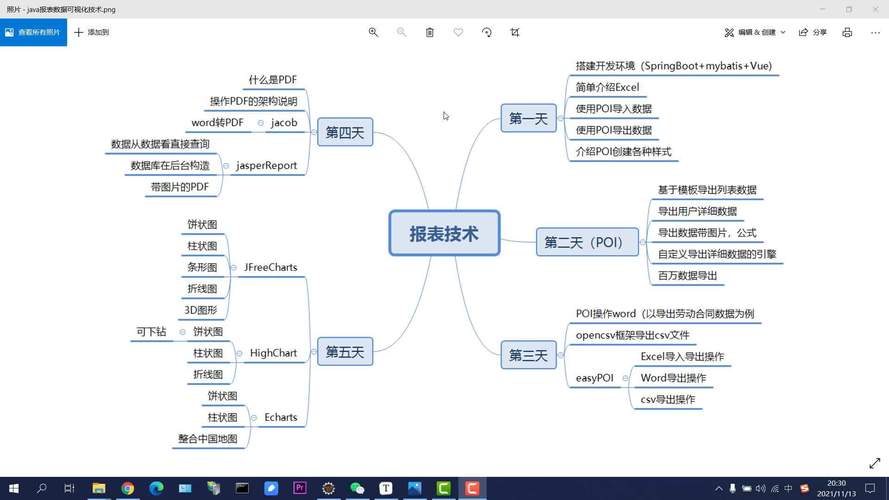
使用 SXSSFWorkbook (大数据量导出)
当数据量很大时,可以使用 SXSSFWorkbook 来避免内存溢出。
(图片来源网络,侵删)
import org.apache.poi.ss.usermodel.*;
import org.apache.poi.xssf.streaming.SXSSFWorkbook;
import java.io.FileOutputStream;
import java.io.IOException;
import java.util.List;
public class LargeDataExcelExport {
    public static void exportLargeData(List<User> userList, String filePath) throws IOException {
        // 创建SXSSFWorkbook,设置内存中的行数
        Workbook workbook = new SXSSFWorkbook(100); // 内存中保留100行
        Sheet sheet = workbook.createSheet("用户数据");
        // 创建表头
        Row headerRow = sheet.createRow(0);
        headerRow.createCell(0).setCellValue("ID");
        headerRow.createCell(1).setCellValue("姓名");
        headerRow.createCell(2).setCellValue("年龄");
        headerRow.createCell(3).setCellValue("邮箱");
        // 填充数据
        int rowNum = 1;
        for (User user : userList) {
            Row row = sheet.createRow(rowNum++);
            row.createCell(0).setCellValue(user.getId());
            row.createCell(1).setCellValue(user.getName());
            row.createCell(2).setCellValue(user.getAge());
            row.createCell(3).setCellValue(user.getEmail());
            // 每写入100行刷新到磁盘
            if (rowNum % 100 == 0) {
                ((SXSSFWorkbook) workbook).flushRows();
            }
        }
        // 写入文件
        try (FileOutputStream fileOut = new FileOutputStream(filePath)) {
            workbook.write(fileOut);
        }
        // 清理临时文件
        ((SXSSFWorkbook) workbook).dispose();
        workbook.close();
    }
}
选择建议
- 小数据量:使用 EasyExcel 或 Apache POI 都可以,EasyExcel 更简单易用
- 大数据量:使用 SXSSFWorkbook 或 EasyExcel 的分页导出功能
- Web 应用:推荐使用 EasyExcel,对内存控制更好
- 需要复杂格式:Apache POI 功能更全面
方法都可以根据实际需求进行调整,如添加样式、合并单元格、数据验证等高级功能。

(图片来源网络,侵删)