Of course! In Java, the term "sublist" most commonly refers to creating a view or a slice of an existing List. This view is backed by the original list, meaning changes to the sublist are reflected in the original list and vice-versa.
The primary method for this is List.sublist(int fromIndex, int toIndex).
The Core Method: list.sublist(fromIndex, toIndex)
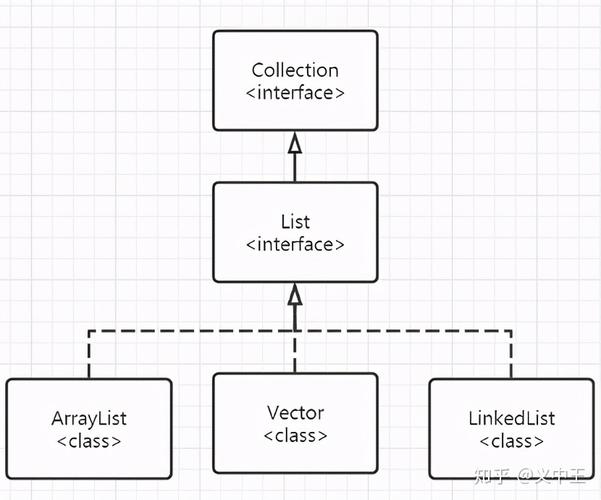
This method is part of the List interface (e.g., ArrayList, LinkedList) and returns a view of the portion of the original list between the specified fromIndex (inclusive) and toIndex (exclusive).
Key Characteristics:
- It's a View, Not a Copy: The returned
Listis a view on the original list. It's not a new, independent list. - Changes are Reflected: Any changes made to the sublist (adding, removing, setting elements) are immediately reflected in the original list.
- Changes Propagate: Changes made to the original list (like adding or removing elements) can invalidate the sublist. If you modify the original list in a way that changes its size, any further operation on the sublist will throw a
ConcurrentModificationException. - Shared References: The objects inside the sublist are the same objects as in the original list. They are not copied.
Syntax:
List<E> sublist = originalList.sublist(fromIndex, toIndex);
fromIndex: The starting index (inclusive).toIndex: The ending index (exclusive).- Throws
IndexOutOfBoundsExceptioniffromIndexortoIndexare out of bounds. - Throws
IllegalArgumentExceptioniffromIndexis greater thantoIndex.
Code Example: Basic Usage
Let's see the "view" behavior in action.
import java.util.ArrayList;
import java.util.List;
public class SublistExample {
    public static void main(String[] args) {
        // Create an original list
        List<String> originalList = new ArrayList<>();
        originalList.add("Apple");
        originalList.add("Banana");
        originalList.add("Cherry");
        originalList.add("Date");
        originalList.add("Elderberry");
        System.out.println("Original List: " + originalList);
        // Create a sublist from index 1 to 3 (exclusive)
        // This will contain ["Banana", "Cherry"]
        List<String> sublist = originalList.subList(1, 3);
        System.out.println("Sublist (1, 3): " + sublist);
        // --- Demonstrate the "View" behavior ---
        // 1. Modify the sublist
        System.out.println("\nModifying the sublist...");
        sublist.set(1, "Cantaloupe"); // Change "Cherry" to "Cantaloupe"
        // This change is reflected in the original list
        System.out.println("Original List after modifying sublist: " + originalList);
        System.out.println("Sublist after modification: " + sublist);
        // 2. Modify the original list
        System.out.println("\nModifying the original list...");
        originalList.add(2, "Blueberry"); // Insert "Blueberry" at index 2
        // This change is reflected in the sublist
        System.out.println("Original List after adding to it: " + originalList);
        System.out.println("Sublist after original modification: " + sublist);
        // 3. Modify the sublist by removing an element
        System.out.println("\nRemoving an element from the sublist...");
        sublist.remove(0); // Remove "Banana"
        System.out.println("Original List after removing from sublist: " + originalList);
        System.out.println("Sublist after removal: " + sublist);
    }
}
Output:
Original List: [Apple, Banana, Cherry, Date, Elderberry]
Sublist (1, 3): [Banana, Cherry]
Modifying the sublist...
Original List after modifying sublist: [Apple, Banana, Cantaloupe, Date, Elderberry]
Sublist after modification: [Banana, Cantaloupe]
Modifying the original list...
Original List after adding to it: [Apple, Banana, Blueberry, Cantaloupe, Date, Elderberry]
Sublist after original modification: [Banana, Blueberry, Cantaloupe]
Removing an element from the sublist...
Original List after removing from sublist: [Apple, Blueberry, Cantaloupe, Date, Elderberry]
Sublist after removal: [Blueberry, Cantaloupe]
Common Pitfall: ConcurrentModificationException
A very common error occurs when you modify the original list's size while a sublist is active.

import java.util.ArrayList;
import java.util.List;
public class SublistPitfall {
    public static void main(String[] args) {
        List<Integer> numbers = new ArrayList<>();
        numbers.add(10);
        numbers.add(20);
        numbers.add(30);
        numbers.add(40);
        List<Integer> sublist = numbers.subList(0, 2);
        System.out.println("Original: " + numbers);
        System.out.println("Sublist: " + sublist);
        // This is the problematic line:
        // We are removing an element from the original list, which changes its size.
        numbers.remove(1); // Removes the element 20
        System.out.println("Original after remove: " + numbers);
        // Now, any operation on the sublist will throw an exception
        try {
            System.out.println("Trying to access the sublist...");
            System.out.println("Sublist: " + sublist); // This line throws the exception
        } catch (java.util.ConcurrentModificationException e) {
            System.out.println("Caught ConcurrentModificationException!");
            e.printStackTrace();
        }
    }
}
Output:
Original: [10, 20, 30, 40]
Sublist: [10, 20]
Original after remove: [10, 30, 40]
Trying to access the sublist...
Caught ConcurrentModificationException!
java.util.ConcurrentModificationException
    at java.util.ArrayList$Sublist.checkForComodification(ArrayList.java:1239)
    at java.util.ArrayList$Sublist.listIterator(ArrayList.java:1244)
    at java.util.ArrayList$Sublist.listIterator(ArrayList.java:1235)
    at java.util.AbstractList.listIterator(AbstractList.java:318)
    at java.util.AbstractList.toString(AbstractList.java:513)
    at java.lang.String.valueOf(String.java:2994)
    at java.io.PrintStream.println(PrintStream.java:762)
    ...
How to Create a True, Independent Copy (Not a View)
If you need a sublist that is completely independent of the original list, you must explicitly create a new list and copy the elements.
Method 1: Using the Constructor (Recommended for Java 8+)
The ArrayList constructor can take any Collection as an argument to create a new list containing its elements.
List<String> originalList = new ArrayList<>(List.of("A", "B", "C", "D", "E"));
// Create a view
List<String> viewSublist = originalList.subList(1, 3);
// Create a true, independent copy
List<String> copiedSublist = new ArrayList<>(originalList.subList(1, 3));
// Now, modifications to one do not affect the other
viewSublist.set(0, "X");
copiedSublist.set(0, "Y");
System.out.println("Original: " + originalList);      // [A, X, C, D, E]
System.out.println("View Sublist: " + viewSublist);   // [X, C]
System.out.println("Copied Sublist: " + copiedSublist); // [Y, C]
Method 2: Using addAll()
You can also use the addAll() method on a new, empty list.
List<String> originalList = new ArrayList<>(List.of("A", "B", "C", "D", "E"));
List<String> copiedSublist = new ArrayList<>();
copiedSublist.addAll(originalList.subList(1, 3));
// ... rest of the logic is the same
Use Cases for sublist()
- Processing a Portion of a List: You want to apply an algorithm or a stream pipeline to only a part of a large list.
List<Integer> bigList = ...; // A list with a million items
List<Integer> firstTen = bigList.subList(0, 10);
int sum = firstTen.stream().mapToInt(i -> i).sum();
- Removing a Range of Elements: This is a highly efficient way to remove a block of elements. Modifying a list via its sublist is generally faster than looping and removing one by one, as the underlying list can perform a single bulk operation.
List<String> names = new ArrayList<>(List.of("Anna", "Ben", "Chloe", "David", "Eve")); // Remove "Ben" and "Chloe" names.subList(1, 3).clear(); // This is more efficient than a loop System.out.println(names); // [Anna, David, Eve] - Getting a "Window" into Data: Useful in scenarios like pagination, where you only want to display a slice of a larger dataset.